Features
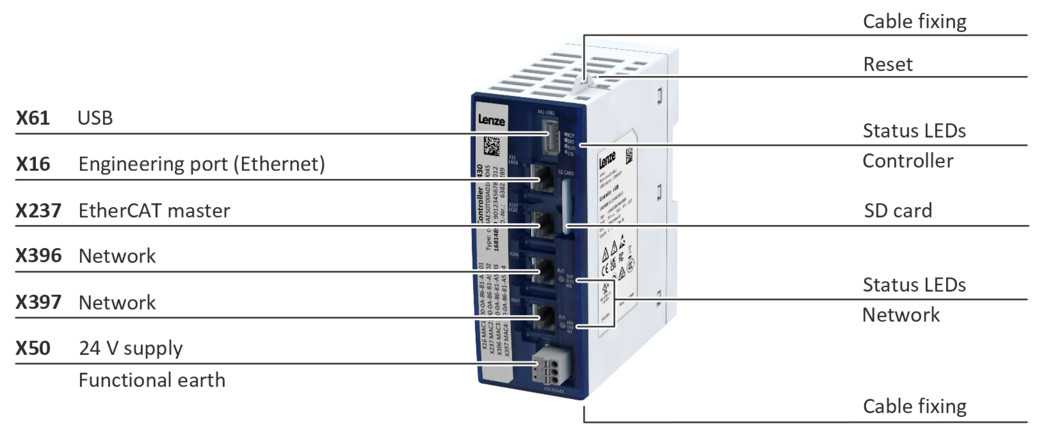
The following figure provides an overview of the elements and connections on the device. Position, size and appearance of elements and connections may vary depending on the options selected for the device.
Interface functionality
|
|
Engineering port
|
EtherCAT
master |
Ethernet switch
|
EtherCAT
slave |
PROFINET
IO-Device |
|
|
X16
|
X237
|
X396/X397
|
||||
|
Network
|
EtherCAT
|
|
Master
|
|
Slave
|
|
|
PROFINET
|
|
|
|
|
IO device
|
|
|
Ethernet switch
|
|
|
●
|
|
|
|
|
Web visualization
|
EASY UI client
|
●
|
|
●
|
|
●
|
|
EASY UI client (encrypted)
|
●
|
|
●
|
|
|
|
|
OPC UA
|
Server
|
●
|
|
●
|
|
●
|
|
Client
|
●
|
|
|
|
|
|
|
PubSub
|
●
|
|
|
|
|
|
|
Engineering tools
|
PLC Designer
|
●
|
|
●
|
|
|
|
PLC Designer (encrypted)
|
●
|
|
●
|
|
|
|
|
EASY UI Designer
|
●
|
|
●
|
|
|
|
|
EASY UI Designer (encrypted)
|
●
|
|
●
|
|
●
|
|
|
EASY Starter
|
●
|
|
●
|
|
●
|
|
|
EASY Starter (encrypted)
|
●
|
|
●
|
|
●
|
|
|
EtherCAT diagnostic tool
|
●
|
|
●
|
|
|
|
|
IP settings
|
IPv4 address
|
●
|
|
●
|
|
●
|
|
Subnet mask
|
●
|
|
●
|
|
●
|
|
|
Gateway
|
●
|
|
|
|
●
|
|
|
DHCP
|
●
|
|
|
|
|
|
|
Settings via "IP.txt" file
|
●
|
|
|
|
|
|
|
Firewall
|
Port restrictions
|
●
|
|
●
|
|
●
|
|
Client address range
|
●
|
|
●
|
|
|
|
|
Ping flood protection
|
●
|
|
●
|
|
|
|
|
Reject packet (Reject)
|
●
|
|
●
|
|
|
|
|
Network protocols
|
TCP/IP
|
●
|
|
●
|
|
●
|
|
UDP
|
●
|
|
|
|
|
|
|
NTP
|
●
|
|
●
|
|
●
|
|
|
HTTPS (diagnostics, visualization)
|
●
|
|
●
|
|
|
|
|
SFTP
|
●
|
|
●
|
|
●
|
|
|
Network-supported services UDP
|
●
|
|
|
|
|
|
|
Network-supported services TCP
|
●
|
|
●
|
|
|
|
|
Network variables
|
●
|
|
|
|
|
|