Status LEDs
LEDs on the front of the device indicate the current operating status. Depending on the running software application, different control modes of the LEDs are possible.
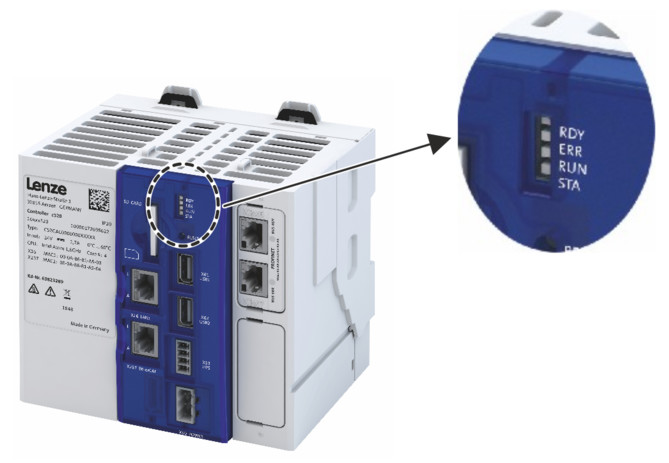
|
LED "RDY" (blue/yellow)
|
Meaning
|
|
Off
|
Device is switched off.
|
|
|
Device starts in delivery status. An inserted USB stick is mounted automatically.
 Mount USB stick |
|
|
Device starts.
|
|
|
Device is ready for operation.
|
|
|
Value has fallen below the voltage
|
|
|
System time must be set.
Time |
|
|
Reset key was pressed during the boot process.
|






|
LED "ERR" (red/yellow)
|
Status
|
Meaning
|
|
Off
|
NO REACTION
|
There are no active error responses in the device.
|
|
|
WARNING
|
The device indicates a warning. The function of the device differs from the expected behavior.
Note!
If the "RDY” LED is blinking at the same time, a hardware error of the device has occurred.
|
|
|
TROUBLE
|
The device indicates a fault. The function of the device is impaired.
|
|
|
ERROR
|
The device indicates an error.
–
The “ERR” LED remains active, regardless of whether the error is permanent or temporary.
–
The application continues to run regardless of the status of the “ERR” LED.
Exception: If an "exception" occurs, the application is stopped immediately. –
Events with “Error” severity can be reset via 0x2841 if the error condition no longer exists.
|
|
|
Software reset
|
Software reset started. The reset button can be released.
|




|
"RUN" LED (yellow/green)
|
Meaning
|
|
|
PLC project is being loaded.
|
|
|
PLC project is stopped.
|
|
|
PLC project is started.
|


|
"STA" LED (yellow/green)
|
Meaning
|
|
|
Process (Backup / Restore / Upgrade / Downgrade) running.
|
|
|
Process (Backup / Restore / Upgrade / Downgrade) completed.
|
