Initial switch-on and functional test
Drive behaviour by default
By default, the V/f characteristic control with a linear characteristic is preset as motor control for asynchronous motors. The V/f characteristic control is a motor control for conventional frequency inverter applications. It is based on a simple and robust control mode for the operation of asynchronous motors with a linear or square-law load torque characteristic (e.g. fan). Because of the minimal parameterisation effort, such applications can be commissioned easily and quickly.
The default settings of the parameters ensure that the inverter is ready for operation immediately and the motor works adequately without further parameterisation if an inverter and an asynchronous motor* Hz asynchronous machine with matching performances are assigned to each other.
* Depending on the device/mains frequency either 50-Hz asynchronous motor or 60-Hz asynchronous motor.
Functional test
Target: the motor connected to the inverter should rotate as quickly as possible.
Requirements:
✓
The connected motor matches the inverter in terms of power.
✓
The parameter settings correspond to the state upon delivery.
Preparation
1.
Wire the power connections. See the operating instructions for more details.
2.
Wire digital inputs X3/DI1 (start/stop), X3/DI3 (reversal) and X3/DI4 (frequency preset 20 Hz).
3.
Do not connect terminal X3/AI1 (analog setpoint selection) or connect it to GND.
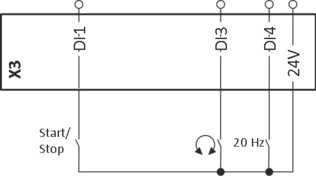
Switch on mains and check readiness for operation
1.
Switch on mains voltage.
2.
Observe LED status displays "RDY" and "ERR" on the front of the inverter:
a.
If the blue "RDY" LED is blinking and the red "ERR" LED does not light up, the inverter is ready for operation. The controller is inhibited.
You can now start the drive.
b.
If the red "ERR" LED is lit permanently, a fault is pending.
Eliminate the fault before you carry on with the functional test.
Carry out functional test
Start drive
1.
Start inverter: X3/DI1 = HIGH.
a.
If the inverter is equipped with an integrated safety system: X1/SIA = HIGH and X1/SIB = HIGH.
2.
Activate frequency preset 1 (20 Hz) as speed setpoint: X3/DI4 = HIGH.
The drive rotates with 20 Hz.
3.
Optional: Activate reversal
Speed characteristic (example)
a.
X3/DI3 = HIGH.
The drive rotates at 20 Hz in the opposite direction.
b.
Deactivate reversal again: X3/DI3 = LOW.
Stop drive
1.
Deactivate frequency preset 1 again: X3/DI4 = LOW.
2.
Stop inverter again: X3/DI1 = LOW.
The functional test has been completed.
 Function assignment of the inputs and outputs (default setting)