Saving/loading the parameter settings
If parameter settings of the inverter are changed, these changes at first are only made in the RAM memory of the inverter. In order to save the parameter settings with mains failure protection, the inverter is provided with a firmly integrated memory module and corresponding device commands.
Details
The memory module has two memories, the user memory and the OEM memory.
User memory
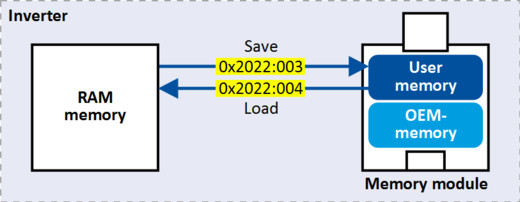
The user memory is used as power-failure-proof storage of parameter settings made by the user during commissioning/operation.
–
Parameter settings carried out with »EASY Starter« or via network must be explicitly saved in the user memory by means of the "Save user data" device command, so that the changes carried out are not lost when the mains of the inverter are switched.
–
Saving can also be made in the »EASY Starter« via the button or the <F6> function key.
 or the <F6> function key.
–
The device command "Load user data" serves to reload the data from the user memory into the RAM.
OEM memory
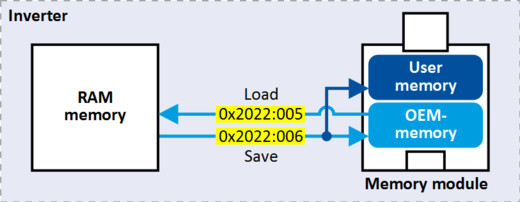
The OEM memory is provided for the storage of customized parameter settings by the OEM/machine builder.
–
With the "Load OEM data" device command, the parameter settings preconfigured by the OEM/machine builder can be reloaded to the RAM memory of the inverter at any time if required.
–
For saving parameter settings in the OEM memory, the "Save OEM data" device command must be executed explicitly. The parameter settings are simultaneously saved in the user memory.
Behavior after the inverter is switched on for the first time
After switch-on, the inverter first tries to load the parameter settings stored in the user memory. If the user memory is empty or damaged, an error message is output and the user must intervene:
–
Case 1 = user memory empty: → default setting is loaded automatically from the firmware → data are saved automatically in the user memory of the memory module.
–
Case 2 = user memory damaged: → Error message → default setting is loaded automatically → data are saved automatically in the user memory of the memory module.
–
Case 3 = OEM memory empty/damaged: → error message → data are loaded automatically from the user memory of the memory module.
Parameter
 Behaviour of the inverter in case of incompatible data in the memory module