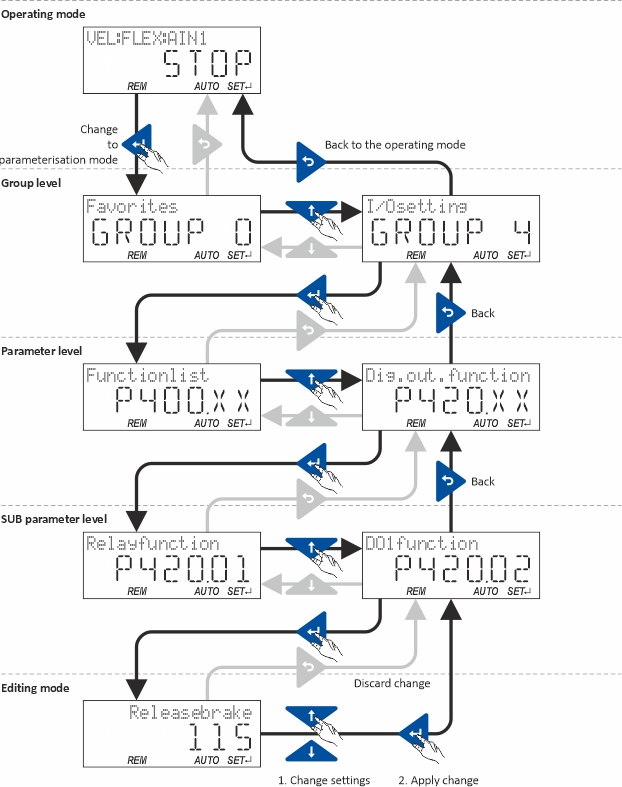
Function of the keypad keys in the parameterisation mode
In the parameterisation mode of the keypad you can have actual values of the inverter displayed for purposes of diagnostics and change settings of the inverter.
|
Function of the keypad keys in the parameterisation mode
|
|||
|
Key
|
Actuation
|
Condition
|
Action
|
|
|
Shortly
|
Local keypad control active.
Display "LOC"
|
Run motor.
|
|
Remote control active
Display "REM"
Display "KSTOP"
|
Deactivate keypad triggered stop.
The motor remains at standstill.
Display changes from "KSTOP" to "STOP".
|
||
|
|
Shortly
|
No Jog operation
|
Stop motor.
Display "KSTOP"
|
|
|
Shortly
|
Parameterisation mode
|
Navigate to one level below.
Group level
à Parameter level à [SUB parameter level] à Editing mode |
|
Editing mode
|
Exit editing mode and accept new setting.
|
||
|
Longer than 3 s
|
None (anytime possible)
|
Save parameter settings in the user memory of the memory module.
|
|
|
|
Shortly
|
Parameterisation mode
|
Navigate to one level above.
[SUB parameter level]
à Parameter level à Group level à Operating mode |
|
Editing mode
|
Abort: Exit editing mode without accepting new setting.
|
||
|
|
Shortly
|
Group level/Parameter level
|
Navigate: Select group/parameter.
|
|
|
Editing mode
|
Change parameter setting.
|
|
|
|
|
|
Without function
|
|
|
|
|
Without function
|








Changing inverter settings by means of the keypad (general operation)