Configure digital inputs

The digital inputs 1 ... 2 are located onboard on terminal X3.
Details
The digital inputs are used for control tasks. For this purpose, the digital inputs are available as selectable triggers for functions.
The following settings are possible for the digital inputs:
–
Debounce time ①
–
Inversion ②
–
Manual I/O control ③
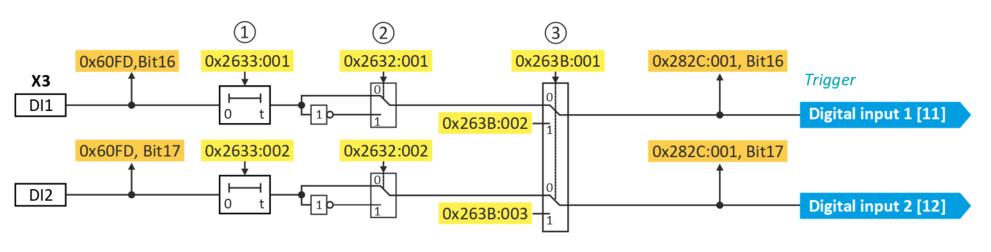
Debounce time
The debounce time can be used to prevent short disturbances from being erroneously recognized as signals.
Inversion
Each digital input can be configured in such a way that the state pending at the terminal is logically inverted internally. This way, a closed contact, for instance, serves to deactivate an assigned function instead of activating it.
Manual I/O control
Each digital input can be manually overridden. After the function is activated, the actual values are "frozen". Afterwards, each digital input can be overwritten manually.
Setting:
–
Activation for all digital inputs: 0x263B:001
–
Entry of the individual manual values: 0x263B:002 ... 0x263B:003
Parameter