Engineering tool »EASY Starter«
The »EASY Starter« is a PC software that is especially designed for the commissioning and diagnostics of the inverter.
Sample screenshot:
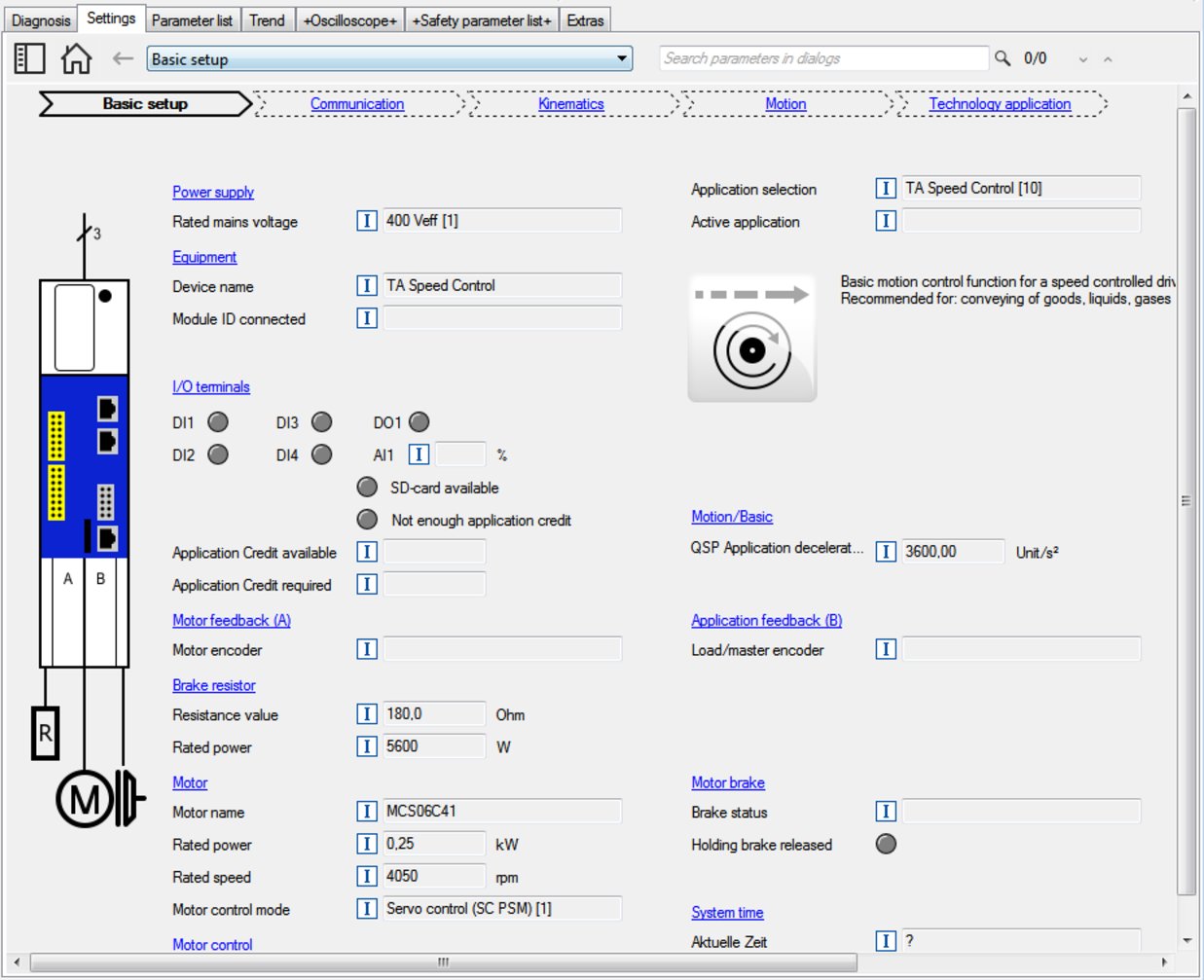
The five main commissioning steps are shown in order towards the top of the Settings tab. Clicking on a link displays a corresponding interface containing the most important parameters that need to be set.
|
Commissioning step
|
Description of the settings
|
|
Basic setting
|
Settings for adjusting the inverter to a simple application based on the default settings.
|
|
Communication
|
Settings for communication via the on-board EtherCAT, another network option, and the engineering port X16 (PC interface).
|
|
Kinematics
|
Basic settings of the technology application for adjusting the motor end and load side (gearbox ratio, mounting direction, moments of inertia, etc.)
|
|
Motion
|
Basic settings of the technology application for adjusting the motion control.
|
|
Technology application
|
Settings for adjusting the technology application for the application.
|
Parameter fields
–
The parameters are sorted thematically.
–
The currently set parameter values are displayed.
–
Fields highlighted in yellow indicate an online connection to the device.
–
Pressing the [F1] key opens the program help.