Status LEDs
The LEDs "RDY" and "ERR" show the current safety status:
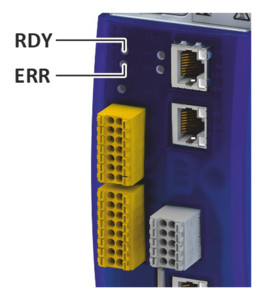
Fig. 1: Position of the RDY and ERR LEDs
 DANGER!
Unreliable status information possible due to LEDs.
LEDs are not reliable status indicators. There is no guarantee that the LEDs provide accurate information.
Possible consequences: Death or severe injuries
▶
Only use LEDs for general diagnostics during commissioning or troubleshooting.
▶
Do not use LEDs as status displays.
|
LED "RDY" (yellow)
|
|
Status
|
Meaning
|
|
off
|
|
-
|
No status message active.
|
|
blinking yellow 2 Hz
|
SOS active
|
|
|
|
blinking yellow 1 Hz
|
Service status
|
Transfer of parameter set requested.
|


|
LED "RDY" (yellow)
|
LED "ERR" (red)
|
Status
|
Meaning
|
|
on
|
blinking red 1 Hz
|
Restart acknowledgement requested
|
During startup, a modified parameter set was detected in the "Init" state.
|
|
blinking red 2 Hz
|
During startup, a changed safety address was detected in the "Init" state.
|
||
|
blinking red
|
During startup, a changed assignment between OCT encoder and inverter was detected in the "Init" state.
|




|
|
LED "ERR" (red)
|
Status
|
Meaning
|
|
|
off
|
-
|
The device is working correctly.
|
|
blinking red 1 Hz
|
Error
|
One of the following errors has been detected:
–
A monitoring device has been activated.
–
An acknowledgeable error is active.
–
Discrepancy of the inputs
|
|
|
blinking red 2 Hz
|
Safety bus error
|
Communication via the safety bus is not established:
–
There is no valid configuration.
–
The start-up has not been completed yet.
|
|
LED "RDY" (yellow)
|
LED "ERR" (red)
|
Status
|
Meaning
|
|
From safety firmware 1.0.x
|
|||
|
off
|
on (red)
|
Critical
|
The device is defective. It must be replaced.
|
|
From safety firmware 1.3.x
|
|||
|
blinking yellow
|
blinking red
|
Critical system error
|
–
"Lock-out" (CPU stopped)
–
STO is active.
–
If the system error occurs again after switching the 24 V supply, the device is defective. It must be replaced.
|


