Interface selection
The selection of the interface determines whether the technology application is controlled via the fieldbus network or via the system bus.
Depending on the selection, the status signals are also output to the fieldbus network or to the system bus.
There are 8 control words and 8 status words with a data width of 32 bits per word available. Their assignment depends on the selected technology application.

This selection only switches the 8 control words and 8 status words.
Details
How to select the interface in the »EASY Starter«:
1.
Select the Settings tab.
2.
Select the technology application parameter dialog.
3.
Select the desired interface.  0x4001
To change the parameter, the inverter must be disabled. Disable operation
Disable operation The source for the 8 control words and the destination for the 8 status words are now set.
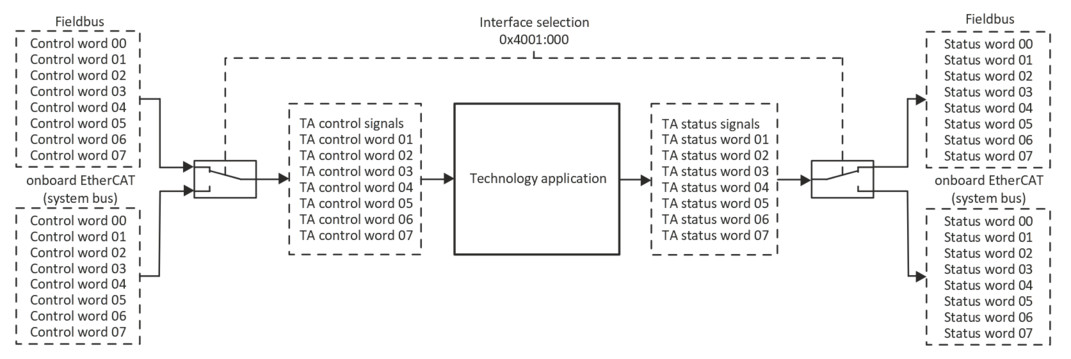
Fig. 1: Principle of interface switching
For test purposes, you can simulate control words and status words manually.
Parameter