L_TC2P_CmdMoveLinearAbsolute
|
|
|
|
L_TC2P_CmdMoveLinearAbsolute |
|
|
|
|
|---|---|---|---|---|---|---|---|
|
|
|
|
|
|
|
|
|
|
L_TC2P_CoordinatedMotion
|
– |
|
itfCmdReceiver |
xCmdAccepted |
|
– |
BOOL |
|
ARRAY[1..12] OF LREAL |
– |
|
alrPosition |
|
|
|
|
|
L_MC4P_CoordSystem |
– |
|
eCoordSystem |
|
|
|
|
|
ARRAY[1..6] OF L_MC4P_AuxMode |
– |
|
aeAuxMode |
|
|
|
|
|
L_MC4P_Orientation_Mode |
– |
|
eOrientationMode |
|
|
|
|
|
ARRAY[1..6] OF MC_DIRECTION |
– |
|
aeDirection |
|
|
|
|
|
|
|
|
|
|
|
|
|
Inputs
|
Identifier Data type |
Description |
|---|---|
|
itfCmdReceiver L_TC2P_CoordinatedMotionState L_TX2P_PickAndPlaceBase |
Connection to the technology module - which interprets the command and executes the job/driving task.
|
|
alrPosition ARRAY[1..12] OF LREAL |
Array with absolute target coordinates in [Units].
Absolute target position of the movement
|
|
eCoordSystem L_MC4P_CoordSystem |
Selection of the coordinate system to be used:
|
|
eOrientationMode L_MC4P_CoordSystem |
Presetting the orientation interpolation for the WCS axes
See also: Direction specification for modulo axes |
|
aeDirection ARRAY[1..6] OF MC_DIRECTION |
Direction specification for WCS rotary axes (A, B, C axis), which are parameterized as modulo. The parameter is evaluated only with For MoveLinear movements only the indices 4 ... 6 (main axes A, B, C) are used. Permissible selection:
The mcCurrentDirection, mcPositiveCycle and mcNegativeCycle modes are not supported.
See also: Direction specification for modulo axes (^ 700) |
|
aeAuxMode ARRAY[1..6] OF L_MC4P_AuxMode |
Mode for the auxiliary axes:
|
Outputs
|
Identifier Data type |
Description |
|
|---|---|---|
|
xCmdAccepted BOOL |
TRUE |
The command is valid and will be included in CmdReceiver |
Method
|
Identifier Data type |
Description |
|
|---|---|---|
|
METHOD Execute Bool |
Release of the order for the execution of the command |
|
|
TRUE |
The command is valid and will be included in CmdReceiver |
|
|
FALSE |
The command is not valid because no CmdReceiver is connected. |
|
Activate the command:
Each command has the method Execute().
To execute the command, the Execute() method must be called. The method has the return value of data type BOOL. The return value = TRUE is set if a valid command receiver is connected to the itfCmdReceiver input.
The TM L_TC2P_CoordinatedMotion changes to the state MOVELINABS, if the motion task of the command is active.
If motion tasks are already executed in the TM L_TC2P_CoordinatedMotion, the motion task from the currently assigned command is appended at the end of the waiting list. The waiting list is processed after the order.
The target position alrPosition from the command is approached absolutely.
Blending
To enable path blending at the target position, the L_TC2P_CmdBlendingRadius or L_TC2P_CmdBlendingPct command must be activated.
Grouping of the commands
If several commands are activated in the same PLC clock. So these are concatenated in a path as a group. The call sequence of the Execute() method of the commands decides the processing sequence.
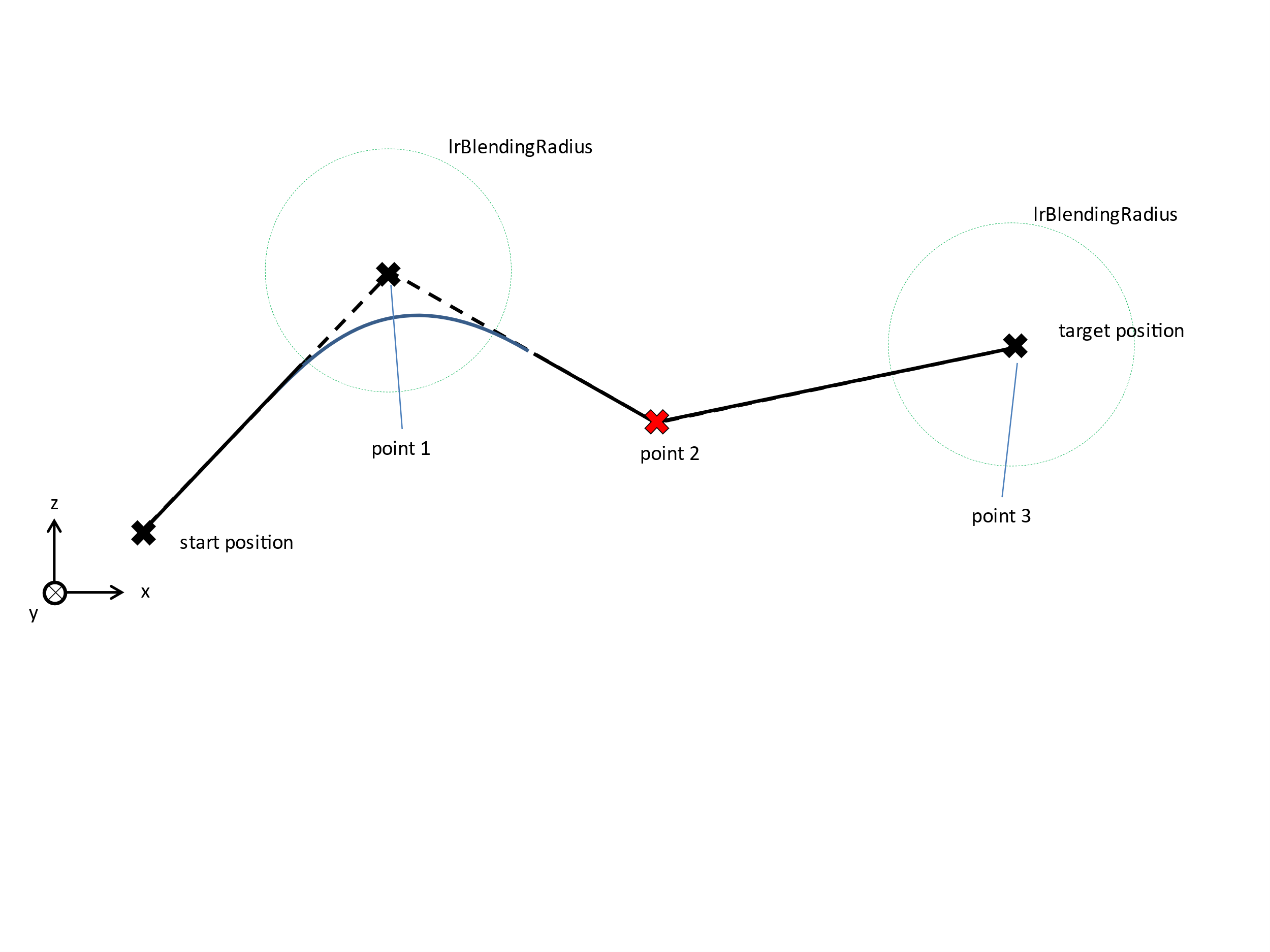
|
|
VAR
/// Technology Module: TM_CoordMotion : L_TC2P_CoordinatedMotionState; /// Commands: Cmd_BasicPar : L_TC2P_CmdBasicProfileParameter :=( itfCmdReceiver := TM CoordMotion); Cmd_MoveLinAbs : L_TC2P_CmdMoveLinearAbsolute :=( itfCmdReceiver := TM_CoordMotion); Cmd_MoveDirAbs : L_TC2P_CmdMoveDirectAbsolute :=( itfCmdReceiver := TM_CoordMotion);
END_VAR |
|
/// send command /// general parameters for move linear abs Cmd_BasicPar . lrPathVel := 100; // velocity Cmd_BasicPar . lrPathAcc := 1000; // accelaration Cmd_BasicPar . lrPathDec := 1000; // decelaration Cmd_BasicPar . lrPathJerk := 0; // Jerk Cmd_BasicPar .Execute(); Cmd_MoveLinAbs. eCoordSystem := L_MC4P_CoordSystem.WCS;
/// execute point 1 Cmd_MoveLinAbs.alrPosition[1] := 100; // x pos Cmd_MoveLinAbs.alrPosition[2] := 0; // y pos Cmd_MoveLinAbs.alrPosition[3] := 100; // z pos Cmd_MoveLinAbs.Execute();
//// execute point 2 Cmd_MoveLinAbs.alrPosition[1] := 150; // x pos Cmd_MoveLinAbs.alrPosition[2] := 0; // y pos Cmd_MoveLinAbs.alrPosition[3] := 50; // z pos Cmd_MoveLinAbs.Execute();
//// execute point 3 Cmd_MoveLinAbs.alrPosition[1] := 200; // x pos Cmd_MoveLinAbs.alrPosition[2] := 0; // y pos Cmd_MoveLinAbs.alrPosition[3] := 80; // z pos Cmd_MoveLinAbs.Execute();
//// weitere Punkte in achsraum Cmd_MoveDirAbs.alrPosition[1] := 45; // x pos Cmd_MoveDirAbs.alrPosition[2] := 45; // y pos Cmd_MoveDirAbs.alrPosition[3] := 45; // z pos Cmd_MoveDirAbs.Execute(); |