L_TC2P_CmdToolControl
Function Overview
With this function, the control of tools can be understood. The function is divided into two sub-functions:
-
The function moduleL_TC2P_CmdToolControl controls the tool. Two signals are provided for switching the tool on and off.
-
The command L_TC2P_CmdToolControl is used to define the time depending on the path, where the tool is located and when the tool is to be controlled.
Example for gripper with vacuum cup
The suction pad is controlled via two digital inputs. The suction pad can be switched on. This builds up pressure in the suction pad and an object can be picked up.
The function L_TC2P_CmdToolControl is calculated cyclically in the application and connected directly to the digital outputs that control the suction gripper.
Now the suction pad is to be switched on when approaching the defined position "Pick". For this purpose, the path is assigned to the technology module via the commands. The command L_TC2P_CmdToolControl is used to define a point in the path at which the suction pad is to be switched on.
|
|
|
|
L_TC2P_CmdToolControl |
|
|
|
|
|---|---|---|---|---|---|---|---|
|
|
|
|
|
|
|
|
|
|
L_TC2P_CoordinatedMotionBase |
– |
|
itfCmdReceiver |
xCmdAccepted |
|
– |
BOOL |
|
L_MC4P_ToolSystem |
– |
|
eToolSystem |
|
|
|
|
|
BOOL |
|
|
xToolRequest |
|
|
|
|
|
|
|
|
|
|
|
|
|
Inputs
|
Identifier Data type |
Description |
|
|---|---|---|
|
itfCmdReceiver L_TC2P_CoordinatedMotionState L_TX2P_PickAndPlaceBase |
Connection to the technology module - which interprets the command and executes the job/driving task.
|
|
|
eToolSystem L_MC4P_ToolSystem |
Marking of tool number with which the destination is to be approached. The tool number can only be changed at standstill.
|
|
|
xToolRequest BOOL
|
TRUE |
Switch on tool: (ToolSwitchOn) Example: The vacuum gripper is activated by releasing the vacuum. The gripper drops the workpiece. |
|
FALSE |
Switch off tool: (ToolSwitchOff) Example: The vacuum gripper is deactivated by building up a vacuum. The gripper can suck in and hold a workpiece. |
|
Outputs
|
Identifier Data type |
Description |
|
|---|---|---|
|
xCmdAccepted BOOL |
TRUE |
The command is valid and will be included in CmdReceiver. |
Method
|
Identifier Data type |
Description |
|
|---|---|---|
|
METHOD Execute : Bool |
Release of the order for the execution of the command. |
|
|
TRUE |
The command is valid and will be included in CmdReceiver. |
|
|
FALSE |
The command is not valid because no CmdReceiver is connected. |
|
Activate the command
Each command has the method Execute().
To execute the command, the Execute() method must be called. The method has the return value of data type BOOL. The return value = TRUE is set if a valid command receiver is connected to the itfCmdReceiver input.
Link to the Geometry command
The specification of the tools via activating the command L_TC2P_CmdToolControl are specified for the subsequent activated geometric command. Thus, the tool can be activated or deactivated in the target point of the subsequent geometry command.
Parameterization of the tools
The tools are defined via the parameterization in the axis group Tool parameters (L_MC4P_TOOL_REF). A total of four tools can be parameterized in the axis group.
-
Steps to change the parameters:
-
Open the "Device" menu.
Double-click on the device node "Device" with the left mouse button.
-
2. Select the menu item "Parameter list".
The menu item shows all parameters of the units from the unit tree.
-
Select the menu item "Axis groups".
All axis groups created in the project are displayed.
-
Select the name of the axis group in which the parameters must be set.
-
Find the desired sub-index to change the setting.
Example sub-index 151: Setting the tool type.
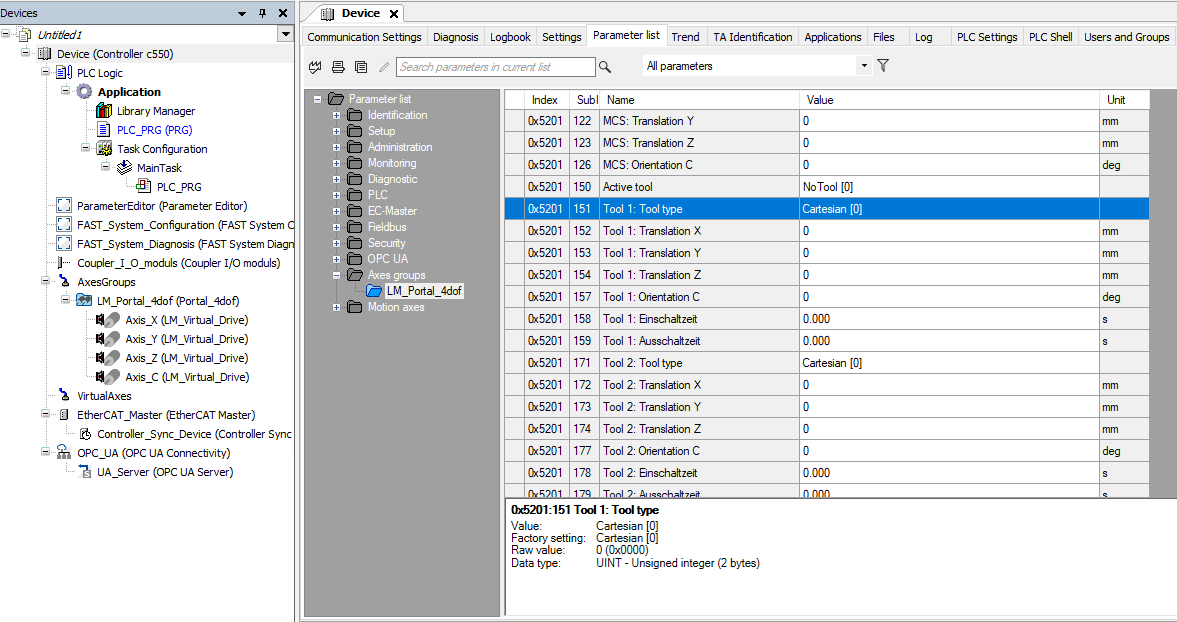
Tool parameters(L_MC4P_TOOL_REF)
A tool consists of a total of 7 parameters each:
|
Name |
Info |
Index-Offset 1, Subindex : |
|||
|---|---|---|---|---|---|
|
Tool1 |
Tool2 |
Tool3 |
Tool4 |
||
|
Tool type |
Tool transformation selection. Currently, only the "Cartesian" selection is possible.
|
151 |
171 |
191 |
211 |
|
Displacement X |
For Cartesian: Displacement of the tool tip in the x-direction of the TCS. |
152 |
172 |
192 |
212 |
|
Displacement Y |
For Cartesian: Displacement of the tool tip in the y-direction of the TCS. |
153 |
173 |
193 |
213 |
|
Displacement Z |
For Cartesian: Displacement of the tool tip in the z-direction of the TCS. |
154 |
174 |
194 |
214 |
|
Orientation A |
For Cartesian: Rotation of the tool coordinate system around the x-axis of the TCS. |
155 |
175 |
195 |
215 |
|
Orientation B |
For Cartesian: Rotation of the tool coordinate system around the y'-axis of the coordinate system resulting after the rotation around RotX. |
156 |
176 |
196 |
216 |
|
Orientation C
|
For Cartesian: Rotation of the tool coordinate system around the z'' axis of the coordinate system resulting after the rotation around RotX and RotY. |
157 |
177 |
197 |
217 |
|
Switch-on time |
Additional information for technology modules used for gripper control. |
158 |
178 |
198 |
218 |
|
Switch-off time |
Additional information for technology modules used for gripper control. |
159 |
179 |
199 |
219 |
Controlling the gripper with the function module L_MC4P_ToolControl:
The L_MC4P_ToolControl is used for the control of tools like a gripper. The FB is connected with axis group and must be switched on via xEnable = TRUE. With the input eTool = 1, 2, 3, or 4 the tool number is selected, which must be observed. At the output lrTimeToSwitch the remaining time for the selected tool is displayed until the tool is activated or deactivated in the point (with property xToolRequest =On or xToolRequest = Off).
Output xPulseOn of the function module L_MC4P_ToolControl:
The xToolOn output is controlled depending on the "Switch-on time" parameter (parameter: 158 for Tool1, 178 for Tool2, 198 for Tool3, 218 for Tool4). Positive values of the parameter cause the tool to be activated by the set value in seconds before reaching the end of the profile at the target point with xToolRequest = On. The xToolOn output is only active for one cycle to activate the tool (close gripper).
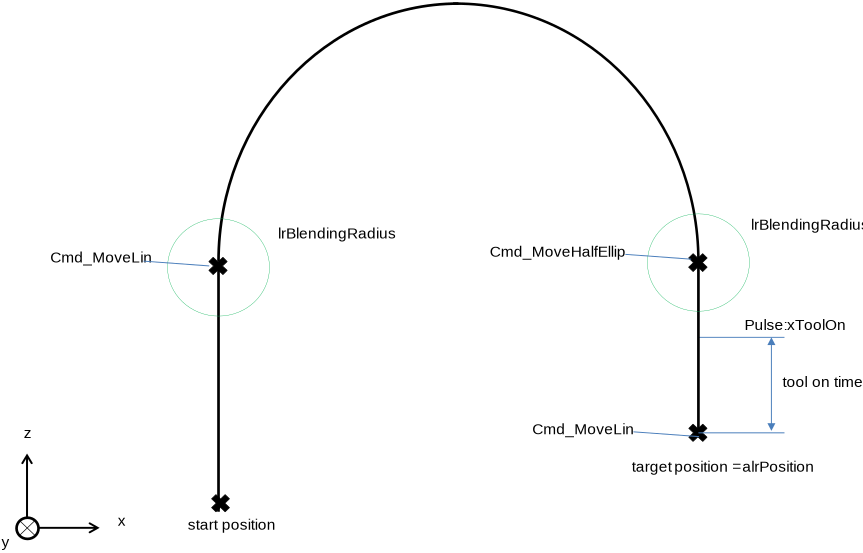
Setting:
-
xToolRequest = On
-
eToolSystem = 1,2,3 or 4
VAR
/// Technology module:
TM_CoordMotion : L_TC2P_CoordinatedMotionState;
/// Technology module:
Cmd_ProfilePar : L_TC2P_CmdBasicProfileParameter
:=( itfCmdReceiver := TM_CoordMotion);
Cmd_Tool : L_TC2P_CmdToolControl
:=( itfCmdReceiver := TM_CoordMotion);
Cmd_MoveLinAbs : L_TC2P_CmdMoveLinearAbsolute
:=( itfCmdReceiver := TM_CoordMotion);
Cmd_MoveHalfEllip : L_TC2P_L_TC2P_JobMoveHalfElliptical
:=( itfCmdReceiver := TM_CoordMotion);
/// state
wState : WORD;
END_VAR
CASE wState OF
10: /// send move elliptical command
/// set profile parameters
Cmd_ProfilePar.lrPathVel := 100;
Cmd_ProfilePar.lrPathAcc := 1000;
Cmd_ProfilePar.lrPathDec := 1000;
Cmd_ProfilePar.lrPathJerk := 100000;
Cmd_ProfilePar.Execute();
/// execute point 1
Cmd_ MoveLinAbs.lrBlendingRadius := 50;
Cmd_ MoveLinAbs.eCoordSystem := L_MC4P_
CoordSystem.WCS;
Cmd_MoveLinAbs.alrPosition[1] := 0; // x pos
Cmd_MoveLinAbs.alrPosition[2] := 0; // y pos
Cmd_MoveLinAbs.alrPosition[3] := 100; // z pos
Cmd_MoveLinAbs.Execute();
/// execute move elliptical
Cmd_MoveHalfEllip.lrBlendingRadius := 50;
Cmd_MoveHalfEllip.eCoordSystem := L_MC4P_CoordSystem.WCS;
Cmd_MoveHalfEllip.lrSemiAxis := 20;
Cmd_MoveHalfEllip.alrEllipticalDirection[1] := 0;
Cmd_MoveHalfEllip.alrEllipticalDirection[2] := 0;
Cmd_MoveHalfEllip.alrEllipticalDirection[3] := 1;
Cmd_MoveHalfEllip.alrPosition[1] := 100; // x pos
Cmd_MoveHalfEllip.alrPosition[2] := 0; // y pos
Cmd_MoveHalfEllip.alrPosition[3] := 100; // z pos
Cmd_MoveHalfEllip.Execute();
/// execute tool for target point
Cmd_Tool.eToolSystem := 1;
Cmd_Tool.xToolRequest := TRUE;
Cmd_Tool.Execute();
/// execute target point
Cmd_ MoveLinAbs.lrBlendingRadius := 50;
Cmd_ MoveLinAbs.eCoordSystem := L_MC4P_
CoordSystem.WCS;
Cmd_MoveLinAbs.alrPosition[1] := 100; // x pos
Cmd_MoveLinAbs.alrPosition[2] := 0; // y pos
Cmd_MoveLinAbs.alrPosition[3] := 0; // z pos
Cmd_MoveLinAbs.Execute();
wState := 20;
END_CASE
Output xPulseOff of the function module L_MC4P_ToolControl:
The xToolOff output is controlled depending on the "Off" parameter (parameter: 159 for Tool1, 179 for Tool2, 199 for Tool3, 219 for Tool4). Positive values of the parameter cause the tool to be deactivated by the set value in seconds before reaching the end of the profile at the target point with xToolRequest = Off. The xToolOff output is only active for one cycle to deactivate the tool (open gripper).
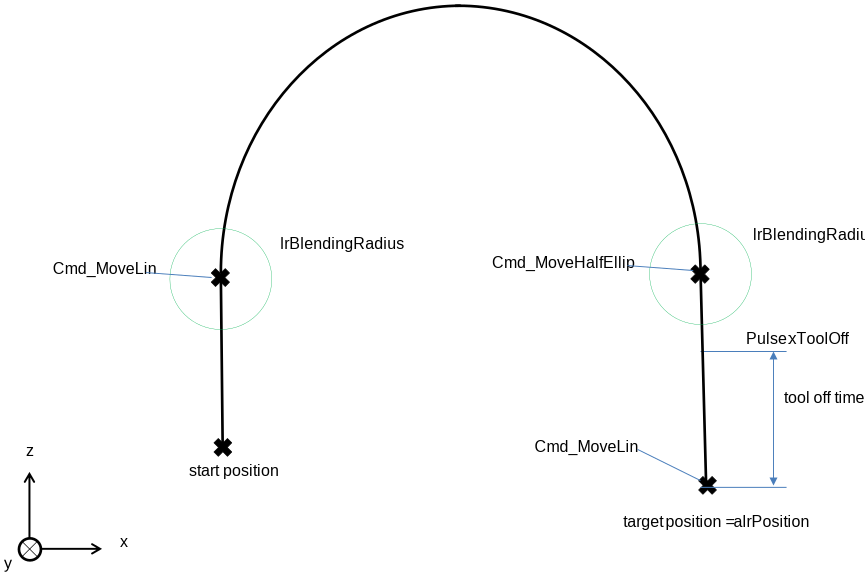
-
Setting:
-
xToolRequest = Off
-
eToolSystem = 1,2,3 or 4
-
VAR
/// Technology module:
TM_CoordMotion : L_TC2P_CoordinatedMotionState;
/// Commands:
Cmd_ProfilePar : L_TC2P_CmdBasicProfileParameter
:=( itfCmdReceiver := TM_CoordMotion);
Cmd_Tool : L_TC2P_CmdToolControl
:=( itfCmdReceiver := TM_CoordMotion);
Cmd_MoveLinAbs : L_TC2P_CmdMoveLinearAbsolute
:=( itfCmdReceiver := TM_CoordMotion);
Cmd_MoveHalfEllip : L_TC2P_L_TC2P_JobMoveHalfElliptical
:=( itfCmdReceiver := TM_CoordMotion);
/// state
wState : WORD;
END_VAR
CASE wState OF
10: /// send move elliptical command
/// set profile parameters
Cmd_ProfilePar.lrPathVel := 100;
Cmd_ProfilePar.lrPathAcc := 1000;
Cmd_ProfilePar.lrPathDec := 1000;
Cmd_ProfilePar.lrPathJerk := 100000;
Cmd_ProfilePar.Execute();
/// execute point 1
Cmd_ MoveLinAbs.lrBlendingRadius := 50;
Cmd_ MoveLinAbs.eCoordSystem := L_MC4P_
CoordSystem.WCS;
Cmd_MoveLinAbs.alrPosition[1] := 0; // x pos
Cmd_MoveLinAbs.alrPosition[2] := 0; // y pos
Cmd_MoveLinAbs.alrPosition[3] := 100; // z pos
Cmd_MoveLinAbs.Execute();
/// execute move elliptical
Cmd_MoveHalfEllip.lrBlendingRadius := 50;
Cmd_MoveHalfEllip.eCoordSystem := L_MC4P_
CoordSystem.WCS;
Cmd_MoveHalfEllip.lrSemiAxis := 20;
Cmd_MoveHalfEllip.alrEllipticalDirection[1] := 0;
Cmd_MoveHalfEllip.alrEllipticalDirection[2] := 0;
Cmd_MoveHalfEllip.alrEllipticalDirection[3] := 1;
Cmd_MoveHalfEllip.alrPosition[1] := 100; // x pos
Cmd_MoveHalfEllip.alrPosition[2] := 0; // y pos
Cmd_MoveHalfEllip.alrPosition[3] := 100; // z pos
Cmd_MoveHalfEllip.Execute();
/// execute tool for target point
Cmd_Tool.eToolSystem := 1;
Cmd_Tool.xToolRequest := FALSE;
Cmd_Tool.Execute();
/// execute target point
Cmd_ MoveLinAbs.lrBlendingRadius := 50;
Cmd_ MoveLinAbs.eCoordSystem := L_MC4P_
CoordSystem.WCS;
Cmd_MoveLinAbs.alrPosition[1] := 100; // x pos
Cmd_MoveLinAbs.alrPosition[2] := 0; // y pos
Cmd_MoveLinAbs.alrPosition[3] := 0; // z pos
Cmd_MoveLinAbs.Execute();
wState := 20;
END_CASE