Authentication, identification and authorization
The following image shows an overview of identification, authentication and authorization.
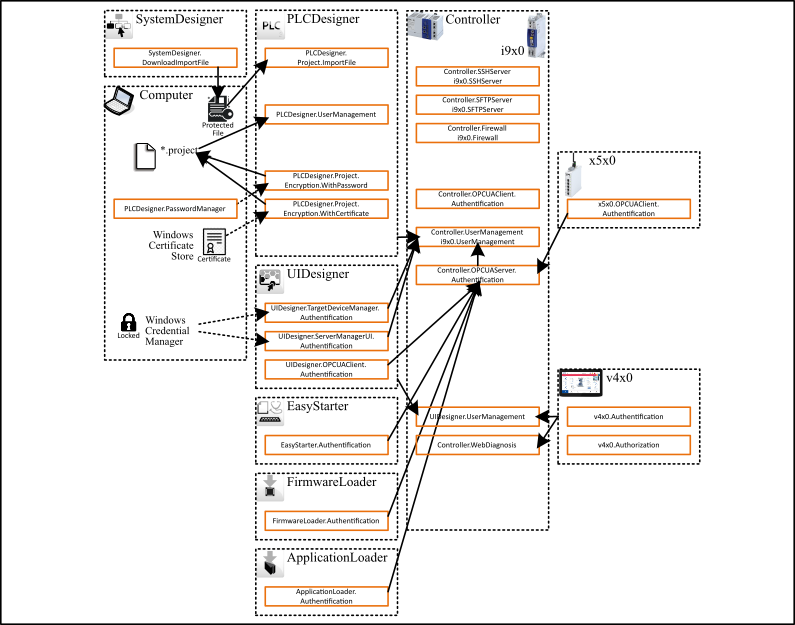
Identification, authentication and authorization
In the following section, the individual functions are grouped in order to be able to recognize the relationships. Furthermore, the goal of this functional unit is briefly described.
Identification and authentication for the transfer file between »EASY System Designer« and »PLC Designer«
-
SystemDesigner.DownloadImportFile
-
PLCDesigner.ImportFile
Set a user-defined password in the »EASY System Designer« and open it with the help of the user-defined password in the »PLC Designer« to protect the project during the transfer.
Integrity, identification and authentication for the PLC Project
-
PLCDesigner.Project.Encryption.WithPassword
-
PLCDesigner.Project.Encryption.WithCertificate
-
PLCDesigner.PasswordManager
Secure the PLC Project for unauthorized use with a Password or a Certificate. For ease of use, there is a Password Manager to store the passwords for encryption.
Identification, authentication and authorization within the PLC Project
-
PLCDesigner.Project.UserManagement
Set up different users and authorizations within the PLC Project in the »PLC Designer«, to be able to work on a common project with different users and different permissions.
User management of the devices "Controller" and "i9x0"
-
Controller.UserManagement
i9x0.UserManagement -
Controller.OPCUAServer.Authentification
-
Controller.OPCUAClient.Authentification
-
UIDesigner.OPCUAClient.Authentification
-
UIDesigner.TargetDeviceManager.Authentification
-
UIDesigner.ServerManagerUI.Authentification
-
EasyStarter.Authentification
-
FirmwareLoader.Authentification
-
ApplicationLoader.Authentification
-
x5x0.OPCUAClient.Authentification
This is the user management of the controller and i9x0. It is set via the settings in the »PLC Designer« and forms the basis for all identification and authorization mechanisms on the controller. All elements that authenticate to the controller and i9x0 use this mechanism, including the »EASY Starter«, the »EASY UI Designer« (only for the controller), the x5x0 IoT Gateway (only for the controller), the UA Expert (only for the controller), the »EASY Firmware Loader« and the »EASY Application Loader«.
User management for the visualization representations
-
UIDesigner.UserManagement
-
Controller.WebDiagnosis
The user management of the visualization display is set via the »EASY UI Designer«. Here users, their authentication and authorizations can be managed. These settings apply to visualization to process visualization and diagnostic visualization.
User management of the visualization component
-
v4x0.Authentification
-
v4x0.Authorization
The v4x0 web panel component has its own user management, which allows you to set rights for two users: admin and user. This regulates the different access authorizations for the different access paths.
Controller firewall
-
Controller.Firewall
i9x0.Firewall
The controller and i9x0 firewall are used to minimizes the attack surface and close all ports on different networks.
Service access to the controller
-
Controller.SSHServer
i9x0.SSHServer -
Controller.SFTPServer
i9x0.SFTPServer
These two protocols are intended for experts or Lenze Service access only.