Certificate handling
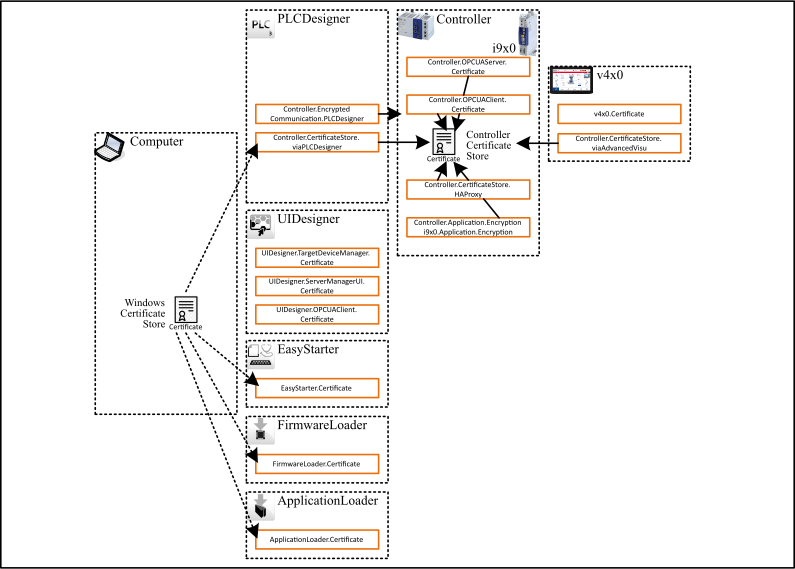
The following image shows an overview of the certificate handling.
Certificate Handling
Controller Certificate Store
-
Controller.CertificateStore.viaPLCDesigner
i9x0.CertificateStore.viaPLCDesigner -
Controller.OPCUAServer.Certificate
-
Controller.OPCUAClient.Certificate
-
Controller.CertificateStore.HAProxy
The Controller and the i9x0 Certificate Store can manage all certificates for the device controller and the i9x0. These certificates can be managed via the PLC Designer.
Handling Controller Certificates via the Visualization
-
v4x0.Certificate
-
Controller.CertificateStore.viaAdvancedVisu
The user can handle the certificates via the Visualization with the functionality controller.CertificateStore.viaAdvancedVisu.
Encryption of Application
-
Controller.Application.Encryption
i9x0.Application.Encryption
This functionality allows users to encrypt encrypt the application and manage the needed certificate in the Controller Certificate Store.
Encrypted Communication Controller
-
Controller.EncryptedCommunication.PLCDesigner
i9x0.EncryptedCommunication.PLCDesigner -
UIDesigner.TargetDeviceManager.Certificate
-
UIDesigner.ServerManagerUI.Certificate
-
EasyStarter.Certificate
-
FirmwareLoader.Certificate
-
ApplicationLoader.Certificate
-
UIDesigner.OPCUAClient.Certificate
There is an encrypted connection between the tools »PLC Designer«, »EASY Starter«, »Firmware Loader«, »Application Loader« and »EASY UI Designer« (only for the controller) and the device controller the transferred data from unauthorized use.