PackageManager.Tool.Integrity
To check the integrity of a tool before installation, it can be downloaded as a zip file from the Lenze homepage. A second file can be used to check the integrity.
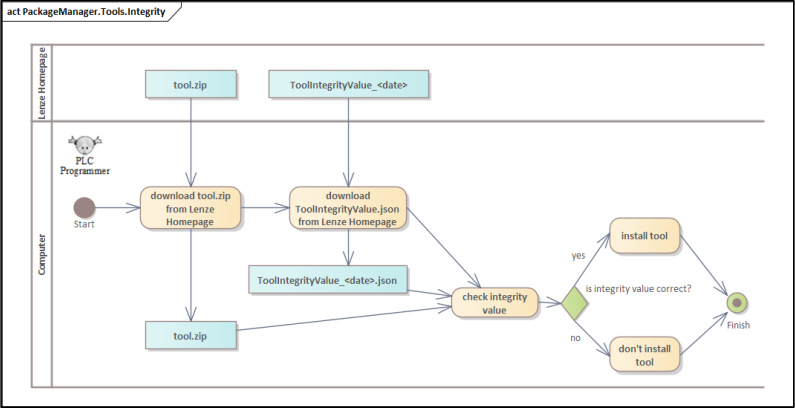
Activity Diagram
The following two options are available here.
-
First, an integrity file exists at the tool's download location. This file contains the integrity value of this exact version of the tool. This option is ideal for those who want to install a tool individually.
-
Secondly, there is an integrity file containing all tools and versions released so far. This can be found under:
All health values are included here. This option is ideal for those who want to check several tools in different versions, possibly even by automatisms. These users do not have to download various integrity files, only the latest version of the sum file is sufficient.
Regardless of whether the single file or the sum file was downloaded, a zip file is created. Unpacking this zip file results in three files. These are a *.csv, a *.json, and a *.xml. All three files contain the same content, that is, the same integrity values,and only differ in format.
-
One way to calculate the integrity value of a file is shown in this documentation. Refer to chapter "\Strategy and Basics\Integrity\Validate Integrity".