PLCDesigner.Project.UserManagement
This chapter describes the functionality of a user management for the »PLC Designer« project. This means that all the properties described here do not apply to the »PLC Designer« as a program, but to the active open project. Using this function, the user can protect individual objects with read/write permissions. An overview is shown in the following image.
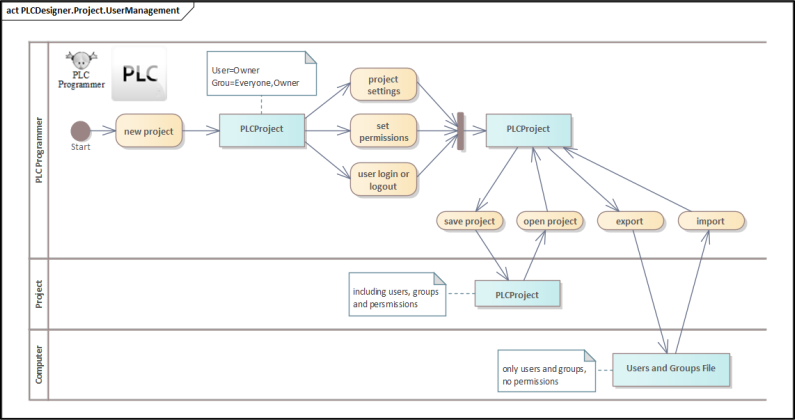
Activity Diagram
The following is a brief description of the respective actions. For more details, refer to the documentation of the »PLC Designer«.
New project
If a new project is created, a user "Owner" is created by default. This user is a member of the groups "Everyone" and "Owner". "Nobody" is displayed as project user, because no login has taken place yet.
Project settings
The project settings can be found under "Project/Project Settings/Users and Groups" in the »PLC Designer«. In order to be able to make changes here, first log in to the default user "Owner" with the default password <empty>. After that, additional users and groups can be created. Under Settings, the maximum number of login attempts and the time for an automatic logout in case of inactivity can be set.
If a user enters an incorrect password more times than the maximum number of attempts allowed, he will be blocked and can no longer log in with the correct password. Under "Project/Project Settings/Users and Groups" the user is displayed with a red cross. To activate the user again, set the "Active" property again via "Edit". Only users in the "Owner" group can do this.
Set permissions
Permission Management can be found under "Project/User Management/Permission". Here, the permissions can be set for individual properties for the "Commands", "Object types", "Project objects" and "Users, groups and permissions". Here, the permission "+ ... granted" and "- ... denied" can be set. For clarity, the default setting is displayed in gray, while changed properties are displayed in red or green.
User login and logout
The user login and the user logout can be found at "Project/User Management/User Login and Logout". The respective logged-in user is displayed in the »PLC Designer« at the bottom of the status bar.
Save and load project
Users, groups, and permissions are stored in the »PLC Designer« project.
Export and import
Via export and import, users, groups, and their relationships can be exported or imported into a file (*.user). The respective permission settings are not included here.
-
If users and groups are to be transferred from one PLC project to another, you can also use the CODESYS export/import feature (to be found in the »PLC Designer« menu under Project). When exporting, select the second POU tab and activate the project settings. A file with the extension *.export will be created. This file can then be integrated to the second project.