Adding offline devices
Via the Lenze update server, a package of device descriptions is installed locally on the user's hard disc by the "EASY Package Manager".
A device description defines ("describes") the full range of functions of the associated Lenze device type by means of a certain number of parameters. Access to the functions of the device is thus enabled by parameters that are used in the "EASY Starter" to configure the device in suitable dialogues.
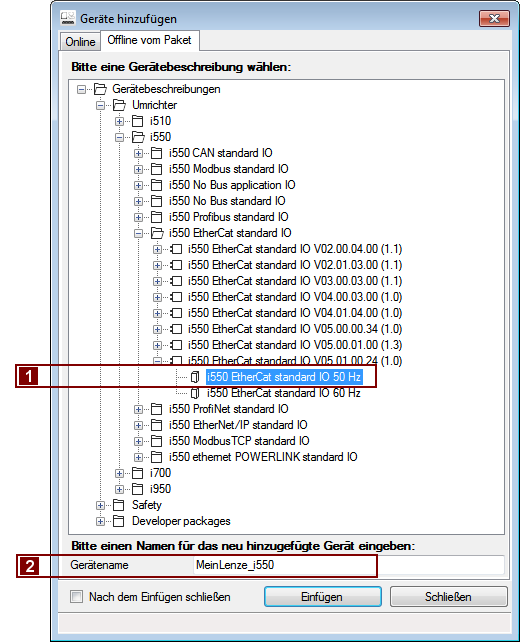
An offline device can be added to the device list of the "EASY Starter" with a user-defined device name from a list of available device descriptions:
|
|
Selected device description for the parameterisation of a device |
|
|
User name This entry inserts the data set as an offline device in the "EASY Starter" device list. |


Using the offline device in the "EASY Starter" device list
Click the Insert button to add the offline device to the "EASY Starter" device list.
The basis for parameterisation is the factory setting of the offline device.
By changing its parameters, the offline device receives an application of its functions to the drive task as desired by the user.
In this respect, the associated file, which is available after saving in *.lda format, is also referred to as an application file. For the sake of simplicity, this application file is referred to as a "file" in the "EASY Starter".