ColorIndicator
Control element that changes colour when the value of the linked variable changes.
|
Symbol |
|
|
Menu ribbon |
Start > Controls > Input/output > Graphics > ColorIndicator |

The ColorIndicator can change colour depending on the variable value (analogue or binary). It is often used to display a status (of a bit).
|
Variable value |
Representation |
|---|---|
|
0 |
|
|
1 |
|


The ColorIndicator displays a different colour depending on the variable value.
Functionalities
The control element supports the following functionality:
-
Connection to a specific process variable for the data source
-
Display of changing or static colours for background and frame depending on the variable value
-
Connection to the user administration for blocking operability
-
Display of the background, the frame, the shadow, etc.
You can configure these functionalities via the properties in the Properties window when you select the control in the Designer or in the document outline.
Style
There are no system styles available for the control. You can create your own styles for the control. These styles are available for selection in the "Style" property after creation.
Structure
The control does not contain any visually displayable sub-elements. It is often used as an element in other controls, such as in the legend of the"PieChart" control.
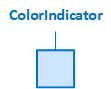
The ColorIndicator is a simple control element.
The control element can switch between different background colours, depending on the value of the linked variable. To define changing colours depending on the variable value, use the "Limits" property to create a list with elements of type "ColorIndicatorLimit".
The "BackgroundColor" property can be used to configure a static background colour that is only displayed if:
-
the control element does not contain a status list, the control element is then permanently displayed in this colour,
-
the current value at runtime does not correspond to any of the values defined in the list elements.
If a border is configured for the control element using the "BorderStyle" and "BorderWidth" properties, the colour for the border can be defined using the "BorderColor" property. The colour of the border is static, i.e. it is not status-dependent.
Related topics: