Homing
Prerequisites
-
The technology module is in "STANDBY" mode.
-
The axis is enabled (xReadyForMotion = TRUE).
Execution
With a rising edge (FALSEäTRUE) at the xHomeExecute input, homing is started (output xHomingBusy = TRUE). The axis travels until the home position is reached.
When the reference switch has been reached, xIsHomed switches to TRUE.
When the homing process has been completed successfully, xHomingDone changes to TRUE.
If xHomeExecute = FALSE, the state is changed to "STANDBY" and xHomingDone is set = FALSE.
Abort of the homing process
The function is aborted via the xHalt input.
Homing is not interrupted if xHomeExecute is set to = FALSE early.
Travel diagram
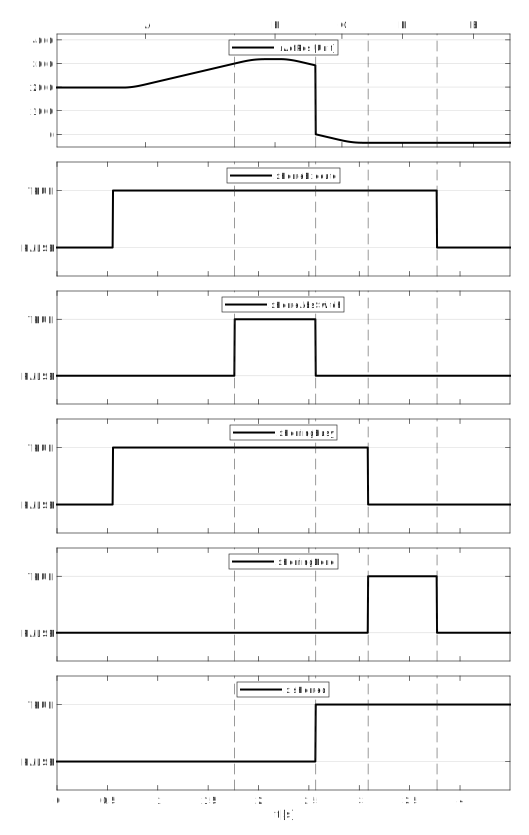
Homing in the CwRpCcwRn module with the home position "0"
|
No |
xHome |
xHome |
xHoming |
xHoming |
xIsHomed |
eTMState |
Info |
|---|---|---|---|---|---|---|---|
|
A |
FALSEäTRUE |
FALSE |
FALSEäTRUE |
FALSE |
FALSE |
STANDBYW HOMING |
The axis starts homing in positive direction. |
|
B |
TRUE |
TRUEæFALSE |
TRUE |
FALSE |
FALSE |
HOMING |
The axis changes the direction of rotation due to the positive edge of xHomeAbsSwitch. |
|
C |
TRUE |
FALSEäTRUE |
TRUE |
FALSE |
FALSEäTRUE |
HOMING |
The negative edge of xHomeAbsSwitch sets the position of the axis to the home position 0 units and the axis is brought to a standstill. |
|
D |
TRUE |
FALSE |
TRUEæFALSE |
FALSEäTRUE |
TRUE |
HOMING |
As soon as the axis has reached the standstill, xHomingBusy is set = FALSE and xHomingDone is set = TRUE. xHomingDone remains TRUE for as long as xHomeExecute is set = TRUE, but always at least for one clock cycle. |
|
E |
TRUEæFALSE |
FALSE |
FALSE |
TRUEæFALSE |
TRUE |
HOMINGW STANDBY |
The axis is ready for operation and can be positioned in an absolute fashion. |
Parameters to be set
The parameters for homing can be found in the AXIS_REF in subindex 70 ... 83.
The manual jog parameters from the PLC program can also be written via the L_MC1P_SetBasicParameter block.