Technology function Torque Follower
Condition
-
The axis is ready to move (xReadyForMotion = TRUE) AND the "STOP" state is not active.
Execution
In eSetValueMode = 8: Torque mode, the axis follows the value at lrSetTorque as long as xFollowSetValues = TRUE. If the input value changes faster than configured in the limitation parameters lrTrqRampUp / lrTrqRampDown, the setpoint change is limited accordingly. This limitation can be recognised by the fact that lrSetTorqueOut does not correspond to lrSetTorque.
If the axis is not counteracted by a torque equal to the set torque lrSetTorque, it would theoretically be possible to accelerate to infinity. In this case, the speed limit configured in lrVelocityLowLimit / lrVelocityLowLimit will take effect. If the associated speed bracketing is active, the status xVelLimitActive = TRUE.
To stop from torque follower mode with speed control (CSV), xFollowSetValues = FALSE, xAbort = TRUE or xHalt = TRUE can be set. In all cases the stop parameters are used to stop. If the stop is aborted before reaching standstill and xFollowSetValues = TRUE, the set torque is immediately followed.
Alternatively, the axis can also be stopped via xAbort or xQSPApplication inputs. When stopping the axis via xAbort = TRUE, the halt ramp is used and the axis changes to CSV mode.
Example
The example shows the use of the xFollowSetValues input bit and the resulting behaviour of the technology module.
- Set scPar.eSetValueMode = 8 i.e., torque mode. The set velocity limits, scPar.lrVelocityHighLimit = +500 and scPar.lrVelocityLowLimit = -500.
Set torque value as 5 Nm at the IrSetTorque input and set the ramp generator values, scPar.lrTrqRampUp = 1 Nm/s and scPar.lrTrqRampDown = 0 Nm/s. - Set the xFollowSetValues input bit TRUE, the torque operation starts, and the axis torque starts increasing gradually to reach at set torque value. The Axis.IrSetTorque variable indicates that the torque has been accepted and it starts to gain torque set value with preselected scPar.lrTrqRampUp set value.
- The set torque value is maintained at 5 Nm and when the xFollowSetValues is set to FALSE the torque decreases with the function halt.
- Set torque filter time using scPar.lrFiltTimeTorque = 1 s.
- Set the xFollowSetValues input bit TRUE, the torque operation starts, and the torque starts increasing gradually to reach at set torque value with preselected scPar.lrTrqRampUp and scPar.lrFiltTimeTorque values.
- The set torque is maintained at 5 Nm and when the xFollowSetValues is set to FALSE, the torque starts to decrease with the function halt.
Based upon setting for scPar.lrFiltTimeTorque and IrSetTorque input, being with or without noise, the following use cases are possible for Torque Follower mode:
|
Case No. |
Use Case Description |
Effect on TM’s execution |
|---|---|---|
|
A, B, C |
lrSetTorque input without noise and preselected aceleration & deceleration set values:
|
With xFollowSetValues = TRUE, set torque value reached for axis With xFollowSetValues = FALSE, axis comes back to standstill. |
|
D, E, F |
lrSetTorque input without noise and preselected torque filter time set value, aceleration & deceleration values:
|
With xFollowSetValue = TRUE, set torque value reached for axis, with velocity filter time. With xFollowSetValue = FALSE, axis comes back to standstill, with filter time. |
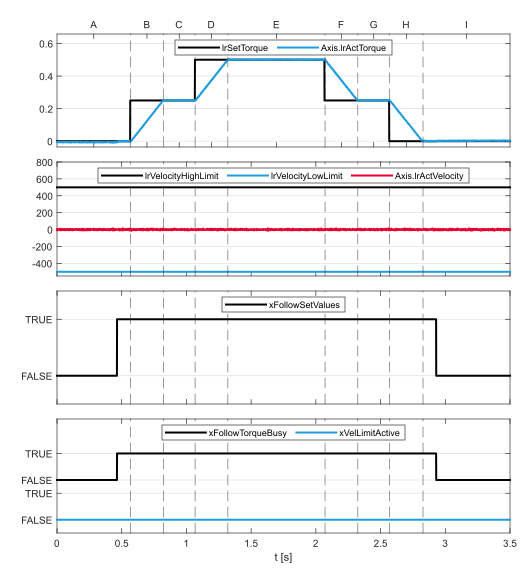
Below table shows overview of the torque follower mode operation:
|
Nr. |
xFollowSetValues |
xFollowTorqueBusy |
xVelLimitActive |
eTMState |
INFO |
|---|---|---|---|---|---|
|
A |
FALSE äTRUE |
FALSE äTRUE |
FALSEä TRUE |
STANDBYW TORQUEFOLLOWER |
The axis accelerates to the preselected torque and holds it. The noise on the input signal are passed directly to the axis |
|
B |
FALSE äTRUE |
FALSE äTRUE |
FALSEä TRUE
|
STANDBYW TORQUEFOLLOWER |
The axis accelerates to the preselected torque and holds it. The noise on the input signal is filtered out by a PT1 filter. The axis reaches the target torque with a delay, but the signal is almost free of noise. |