Technology function Velocity Follower
When the velocity follower mode is activated (scPar.eSetValueMode = 2: Vel and xFollowSetValues = TRUE; eTMState = VELOCITYFOLLOWER), the axis follows the value at the lrSetVelocity input. The parameters lrAccVelFollower and lrDecVelFollower can be used to limit the acceleration / deceleration. With the default setting of 0.00 unit/s² there is no limitation.
Control mode subindex 90 configures whether position control is active or not. In addition, the parameterscPar.lrFiltTimeVelocity can be used for smoothing of a noisy input signal by means of a PT1 filter. If the following operation is aborted with xAbort = TRUE, the deceleration is performed with scPar.lrDecVelFollower. If lrDecVelFollower = 0.00 units/s², then the deceleration parameters from the scPar structure (lrDec, lrJerk) apply. If xAbort = FALSE and input xFollowSetValues = TRUE, the axis will follow the velocity setpoint at input lrSetVelocity.
Example
In the example, the master velocity is poorly resolved and noisy. A poorly resolved master velocity causes the slave axis to run unevenly. You can hear control noise and only low controller gains can be set.
An alternative is to smooth the master speed using PT1 filters. Filtering the line speed reduces the effects of the noisy line speed.
The values in lrFiltTimeVelocity should typically be in the range of a few milliseconds. However, there are disadvantages to using filters. The filter time causes a time delay between the follower and master values. The synchronisation deteriorates as the filter time increases.
In the following trajectory, the TM is synchronised to a noisy line speed. The trajectory is divided into area A and area B.
In area A the filter function is deactivated. The TM follows the line speed exactly. The noise of the line speed is transferred to the axis of the TM and thus to the setpoint of the motor. This can have disadvantages such as high wear on mechanical parts such as ball bearings and motor gears.
In range B, the filter function is activated with a slightly longer filter time. The line speed noise is smoothed. The axis is given a constant setpoint, resulting in little or no noise. However, this can also have the disadvantage of affecting synchronisation. The axis follows the setpoint with a time delay.
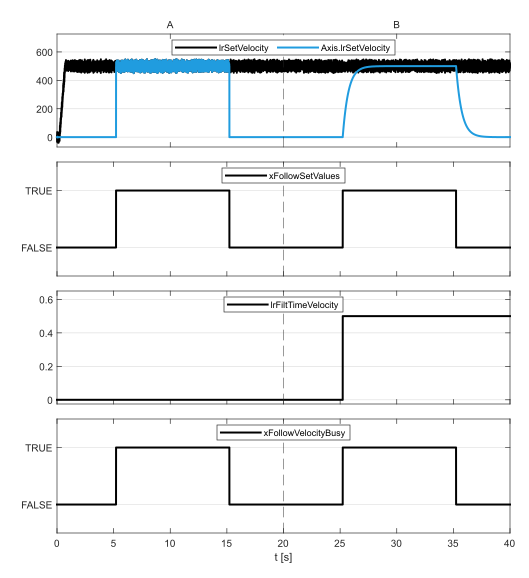
Following table shows overview of the velocity follower mode operation:
|
No |
xFollowSetValues |
xFollow VelocityBusy |
lrFiltTimeVelocity |
eTMState |
INFO |
|---|---|---|---|---|---|
|
A |
FALSE äTRUE |
FALSE äTRUE |
0ms |
STANDBYW VELO ITYFOLLOWER |
The axis accelerates to the preselected set speed and maintains it. The disturbances on the input signal are passed directly to the axis. |
|
B |
FALSE äTRUEE |
FALSE äTRUE |
500ms |
STANDBYW VELO ITYFOLLOWER |
The axis accelerates to the preset target speed and maintains it. The noise on the input signal is filtered out by a PT1 filter. The axis reaches the target speed with a delay, but without disturbance. Synchronisation is disturbed, the axis follows the setpoint with a time delay. |