Set mode
Configuration dialog in the "PLC Designer":
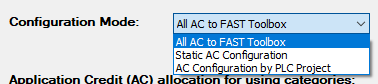
Mode 1: "All AC to FAST Toolbox"
For the controllers of the 3200C device series, the application credit has so far only been used to license the functions of the FAST Toolbox and cannot be distributed to other AC users.
If an existing PLC program is transferred from 3200 to a new controller that supports the LLM service, the previously known behavior is achieved with this setting.
Mode 2: "Static AC Configuration"
In this setting, the programmer can allocate the available AC to the following four different areas/users:
-
FAST Toolbox: FAST PLCopen, technology and function modules.
-
DeviceFeatures: Certain controller functions can be activated and require AC to enable them (example: selectable slave interface on the c430).
-
OPC UA packages: These packages contain functions such as additional client connections, pub/sub mechanisms etc.. For example, a controller has a certain number of client connections included as standard. If more are required, these must be licensed through additional AC.
-
FAST UI The same as for the OPC UA client connections also applies to the UI clients. If more clients are required than are included in the standard version, these must be activated by means of an additional AC.
Mode 3: "AC configuration by PLC-project"
In this mode, the AC is not split until the application is running, e.g. when the machine is switched on, by calling a function block in the PLC program.
-
For example, by evaluating internal or external signals in the PLC program, a decision can be made as to which division should take effect for the further operation of the machine.
-
As long as no AC distribution has been carried out via FB, the entire AC is assigned to the FAST Toolbox.