How SKS works
The SKS offers an OPC UA client/server interface via which the security keys can be provided. A distinction is made here between the push and the pull (server) interface.
With the push interface, the SKS acts as a client and writes the current keys to an OPC UA Publisher or Subscriber on its own. To do this, the Publisher or Subscriber are connected to an OPC UA Server on the same device, which provides an address model with methods that can be used to set the keys.
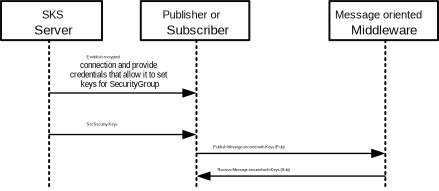
Handshake for pushing the keys from the SKS
With the pull interface, on the other hand, the SKS acts as a Server and provides an address model with methods that can be used by the Publisher or Subscriber (with an internal Client) to retrieve the keys. In this case, the client is always responsible for retrieving the latest keys promptly.
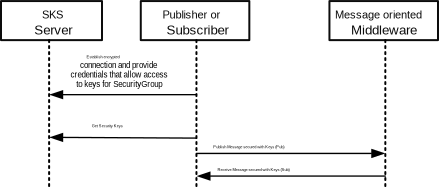
Handshake for pulling the keys from the SKS
Security groups are used to assign a key. Each group has its own key that can be queried via the interface. This security group ID is specified in the PubSub configuration for each data set writer and data set reader.
The prerequisite for communication and key handling is a standardized (equal) system time on all communication partners. This can be achieved manually or by using an NTP server.
Encrypted communication between the Publisher / Subscriber and the SKS Server is needed. To achieve this, the two entities must trust each other via the certificates. To do so, a Global Discovery Server can be used, or the user must trust the certificates manually with the PLC Designer Security Screen or the Controller-s web-based diagnosis.