Lenze Controller as SKS Server
The Lenze Controller itself provides a Security Key Service, which is accessible by the Lenze OPC UA Server. The focus is on secure M2M communication or communication within a machine.
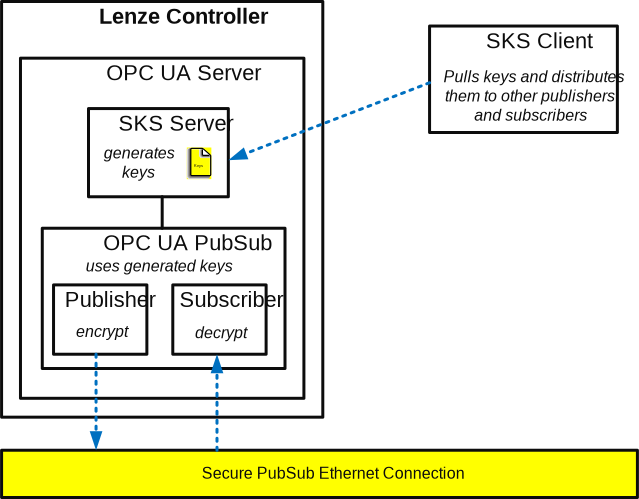
The SKS Server feature can be enabled by following setting parameter. Due to a representation of the SKS Server interface in the OPC UA Server information model, a restart of the OPC UA Server is needed to activate the setting.
|
Index |
Sub |
Name |
Default |
c520, c550 |
|---|---|---|---|---|
|
0x247C |
130 |
SKS Server |
0: Disabled |
0: Disabled 1: Enabled A OPC UA Server restart 0x2470:001 is needed to activate the setting. |
SKS Configuration Authorization
It-s possible to restrict the right to configure the SKS functionality.
With activated device user management -
-
The admin user is allowed to configure PubSub connections and the SKS feature.
-
The anonymous user is not allowed to configure it.
-
To configure PubSub connections and the SKS feature with a normal user, the user needs to be added to the User Role -PubSub- and -SKSConfiguration-.
With deactivated device user management -
-
The anonymous user is allowed to configure PubSub connections and the SKS feature.
Key Access Authorization
Pulling keys requires another new User Role -SKSAccess-. -SKSAccess- is handled analogous to the -SKSConfiguration- User Role.
With activated device user management -
-
The admin user is allowed to pull keys from the SKS Server.
-
The anonymous user is not allowed to pull keys.
-
To pull keys with a normal user, the user needs to be added to the -SKSAccess- Group
With deactivated device user management -
-
The anonymous user is allowed to pull keys.
SKS Configuration
The SKS Server feature can be configured as part of the configuration of the PubSub connections in two ways, static or dynamic. For this, see also chapter 2.2 Configuration and Diagnosis.
-
To realize projects with a static configuration please contact your local Lenze sales representative.
-
To realize projects with a dynamic configuration, it-s possible to use the UA Expert with the integrated -PubSub Config View-.
-
A configuration example can be found under following chapter 3.4 HOW TO Setup SKS Client / Server with static IPs
If an SKS client attempts to access the SKS server with insufficient credentials (username / password), this is rejected. After several failed attempts, the client is blocked for a certain time, even if it then attempts a connection with correct credentials. By default, there are 5 attempts and a blocking time of 3600 seconds. This can be changed in the CODESYS device settings under "Change Runtime Password Policy".