Lenze and customer-specific client connections
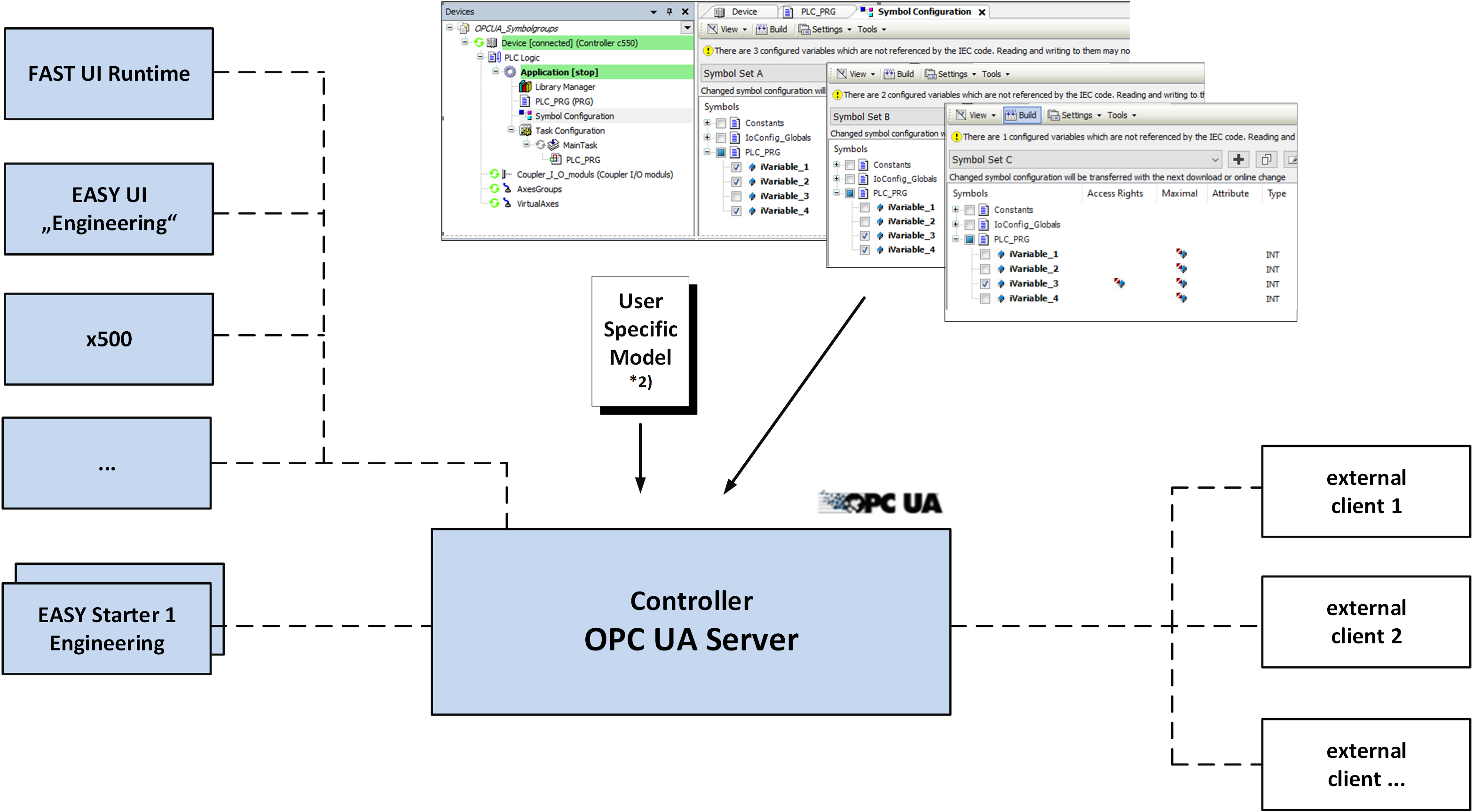
OPC UA is not only used for customer-specific client-server connections, such as the connection of the controller to an MES system. Lenze-specific connections also use OPC UA communication. This includes following Lenze clients:
-
FAST UI Runtime
-
EASYUI Designer, Diagnosis and Target Device Manager
-
x500
-
SKS Client
-
EASY Starter
|
*1) |
Also the UA Expert by Unified Automation has free access to the Lenze server, as a recommended general OPC UA client for diagnosis purposes. |
|
*2) |
It is possible to load user specific information models based on Companion Specifications. |
If a client mentioned above connects to the Lenze OPC UA server, it is identified as a Lenze client for internal system communication. This means that no separate OPC UA license is required for the Lenze clients, as is the case for the additional external clients. However, the Lenze system sessions that can be used in parallel are also limited, as shown in the table below. Lenze system clients that are not explicitly granted a session use the pool of "any other Lenze clients".
The following table provides a detailed overview.
|
Session Category |
Max. Sessions |
Clients |
Model Access |
|
|---|---|---|---|---|
|
c4xx |
c5xx |
|||
|
Lenze Engineering Clients |
1 |
2 |
EASY Starter Firmware loader Application Loader |
Vendor specific Model |
|
Lenze System Clients |
4 + 1any |
4 + 2any |
1 x FAST UI Runtime 1 x x500 1 x UA Expert 1 x SKS Client 2 x any other Lenze Client 4) |
PLCopen Model User specific Model Vendor specific Model |
|
external Clients |
4 3) |
c520 = 6 3) c550 = 12 3) |
external Client e.g. other Controller, MES, -
|
PLCopen Model File Access Model User specific Model |
|
*3) |
One client connection (session) is included in the basic setup of the OPC UA server. Additional external sessions are subject to license. |
|
*4) |
FAST UI Runtime, EASYUI Designer, Diagnosis and Target Device Manager, x500 , SKS Client and UA Expert as recommended diagnosis client |
If a connection between client and server is lost, the server waits for a SessionTimeOut time until it cleans up the session and releases it for a new possible client connection. The advantage is, if the old client comes back during this time, the previously created settings like "registered nodes" and "subscriptions" are preserved for it. The disadvantage is that another client cannot reassign this session during the SessionTimeOut time.