Provisioning mode
The provisioning mode is used for the initial deployment of certificates on the server. In this mode the server will accept all certificates although they aren-t trusted.
The Lenze OPC UA Server has the parameter 0x2471:129 for enabling the provisioning mode. When the parameter is changed, the server needs to be restarted to make the setting active.
|
Index |
Sub |
Name |
Default |
Note |
|---|---|---|---|---|
|
0x2471 |
129 |
Provisioning mode |
1: Enabled Automatic 1) |
0: Disabled 1: Enabled Automatic 2: Enabled Force |
|
1) |
Since FW >= V2.0 the default is "Enabled Automatic". In FW < V2.0 the provisioning mode is disabled by default. |
0. Disabled: The provisioning mode is always disabled.
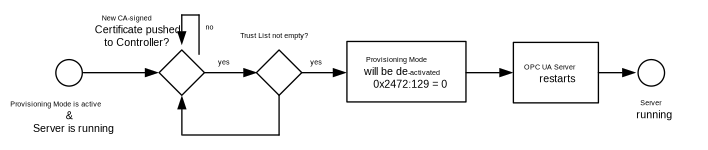
1. Enabled Automatic: The provisioning mode is only enabled if there is no trust list (trusted certificates) available. This check is done at startup of the server.

The Enabled Automatic mode is used for the initial commissioning of a controller in a GDS-managed network. During this initial commissioning, a trust list and a CA-signed certificate are written to the server for the first time.
In this mode all received client certificates are accepted but not stored in the trust list.
This provisioning mode is ended automatically with a restart of the server, if -
-
a signed certificate is pushed to the server and the trust list of the controller is not empty, or
-
one hour has passed since the controller was started in provisioning mode to protect the device from unauthorized access.
2. Enabled Force: This provisioning mode is always enabled after server restart.
The Enabled Force mode is generally used for subsequent commissioning of a controller in a GDS-managed network, e.g. by the machine operator. A trust list and a CA-signed certificate already exist on the server during this commissioning. Thus, the Enabled Automatic mode would not work. With the Enabled Force mode a new trust list and a new CA-signed certificate can be written to the Server.
If the Controller is not integrated in a GDS-managed network, normally self-signed Certificates are used instead of CA-signed Certificates. In this scenario the Enabled Force mode can also be used to store (self-signed) Client certificates (e.g. from UA Expert) persistent in the trust list folder.
The provisioning force mode has following handling -
-
All received client certificates are accepted and also stored in the trust list.
-
If the trust list of the controller isn-t empty and a CA-signed certificate is pushed to the server, the server will be restarted. Same behavior as in auto mode.
-
The (new) CA-signed certificate is now used for the server.
-
To disable the provisioning force mode, the setting parameter 0x2471:129 must be set to "disabled" and the server has to be started manually. There is no automatism.
In case of -Enabled Automatic-, it is required that the trust list is empty to activate the provisioning mode. If there are any trusted certificates, they need to be deleted first via the Security-Screen of the PLC Designer.

It-s possible to accept all client certificates for the current session without any check. This feature can be helpful for an easier engineering access without a GDS managed network, if other security measures are taken. The temporarily accepted certificates will not be stored in the trusted folder.
This feature can be activated with parameter 0x2471:130 - OPC UA server settings: Accept untrusted Client Certificates.