Gripper control
The technology module L_TX2P_PickAndPlaceBase supports the calculation of the profiles adapted to the tools of the axis group. The tools are defined via the parameterization in the axis group Tool parameters (L_MC4P_TOOL_REF).
A total of four tools can be parameterized in the axis group.
Tool parameters (L_MC4P_TOOL_REF)
A tool consists of 7 parameters in total:
|
Name
|
Info
|
Index offset 1, subindex |
|||
|---|---|---|---|---|---|
|
Tool1 |
Tool2 |
Tool3 |
Tool4 |
||
|
Tool type |
Tool transformation selection
|
151 |
171 |
191 |
211 |
|
Displacement X |
For Cartesian: Displacement of the tool tip in the x-direction of the TCS. |
152 |
172 |
192 |
212 |
|
Displacement Y |
For Cartesian: Displacement of the tool tip in the y-direction of the TCS. |
153 |
173 |
193 |
213 |
|
Displacement Z |
For Cartesian: Displacement of the tool tip in the z-direction of the TCS. |
154 |
174 |
194 |
214 |
|
Orientation A |
For Cartesian: Rotation of the tool coordinate system around the x-axis of the TCS. |
155 |
175 |
195 |
215 |
|
Orientation B |
For Cartesian: Rotation of the tool coordinate system around the y'-axis of the coordinate system resulting after the rotation around RotX. |
156 |
176 |
196 |
216 |
|
Orientation C |
For Cartesian: Rotation of the tool coordinate system around the z'' axis of the coordinate system resulting after the rotation around RotX and RotY. |
157 |
177 |
197 |
217 |
|
Switch-on time |
Additional information for technology modules used for gripper control |
158 |
178 |
198 |
218 |
|
Switch-off time |
Additional information for technology modules used for gripper control |
159 |
179 |
199 |
219 |
Tool selection
The scPar.eToolSystem parameter is used to select a tool with which the profile for approaching the target position is approached. Here, the "Tool Center Point" (tool zero point) is set to the selected tool scPar.eToolSystem.
A tool change can only take place at standstill. When changing the tool number, the tool stops at the leading target point.
Activate tool
The tool can be optionally activated or deactivated in the scPar.alrPostion target point.
With the setting scPar.eTarget = GripperOn the tool is activated in the target point. If the tool is a gripper, it will be closed. The target point in which the tool is activated is a breakpoint with a set waiting time. The waiting time in the point is set by the parameter scPar.lrTargetWaitTime. This point in the chaining of profiles cannot be ground.
Deactivate tool
With the setting scPar.eTarget = GripperOff the tool is activated in the target point. If the tool is a gripper, it will be opened. The target point in which the tool is deactivated is a breakpoint with a set waiting time. The waiting time in the point is set by the parameter scPar.lrTargetWaitTime. This point in the chaining of profiles cannot be ground.
Control of the gripper via the L_MC4P_ToolControl function block
The L_MC4P_ToolControl is used for controlling tools such as a gripper. The FB is connected to axis groups and must be switched on via xEnable = TRUE. With the input eTool = 1, 2, 3, or 4 the tool number is selected, which must be observed. At output lrTimeToSwitch the remaining time for the selected tool is displayed until the tool is activated or deactivated in the point (with property scPar.eTarget = GripperOn or scPar.eTarget = GripperOff).
The xToolOn output is controlled depending on the switch-on time parameter (parameter: 158 for Tool1, 178 for Tool2, 198 for Tool3, 218 for Tool4). Positive values of the parameter cause the tool to be activated by the set value in seconds before reaching the end of the profile at the target point with scPar.eTarget = GripperOn. The xToolOn output is only active for one cycle to activate the tool (close gripper).
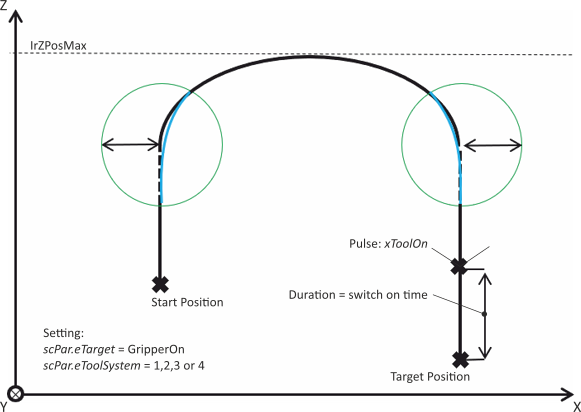
Example: Driving profile with activating the tool in the target point
The xToolOff output is controlled depending on the parameter switched off (parameter: 159 for Tool1, 179 for Tool2, 199 for Tool3, 219 for Tool4). Positive values of the parameter cause the tool to be deactivated by the set value in seconds before reaching the end of the profile at the target point with scPar.eTarget = GripperOff. The xToolOff output is only active for one cycle to deactivate the tool (open gripper).
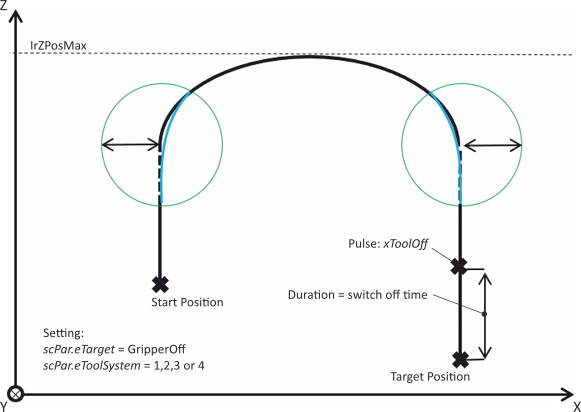
Example: Driving profile with deactivation of the tool in the target point