Set driving profile
In the TM L_TX2P_PickAndPlaceBase a simple PickAndPlace profile can be preset by means of a few parameters.
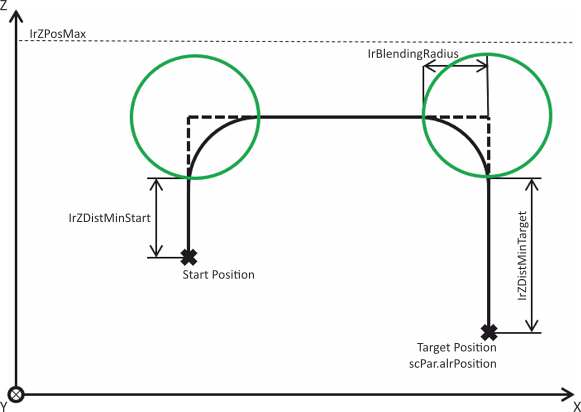
Simple PickAndPlace profile
Regardless of the profile type, the start position of the profile is the actual position (X, Y, Z, A, B, C, Aux1) of the "Tool Center Point" (tool zero point) in space.
The target position is specified via the scPar.alrPosition parameter. A coordinate system can be specified for the target position via the parameter scPar.eCoordSystem.
The lrZDistMinStart parameter defines the minimum height of the "Tool Center Point" above the start point that is moved in the Z direction. The movement in the Z direction is executed in the coordinate system that is active at the start point. The movement into the slept area and further to the target point takes place in the scPar.eCoordSystem coordinate system.
The lrZDistMinTarget parameter sets the minimum height of the "Tool Center Point" above the target point, which is defined in the Z direction above the scPar.alrPosition target points.
The blending movements are omitted if lrBlendingRadius = 0 is parameterized. In this case, it will stop at every intermediate point of the path.
-
The world coordinate system (WCS), the machine coordinate system (MCS) and all product coordinate systems (PCS 1...16) are supported. The axis coordinate system (ACS) is not supported.