Example 2: TransitionMode "TMCornerDistance"

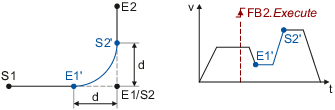
In this mode, entry into the transition segment starts when the path is a defined distance away from the programmed path point. The profile parameters in the transition segment result from the programmed buffer mode.
TransitionParameter

Info

TransitionParameter[1]

Distance "d" in [mm]

  • Distance between the programmed end point (E1) and the start point (E1') of the transition segment.
  • The transition parameter is defined as the segment length to be shortened and only corresponds to the actual (geometric) distance to the programmed target point for MoveLinear movements.
  • For MoveCircular movements, the transition parameter corresponds to the arc length to be shortened.
  • A smoothing of MoveDirect movements is only possible via a percentage specification in the transition parameter [2], as the geometric movement in the Cartesian workspace for MoveDirect movements is significantly dependent on the kinematics of the axis group used.

TransitionParameter[2]

Distance in [%] of the path length

  • Alternatively, this parameter can be used to programme the percentage distance in relation to the path length of the original path.
  • The value "100" (= 100 %) corresponds to half the segment length.
  • Prioritisation takes place according to the following logic:
    If TransitionParameter [1]<>0, then grinding in [mm]
    otherwise, if TransitionParameter [2]<>0, then grind in [%] of the path length
    otherwise no blending.
  • The segments are always shortened symmetrically to the corner point E1/S2.
  • If TransitionParameter [1]:=0 and TransitionParameter [2]:= 0 (or not connected), no transition curve is inserted.
  • If the transition between the two movements at path point E1/S2 is sufficiently continuous (e.g. two straight lines in the same direction), no exact stop is performed. See also example 3: BufferMode "mcBlending..." for a path movement.