Programming a configuration change for axes groups with several configurations
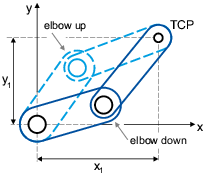
For the most serial kinematics (e.g. Scara_3dof and Scara_4dof ), the calculation of the axis angles from the end effector position by backward transformation (inverse kinematics) cannot be solved unambiguously.
|
 [16-3] Example: SCARA with two joints (2 rotary axes)
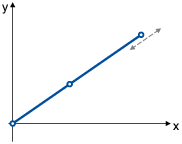
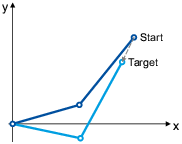
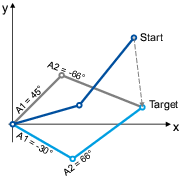
When the configuration is changed, the robot has to be traversed by a singular axis angle setting. This causes the robot to lose one or several of its Cartesian degrees of freedom.
|
|
|
|
|
|
[16-4] Example: SCARA with two joints (2 rotary axes)

|
Note!
The current configuration of the axes group can be read out via a Configuration property. An ARRAY[1..6] OF INT is returned in which the configuration is coded via {-1, 0, 1} (zero means a singular setting). The assignment of the array indices is kinematics-specific. |