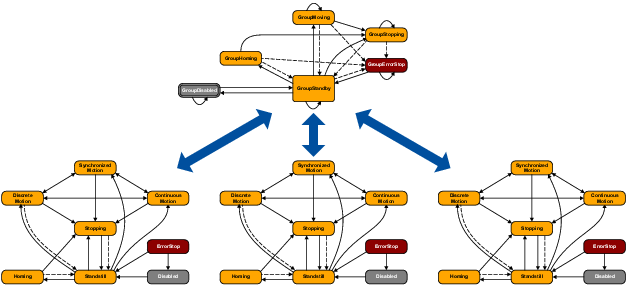
Relationship between axis states and axes group states
|
Example of a relationship between three single axes being in one axes group.
If an axis of an axes group is instructed with a command for a single-axis movement (e.g. MC_MoveAbsolute ), it behaves as follows:
Drive axes A1 ... A6
- Single axis commands (e.g. MC_Home , MC_MoveAbsolute ) can only be used in the " GroupDisabled " state for the real axes of an axes group.
- In all other cases, the call of a single axis command for a real axis is rejected. The corresponding FB signals it via its Error output.
- The axes and axes groups do not change to an error state.
- In the logbook of the axes and axes group, "Warning" is entered.
- While the drive axes are moved, the axes group cannot be activated.
- MC_GroupEnable needs all drive axes to be in " Standstill " state. All real axes have to be switched on before the axes group (e.g. via MC_Power or L_MC4P_GroupPower ).
- While the drive axes are moving, the axes group remains in the " GroupDisabled " state. it is not changed to the "GroupMoving" state.
- The above descriptions both refer to the motion-instructing FBs ( MC_MoveAbsolute , MC_MoveRelative , etc.) and the MC_Halt , MC_Stop , MC_Home and all other function blocks.
Virtual main axes X, Y, Z, A, B, C
- Single axis commands can exclusively be transmitted to the virtual main axes if the axes group is in the "GroupStandby" state or is already controlled by single axis commands on a different main axis.
- The axes group changes to the "GroupMoving" state.
- All drive axes change to the "SynchronizedMotion" state.
- The main axis involved changes the state according to the called FB.
- A change takes place, for instance, to the "Homing" state if MC_Home ( Axis:=AxesGroup.Axis_X ) is called.
- The main axes that are not involved remain in the "Standstill" state.
- A velocity changeover of single axis and axes group movements is not possible.
- All motion-instructing axes group FBs (e.g. MC_MoveLinearAbsolute, MC_GroupHalt) reject the processing as long as the single-axis movement has not been completed. The corresponding FB signals it via its Error output.
- The axes and axes groups do not change to an error state.
- In the logbook of the axes and axes group, "Warning" is entered.
- When the movement is completed, the axis changes to the "Standstill" state.
- The axes group changes to the "GroupStandby" state as soon as all single axis commands for the Cartesian axes have been completed. This also prevents a "GroupDisable" while the Cartesian main axis is moved.
- The above descriptions both refer to the motion-instructing FBs ( MC_MoveAbsolute , MC_MoveRelative , etc.) and the MC_Halt , MC_Stop , MC_Home and all other function blocks.
Auxiliary axes Aux1 ... Aux6
An auxiliary axis is an axis the position of which does not have to be defined with a fixed numerical value for each set transition. The movement of the auxiliary axis is smoothed via several main axis sets. Main axes and auxiliary axes reach their programmed target positions at the same time. Here, the movements times are adjusted automatically.
 Auxiliary axes