Absolute positioning
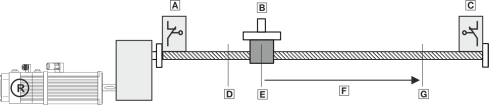
Example: Absolute positioning of a linear axis
|
Pos |
Description |
|---|---|
|
A |
Negative hardware limit switch |
|
B |
Load (e.g. slide) |
|
C |
Positive hardware limit switch |
|
D |
Zero position of the measuring system |
|
E |
Current actual position |
|
F |
Distance to be travelled |
|
G |
Target position (lrPos_Dist input) |
With absolute positioning, the target position in the lrPos_Dist input (G) is defined as a unique absolute position, relating to the zero position of the measuring system (D). The distance to be travelled (F) results from the distance between the current actual position (E) and the absolute target position (G).
Prerequisites
-
The axis is enabled (xReadyForMotion = TRUE).
-
The axis is referenced (xIsHomed = TRUE).
Execution
With a rising edge (FALSEäTRUE) at the xMoveAbsExecute input, a travel to the absolute target position in the lrSetPos_Dist input is started on the basis of the parameters for the motion profile (see below). The technology module changes to the "MOVEABS" state.
In order to reach the target position, the axis is brought to a standstill via the lrDec parameter. The axis reaches a standstill exactly in the target position.
After reaching the target position, the state changes back to STANDBY (xMoveAbsExecute = FALSE).
During the travel process, the absolute target position in the lrPos_Dist input can be changed, which requires triggering the Execute input for positioning again.
Positioning can be interrupted via xAbort, xHalt or xQSPApplication. Via xFinishPositioning, positioning can be continued again and completed.
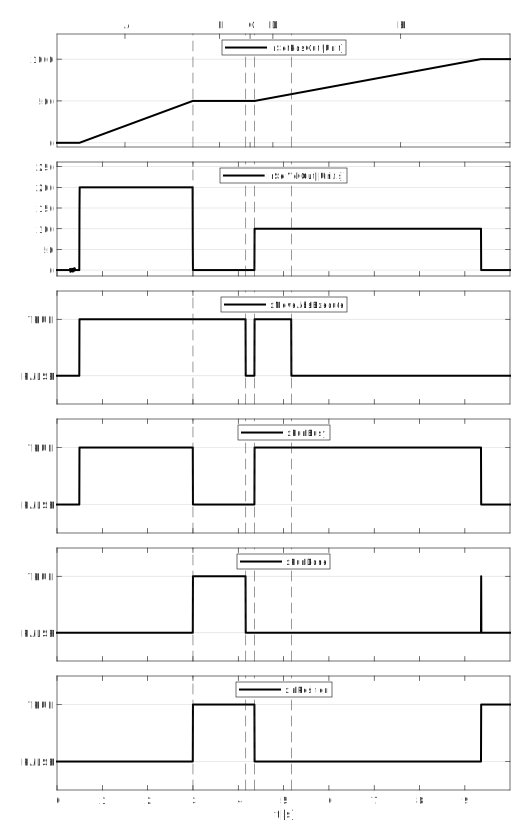
Travel diagram
|
No |
xMoveAbs Execute |
xFuncBusy |
xFunDone |
xInPosition |
eTMState |
Info |
|---|---|---|---|---|---|---|
|
A |
FALSE ä TRUE |
FALSE äTRUE |
FALSE |
TRUEæ FALSE |
STANDBYW MOVEABS |
The axis starts the positioning run to the absolute target position 500 units. |
|
B |
TRUE |
TRUEæ FALSE |
FALSE ä TRUE |
FALSE ä TRUE |
MOVEABSW STANDBY |
When the target position has been reached, xInPosition is set to TRUE. |
|
C |
TRUEæ FALSE |
FALSE |
TRUEæ FALSE |
TRUE |
STANDBY |
When xMoveAbsExecute is set to FALSE, the xFunDone status signal changes from TRUEæFALSE. |
|
D |
FALSE ä TRUE |
FALSE ä TRUE |
FALSE |
TRUEæ FALSE |
STANDBYW MOVEABS |
The axis starts the positioning run to the absolute target position 1000 units. |
|
E |
TRUEæ FALSE |
TRUEæ FALSE |
FALSEä TRUEæ FALSE |
FALSE ä TRUE |
MOVEABSW STANDBY |
After the target position has been reached, xFunDone remains TRUE for exactly one cycle, because xMoveAbsExecute = FALSE has been requested during the positioning process. |
Parameters to be set
Further parameters for absolute positioning can be found in the AXIS_REF in subindex 130 ... 137.