XYChart
Diagram for displaying XY coordinates.
|
Symbol |
f
|
|
Menu ribbon |
Start > Controls > Input/output > Variable output > XYChart |

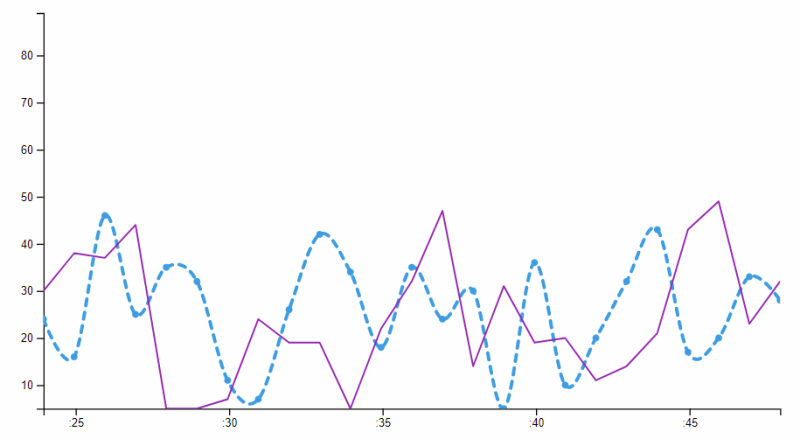
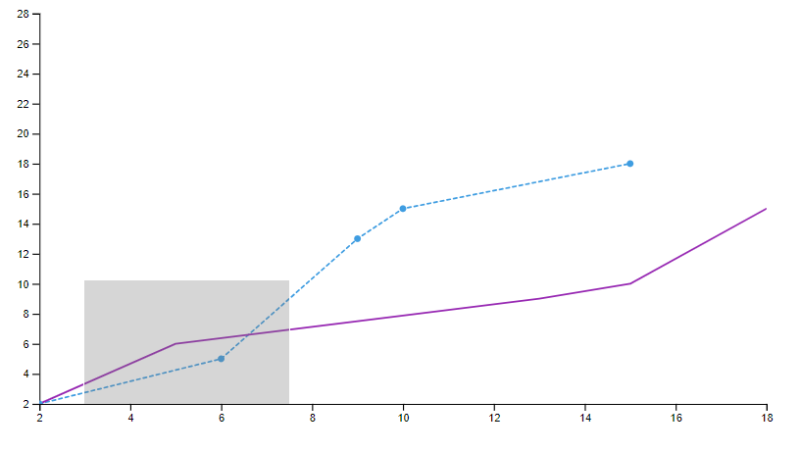
The "XYChart" control element displays XY value pairs as lines in a coordinate system. The corresponding arrays are linked in the "XYChartLine" control element, which can be added and configured in the "Chart elements" property in the collection list.
The lines (XYChartLine) visualise the current values of the connected arrays. By dragging a square over the control element, a specific area is displayed enlarged. This detailed view can be exited by right-clicking on the diagram.
Functionalities
The control element supports the following functionality:
-
Connection to array variables
-
(Dynamic) visualisation of scale values
-
Visualisation of the lines
Style
The "XYChart" is available in the following styles: Lenze.Default, LenzeCyan.Default, Custom.Default.
Structure and properties of the XYCharts
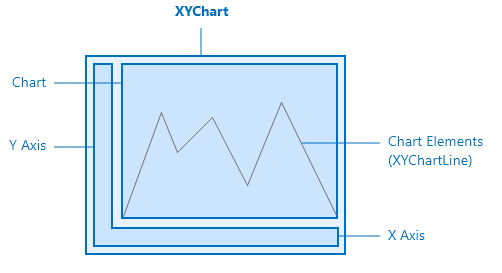
The XYChart and its elements
The control element contains internal containers for the chart, the lines and the two axes.
Axles
Dynamic scaling of the Y axis can be activated using the "Y axis min value dynamic" option; dynamic scaling is always active for the X axis. The offset properties "Y axis min offset" and "Y axis max offset" can be used to shift the y-axis. If temporal data is to be mapped on the x-axis, a DateTime array must be linked and the "X axis date time" option must be set.
Line representation
The properties of the "XYChartLine" are visible either via the collection editor of the XYChart or by directly selecting the control element in the document outline. The line colour, its thickness and its style can be defined here. Furthermore, the specific points of the value pairs can be displayed using "Enable dots" and settings can be made for the curve type.
Related topics: