PanoramaView
A placeholder control that enables navigation through multiple views.
|
Symbol |
|
|
Menu ribbon |
Start > Controls > Navigation > Container > PanoramaView |

The "PanoramaView" control element contains one or more "PanoramaViewItems", to each of which a view is linked. Two so-called "Indicators", which are shown as arrows in the standard version, can be used to navigate through the various views at runtime. The swipe gesture can also be used for this on touch devices.
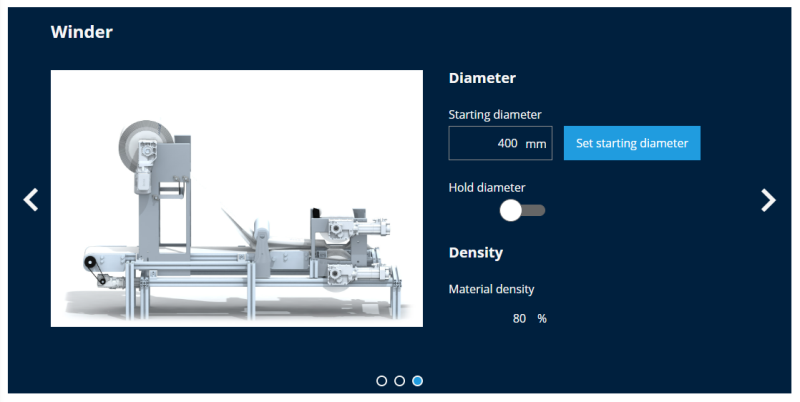
Exemplary representation of a PanoramaView with three PanoramaViewItems
Functionalities
The control element supports the following functionality:
-
Display of the background, the frame, the shadow, etc.
-
Color display of the background, frame, text, etc., also depending on the status of the control element
Style
The PanoramaView is available in the following styles: Lenze.Default, LenzeCyan.Default, Custom.Default. However, there are no visual differences due to their placeholder function.
Structure and properties of the PanoramaView
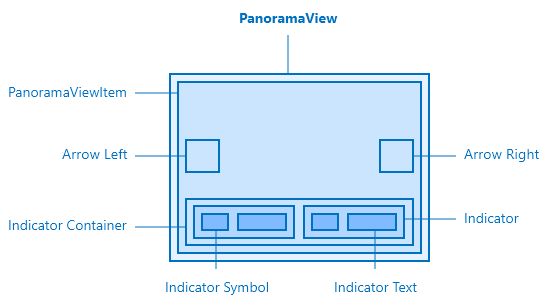
The PanoramaView and its elements
The control contains internal containers for displaying the view (PanoramaViewItem), the navigation arrows and the indicator components.
PanoramaView
By default, the PanoramaView contains one PanoramaViewItem. The collection can be supplemented with additional PanoramaViewItems under PanoramaWViews. Visual adjustments are possible for the navigation arrows via the corresponding colour and symbol properties in the "Left Arrow", "Right Arrow" and "Colors" categories. One indicator element is created in the indicator container for each integrated PanoramaViewItem. By default, the frames of the indicators are coloured and rounded so that they provide an overview of the current navigation area as points. However, images or texts can also be displayed for each PanoramaView item. These options can be configured generically under "View Indicators Symbol" or "View Indicators Text", but the specific images or texts must be selected on the corresponding PanoramaView item.
Furthermore, the swipe gesture can be (de)activated on a touch-based end device (Swipe enabled) and the transition time between the views (transition duration, default is 400 ms) can be defined.
PanoramaViewItem
To display a view, it must be linked to the "View" property in a "PanoramaViewItem". The "PanoramaViewItem" can be linked to an icon or text that can be used as a preview for navigation. It is also possible to hide a view using the user rights.
Related topics: