Components
The following diagram shows the components of the Alarms system module. The task of each component and the interaction of the components are explained below.
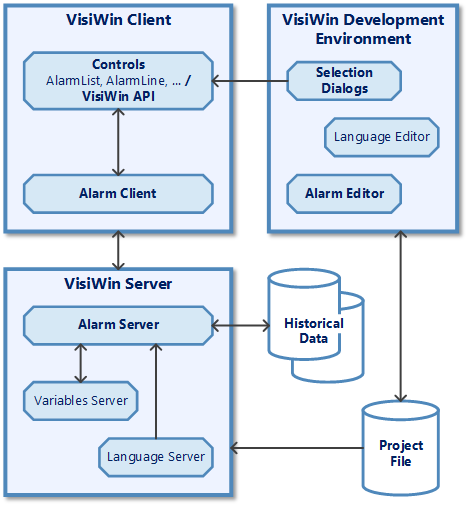
The variable server supplies the process data for triggering alarms.
During initialisation, the alarm server reads the definitions specified in the project file. Process data that are defined as event or acknowledgement variables for alarms are registered with the variable server for monitoring, i.e. if one of these process values changes, the alarm server is informed. Process data that are specified as status variables in the definitions are written to the variable server when an alarm status changes.
Application language-dependent alarm texts are obtained from the language server.
When an alarm status changes, this is communicated to all connected alarm clients. Acknowledgements received from a client are automatically forwarded to all other clients and, if necessary, to the variable server.
The language server provides the alarm server with the localizable alarm texts with all the possibilities of dynamic texts. Localisable texts can therefore contain process variable values, other state-related localizable texts and special formats such as date, time, etc.
The alarm client of a visualisation application is used to receive alarms from the alarm server and transfer them to the control elements. Acknowledgement processes in control elements are forwarded to the alarm server. This then makes the necessary status changes. The client functions are offered in the "VisiWin.Alarm" namespace.
Alarms can be displayed using the special alarm controls. For example, the AlarmList control enables the pre-filtered view of alarms in the form of a list and also an integrated acknowledgement option for alarms.
The project file contains the definitions of the alarm system. The definitions contain information on which process value is relevant to the message, how the alarm should be displayed and which additional actions should be carried out when the alarm occurs. At development time, the definitions can be edited with the alarm editor and queried with the properties pages of the control elements. At runtime, the definitions are read by the alarm server. They determine the behaviour of the alarm server and the application.
The alarm editor enables the alarm system to be configured. By setting definitions in the project file, it makes it possible to determine the runtime behaviour of the alarm server.
For the Alarms system module, »EASY UI Designer« provides dialogues for selecting alarm classes and alarm groups as configuration support.
In addition to the pure monitoring of alarm statuses, the alarm server manages an alarm history in the form of a database. All alarm status changes that occur can be saved in this database.