Components
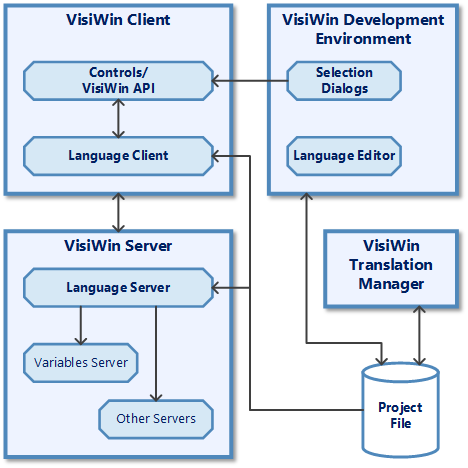
The following diagram shows the components of the language switching system module. The task of each component and the interaction of the components are explained below.
Language server
The language server accesses the server-side project file. Its task is to distribute requested localizable texts in the system. The text definitions of the project file store whether dynamic process values need to be included in the text. If this is the case, the language server retrieves the corresponding values from the variable server.
Variable server
The variable server realises the connection to the process.
More servers
Special components, such as the alarm server, display information in text form. They request the texts from the voice server.
Control elements
Basically, all control elements that allow textual representation in any form can be localised and are therefore directly or indirectly connected to the text system. The output enables the display of fixed texts, switchable texts depending on a process value and dynamic texts that can contain current process values.
Language editor
The editor allows you to project the definitions of the language switch. This includes the texts, fonts and font classes.
To support project planning, »EASY UI Designer« provides dialogues for user-friendly selection of definitions from the project file at development time.