All controls that display texts from the language switcher contain the LocalisableText property. This property contains a button in the properties window  to open the Select LocalizableText dialogue.
Figure 1: Select LocalizableText dialogue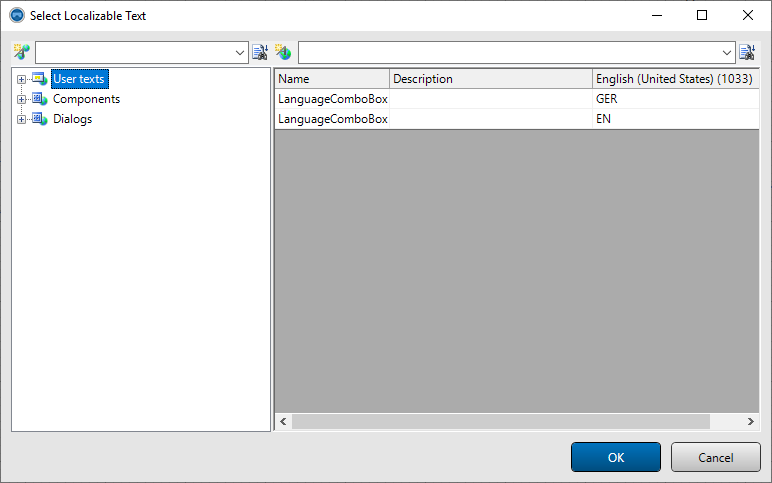
The Select LocalizableText dialogue lists the texts from the language switch in hierarchical form. New texts and text groups can be created within the dialogue.
If, for example, a label is to be linked to a localizable text, there are two procedures:
- The text has already been defined in the language switch editor
- The text group view on the left-hand side can be used to navigate to the desired text group. Then select the corresponding text in the text list on the right-hand side. Click OK to close the dialogue and create the link to the text.
- The text has not yet been defined
- The desired group must be selected in the text group view. A new text can then be created using the
 (New text) button. A new text group can also be created using the button
  (New group). The link to the newly created text is again created by selecting the text and then closing the dialogue by clicking OK.
Remark:
- Within the Select LocalizableText dialogue, the texts are only displayed in the developer language. This language is switched via the project explorer in the node on the Language tab.
- The Select LocalizableText dialogue contains two search functions. A part of a complete text identifier (i.e. the complete text group path together with the actual text name) can be entered in the left-hand input field at the top of the dialogue. The dialogue navigates to the first corresponding hit as you type. Navigation to the next hit is triggered via the button
 (continue search in full name).
 - In addition to searching for text names, you can also search for text content by entering a search term in the second input field on the right-hand side of the dialogue. Navigation to the next hit is initiated via the button (Continue search in column...).