Components
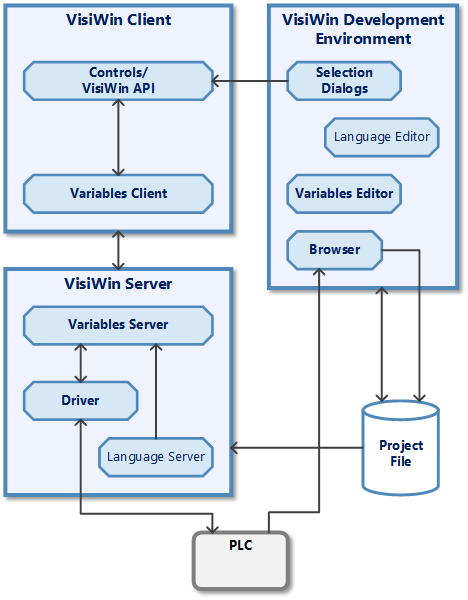
The following diagram shows the intermediate communication stations between the visualisation and the machine as components. The task of each component and the interaction of the components are explained below.
Controls/property bindings
The control elements design the interface of the visualisation application. There are controls for the numerical or graphical input/output of process data. At runtime, the controls and property bindings are linked to the variable client. At development time, the control elements and property bindings are provided with configuration support via the variable selection dialogue. This makes it possible to select process variable definitions that represent the process values to be displayed at runtime.
Variable client
The client is implemented as a reference in the project. It collects the data requests from control elements and property bindings. This means that the entire application is registered with the variable server as just one client. The exchange of data via the variable client is fully automatic. Only the error log of the variable client is configurable.
Variable server
The variable server is started via the project server. Its task is to control the data exchange defined in the project file between the communication components and the connected visualisation applications. It also serves as a data supplier for other systems (such as the alarm server).
OPC server (Classic OPC/OPC-UA)
OPC servers provide a means of communication with a PLC. They use a hardware-specific protocol to exchange data with the PLC. The connection to the variable server is defined via the OPC specification.
Project file
The project file contains the definitions of the process connection. These are configured in the development environment using the variable editor. The data is interpreted by the variable server at runtime.
Control variables are imported into the project via the browser.
Variable editor
The variable editor is used to configure the definitions of the process connection. It is integrated into the development environment. The definitions made here are saved in the project file.