Resizable column width
The width of the column in a table-like control can be resized at runtime.
If the user clicks and holds the left mouse button in the area between this column header and the next one (on the right), the mouse pointer changes ( ) and the column divider can be moved horizontally.
This behavior can be configured by the TableHeaderCell control properties found in the Resizing category.
CanUserResize
Specifies whether the column width can be resized by the user at runtime.
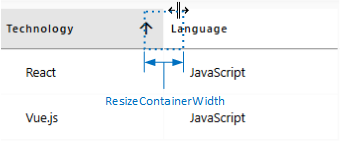
ResizeContainerWidth
Sets the width of the area between this and the next column header that allows the user to resize the width of this column.
Das Element "Title" ist zum Beispiel im Steuerelement "Group" enthalten.
Applies to