Coordinate systems serve to describe positions and orientations in the work space and the current configuration of the machine. The directions of the coordinate systems are defined in the kinematics descriptions. A standard configuration (zero position) is described for each kinematics.
|
Coordinate systems of kinematics |
||
|---|---|---|
|
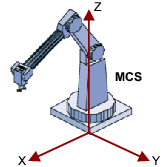
Machine coordinate system (MCS) |
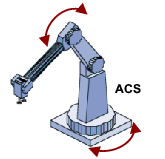
Axis Coordinate System (ACS) |
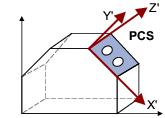
Product Coordinate System (PCS_x) |
|
|
|
|

|
Note!
If the MCS reference coordinate system has been shifted or rotated via the parameters 121 ... 126 , the WCS reference coordinate system applies. |

 Tip!
Tip!
The coordinate systems MCS , ACS and PCS are defined in the PLCopen-specification " Function blocks for motion control, Part 4 - Coordinated Motion, version 1.0 ".
World Coordinate System (WCS)
The WCS is a reference coordinate system definable by the user. The possible definition of the WCS depends on the kinematics. By default, at switch-on, the WCS is congruent with the MCS.
Degrees of freedom of the WCS
- 2D kinematics (XZ) can be moved in x and z direction and rotated around the y axis (B axis), since in all other cases, a non-available y axis should be set active.
- 3D kinematics (XYZ) can be moved in any direction and rotated around all three axes since these do not include any rotation axes in the device tree.
- 4D kinematics (XYZC) can be moved in all directions. However, they can only be rotated around the z axis as otherwise the mechanical rotation would not coincide with the C axis anymore and thus inconsistencies in the device tree would occur.
Machine coordinate system (MCS)
The MCS depends on the kinematics and cannot be shifted/positioned. The z axis usually faces "upwards" in the MCS.
The position of the MCS results from the construction and for some kinematics additionally from the zero positions of the real drives. For individual coordinate systems, the 16 PCS are available.
Axis Coordinate System (ACS)
The positive direction of rotation about coordinate axes is constantly determined according to the right-hand rule, which means that the position of the Z axes in the drafts of the single kinematics models determine the positive direction of rotation of the output end.
The user has to make sure that the zero position and the positive direction of rotation of the real drives comply with the defined zero position and direction of rotation of the prevailing kinematics.
Product Coordinate System (PCS_x)
PCS_1 ... PCS_16 are freely definable Cartesian or cylindrical coordinate systems. The FBs MC_SetCoordinateTransform and MC_SetCartesianTransform serve to set the MCS / PCS transformation.
By default, all PCSs are congruent with the MCS.
|
|
Note!
Observe the following when using 4D kinematics:
See also: Special handling of 4D kinematics |
Tool Coordinate System (TCS)
The TCS depends on the kinematics and can be shifted and positioned using tools. Programming a target position and orientation in one of the Cartesian coordinate systems ( WCS , MCS or PCS_x ) always describes the position of the TCS coordinates in the corresponding coordinate system.
The TCS can be shifted and positioned relatively to the kinematics-specific output position by the user by means of a tool transformation.
 Basics of the tool management
Selection input CoordSystem / enumeration type L_MC4P_CoordSystem
The function blocks for coordinated multi-axes movements have a CoordSystem input which serves to define the coordinate system to be used. The selection is made via the enumeration type L_MC4P_CoordSystem for which the following constants (INT) are defined:
|
Name |
Value |
Info |
|---|---|---|
|
ACS |
-1 |
Coordinate system referred to the axis |
|
MCS |
1000 |
Coordinate system referred to the machine |
|
PCS_1 |
1 |
Coordinate system referred to the product or workpiece |
|
... |
... |
|
|
PCS_16 |
16 |
|
|
WCS |
0 |
Coordinate system definable by the user. By default identical to the MCS. |