Motivation: In the kinematics, the position and orientation of the end effector coordinate system TCS are fixed. Usually, however, this position is not identical to the position of the real tool used (see the following sample illustration "Delta2 robot with tool").
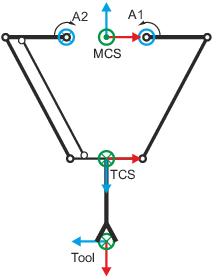
Axis legend: x - red y - green z - blue |
 [16-13] Example: Delta2 robot with tool
Please also observe the following descriptions on this topic:
 Transformations between ACS and MCS integrated in the axes groups
Extension of the transformation by a tool
For converting between the fixed TCS and the real tool, the user is provided with four tools (Tool_1 ... Tool_4) in each axes group. The tools can be parameterised and activated online and offline.

|
Note!
Observe the following when using 4D kinematics: When programming a movement using an active tool, the Z axis of the tool must be aligned following the Z axis of the flange (orientation A and B parameters of the respective tool must be zero)! See also: Special handling of 4D kinematics |
Tool parameter (L_MC4P_TOOL_REF)
Each tool consists of 7 parameters:

|

|

|
|
|
|
|---|---|---|---|---|---|
|
Name |
Info |
Index-Offset 1, Subindex: |
|||
|
Tool1 |
Tool2 |
Tool3 |
Tool4 |
||
|
Tool type |
Selection of the tool transformation
|
||||
|
Offset X |
Cartesian: Offset of the tool tip towards X direction of the TCS |
||||
|
Offset Y |
Cartesian: Offset of the tool tip towards Y direction of the TCS |
||||
|
Offset Z |
Cartesian: Offset of the tool tip towards Z direction of the TCS |
||||
|
Orientation A |
Cartesian: Rotation of the tool coordinate system around the x axis of the TCS |
||||
|
Orientation B |
Cartesian: Rotation of the tool coordinate system around the Y' axis of the coordinate system resulting after the rotation around RotX. |
||||
|
Orientation C |
Cartesian: Rotation of the tool coordinate system around the Z'' axis of the coordinate system resulting after the rotation around RotX and RotY. |
||||
|
Switch-on time |
Additional information for technology modules used for gripper control |
||||
|
Switch-off time |
|||||
For the tool offset in Z direction and rotation around the y axis shown in figure [16-13] , the following settings would be necessary:
- Tool1_Type = Cartesian
- Tool1_TransZ = 100
- Tool1_RotY = 90
- all other parameters = 0
Activate tool
The active tool can be selected offline in the generic tab via the ActiveTool parameter (subindex 150 ). Optionally, a tool can be activated online using the FB L_MC4P_SetActiveTool .
Valid up to library L_MC4P_RoboticHandling version V03.25.00:
- The active tool remains active until a new tool or no tool will be selected. A tool change is only possible while the axes group is at standstill (axes group state "GroupStandby" or "GroupDisabled").
As of the library L_MC4P_RoboticHandling version V03.26.00 applies:
- A tool change with FB L_MC4P_SetActiveTool is also permitted between buffered movements. The tool change does not affect movements that have already been commissioned, but affects all further movements. Tool change between buffered movements
|
|
Note!
When the tool is changed, the coordinates of the drive axes remain constant, the position and orientation of the MCS axes usually change erratically. |
Parameterising the tool
The tool can be parameterised offline in the generic tab. Optionally, the FB L_MC4P_SetToolTransform can be used.
- The active tool cannot be modified.
- The No_Tool tool cannot be changed.
Tool change between buffered movements
As of library L_MC4P_RoboticHandling version V03.26.00 you can change the active tool while the axis group is in motion.
The main use case is a robot with multiple grippers, as exemplified in the following figure.
|
|
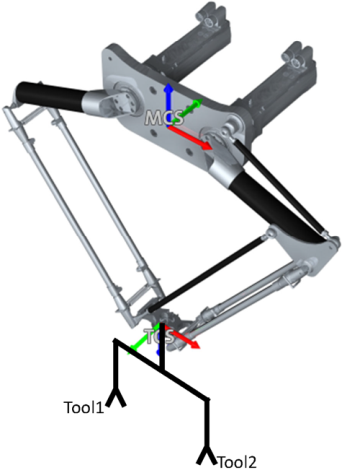
The offsets of tool 1 and tool 2 can be parameterized in the axis group parameters. In the example, offsets of 120 mm and 150 mm are used as examples.
- Tool 1: Offset X (index offset 1, subindex 152) = -150 mm
- Tool 1: Offset Z (index offset 1, subindex 154) = 120 mm
- Tool 2: Offset X (index offset 1, subindex 172) = 150 mm
- Tool 2: Offset Z (index offset 1, subindex 174) = 120 mm
The multi-gripper functionality can be solved as follows.
- Activate tool 1 with FBL_MC4P_SetActiveTool
- Tool 1: Offset Z (index offset 1, subindex 154) = 120 mm
- Tool 2: Offset X (index offset 1, subindex 172) = 150 mm
- Tool 2: Offset Z (index offset 1, subindex 174) = 120 mm
- Commission movements to reach object A to be picked up with tool 1.
- Activate tool 2 with FB L_MC4P_SetActiveTool . Tool 2 is buffered as long as the previously programmed movements to object A are busy or active.
- Assign movements to reach object B to be picked up with tool 2.
- Order movements to the storage position

|
Note!
When the pickup position of object A is reached, tool 2 automatically becomes the active tool. While the ACS positions remain constant, the position of the WCS axes takes into account the geometric changes of the tool dimensions. Therefore, at this point, the position of the X axis jumps by the value 300 mm. |
Reading out the active tool and its parameters
For reading out the active tool and its parameters, the FB L_MC4P_GetActiveTool can be used.
The following illustrations show schematic representations of the transformation between MCS and ACS and the extensions of the kinematics by a parameterised tool.
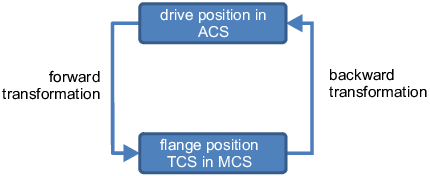
[16-14] Transformations between ACS and MCS integrated in the axes groups
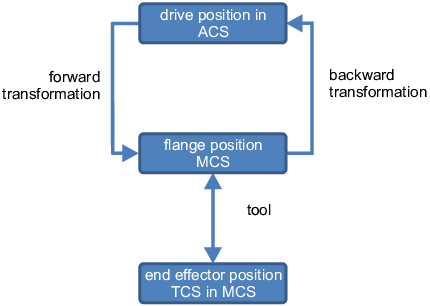
[16-15] Extension of the transformation by a tool