L_MC2P_CamRefFromStruct
This FB generates an MC_CAM_REF structure for the FB MC_CamIn online from the transmitted cam data (basic conditions, characteristics, or data points)
The instance of the FB
- is an interface of MC_CAM_REF type
- can directly be connected to an input of MC_CAM_REF type of another FB, e.g.
- CamTable input of the FB MC_CamIn
- CamTable1 input of the TM L_TT1P_FlexCamBase
MC_CamIn1.CamTable:= L_MC2P_CamRefFromStruct1
|
|
|
|
L_MC2P_CamRefFromStruct |
|
|
|
|
|---|---|---|---|---|---|---|---|
|
BOOL |
- |
|
xExecute |
xDone |
|
- |
BOOL |
|
STRING(50) |
- |
|
sName |
xBusy |
|
- |
BOOL |
|
L_MC2P_CamType |
- |
|
eCamType |
xError |
|
- |
BOOL |
|
UDINT |
- |
|
udiCamDataCount |
eErrorID |
|
- |
L_IE1P_Error |
|
L_MC2P_IMotionData |
- |
|
itfCamData |
|
|
|
|
|
L_MC2P_
|
- |
|
eInterpolationQuality |
|
|
|
|
|
LREAL |
- |
|
lrXStartPos |
|
|
|
|
|
LREAL |
- |
|
lrXEndPos |
|
|
|
|
|
|
|
|
|
|
|
|
|
Inputs
|
Name Data type |
Information/possible settings |
|
|---|---|---|
|
xExecute BOOL |
FALSE ä TRUE |
Start generation. |
|
sName STRING(50) |
Name of cam |
|
|
eCamType |
Type of cam data:
|
|
|
udiCamDataCount UDINT |
Number of the transmitted profile elements |
|
|
itfCamData L_MC2P_IMotionData |
Cam data |
|
|
eInterpolationQuality |
Interpolation type (optional for data point tables):
|
|
|
lrXStartPos LREAL |
X starting position of the curve |
|
|
lrXEndPos LREAL |
X end position of the curve |
|
Outputs
|
Name Data type |
Value/meaning |
|
|---|---|---|
|
xDone BOOL |
TRUE |
Generated cam data is available. |
|
xBusy BOOL |
TRUE |
Processing is running. |
|
xError BOOL |
TRUE |
An error has occurred. For details see eErrorID . |
|
eErrorID |
If xError = TRUE: Error number for the error that has occurred.
|
|
Example: Create curve with three points
|
Create instances
L_MC2P_CamDataXYVA_1: ARRAY[0..2] OF L_MC2P_CamDataXYVA;
L_MC2P_CamREfFromStruct_1: L_MC2P_CamREfFromStruct;
MC_CamIn_1: MC_CamIn;
Call FBs and execute curve
// define 3 points within the curve 360 units
L_MC2P_CamDataXYVA_1[0].lrX := 0.0;
L_MC2P_CamDataXYVA_1[0].lrY := 0.0;
L_MC2P_CamDataXYVA_1[0].lrYs := 1;
L_MC2P_CamDataXYVA_1[0].lrYss := 0.0;
L_MC2P_CamDataXYVA_1[0].eLawOfMotion := L_MC2P_LawOfMotion.Poly5;
L_MC2P_CamDataXYVA_1[1].lrX := 180.0;
L_MC2P_CamDataXYVA_1[1].lrY := 100.0;
L_MC2P_CamDataXYVA_1[1].lrYs := 0;
L_MC2P_CamDataXYVA_1[1].lrYss := 0.0;
L_MC2P_CamDataXYVA_1[1].eLawOfMotion := L_MC2P_LawOfMotion.Poly5;
L_MC2P_CamDataXYVA_1[2].lrX := 360.0;
L_MC2P_CamDataXYVA_1[2].lrY := 360.0;
L_MC2P_CamDataXYVA_1[2].lrYs := 1;
L_MC2P_CamDataXYVA_1[2].lrYss := 0.0;
L_MC2P_CamDataXYVA_1[2].eLawOfMotion := L_MC2P_LawOfMotion.Poly5;
L_MC2P_CamRefFromStruct_1(
xExecute:= TRUE,
sName:= 'Curve1' ,
udiCamDataCount:= 3 ,
itfCamData:= (L_MC2P_CamDataXYVA_1[0]),
eCamType:= L_MC2P_CamType.XYVA ,
eInterpolationQuality:= L_MC2P_InterpolationQuality.Linear,
lrXStartPos:= 0.0,
lrXEndPos:= 360.0,
xDone=> ,
xBusy=> ,
xError=> ,
eErrorID=> );
|
|
MC_CamIn_1(
Master:= Master,
Slave:= Slave,
Execute:= TRUE,
ContinuousUpdate:= ,
MasterOffset:= ,
SlaveOffset:= ,
MasterScaling:= ,
SlaveScaling:= ,
MasterStartDistance:= ,
MasterSyncPosition:= ,
StartMode:=,
MasterValueSource:=,
CamTable:= L_MC2P_CamRefFromStruct_1,
BufferMode:=,
DirectChange:= ,
ClutchTime:= ,
VelocityDiff:= ,
Acceleration:= ,
Deceleration:= ,
Jerk:= ,
ScalingOffsetMode:=,
Periodic:= TRUE,
MasterAbsolute:= ,
SlaveAbsolute:= ,
InSync=> ,
Busy=> ,
Active=> ,
CommandAborted=> ,
Error=> ,
ErrorID=> ,
EndOfProfile=> );
|
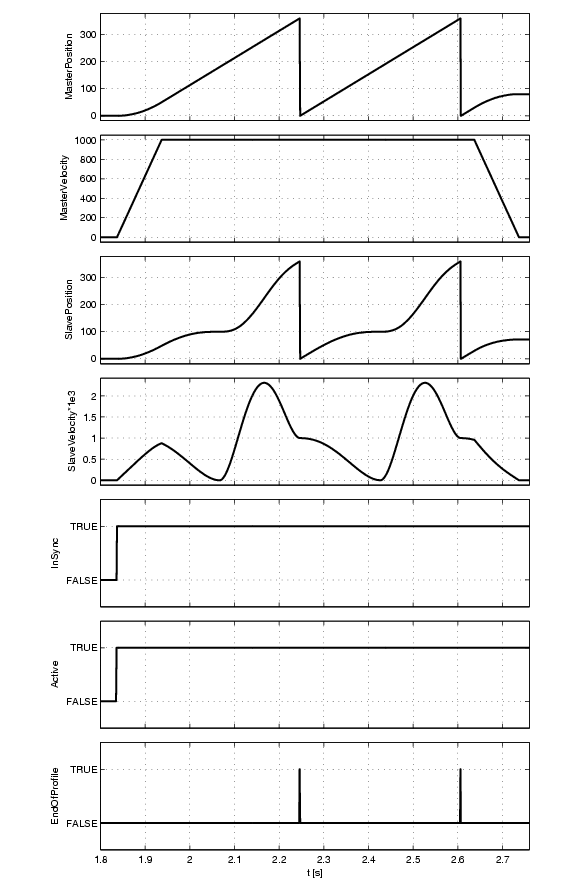
|
Curves for example