Path planning
Path planning horizon (index offset 0, sub-index 30)
|
Maximum number of lane segments that are recalculated when a new lane order is added. The path segments include both the path sections of the respective individual modules (e.g. MC_MoveLinearAbsolute, MC_MoveCircularAbsolute) and the path geometries inserted between the function modules by the set smoothing mode (Buffer_Mode, TransitionMode). The higher the value of the parameter, the more segments are modified when a new motion task is appended. This ensures potentially higher achievable path speeds for short movement sections. At the same time, however, the computing load on the controller is also increased. An initial profile start may be delayed. |
|||||||||||
|
Setting range (min. value | unit | max. value) |
Lenze setting |
||||||||||
|
0 |
|
20 |
3 |
||||||||
|
|
UNSIGNED_16 |
||||||||||


Standard angular velocity (index offset 0, subindex 31)
|
The parameter is used in path planning if a change of orientation has also been programmed during the movement of the end effector. The parameter is only available for kinematics with four or more degrees of freedom.
|
|||||||||||
|
Setting range (min. value | unit | max. value) |
Lenze setting |
||||||||||
|
0 |
deg/s |
2147483647 |
10 deg/s |
||||||||
|
|
FLOAT_64 |
||||||||||

|
The parameter is used in path planning if a change of orientation has also been programmed during the movement of the end effector. The parameter is only available for kinematics with four or more degrees of freedom.
|
|||||||||||
|
Setting range (min. value | unit | max. value) |
Lenze setting |
||||||||||
|
0 |
deg/s² |
2147483647 |
100 deg/s² |
||||||||
|
|
FLOAT_64 |
||||||||||
|
The parameter is used in path planning if a change of orientation has also been programmed during the movement of the end effector. The parameter is only available for kinematics with four or more degrees of freedom.
|
|||||||||||
|
Setting range (min. value | unit | max. value) |
Lenze setting |
||||||||||
|
0 |
deg/s³ |
2147483647 |
1000 deg/s³ |
||||||||
|
|
FLOAT_64 |
||||||||||
Task utilisation path preparation (index offset 0, subindex 34)
|
Setting range (min. value | unit | max. value) |
Lenze setting |
||||||||||
|
1 |
|
10 |
1 |
||||||||
|
|
UNSIGNED_16 |
||||||||||
This parameter can be used to influence the path preparation time required between commissioning and the start of the movement.
Increasing this parameter ensures a faster start of the movement, but with the disadvantage of increased utilisation of the PLC.
Adjustments to the parameter are particularly recommended if the PLC is not operated with the minimum cycle time and a computing time reserve is therefore available.
The following figure shows the qualitative influence of the parameter on processor utilisation and path preparation time when three interconnected FBs MC_MoveLinearAbsolute are executed simultaneously.
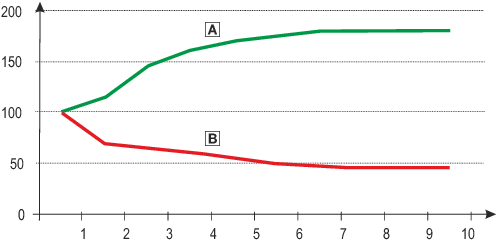


The absolute influences are dependent on
- from the number of degrees of freedom and auxiliary axes of the axis group,
- The number and parameterisation of Move modules ordered at the same time,
- of FB type ( MC_MoveLinear* , MC_MoveCircular* , MC_MoveDirect* ).
Complete Path blending (index offset 0, subindex 35)
|
Selection list (Lenze setting in bold) |
|
||||||||||
|
0 |
Not active |
||||||||||
|
1 |
active |
||||||||||
|
|
UNSIGNED_8 |
||||||||||
See also Example: Complete path blending
Curved paths: Limitation of the path (index offset 0, subindex 36)
|
Selection list (Lenze setting in bold) |
Info |
||||||||||
|
0 |
Not active |
Only suitable for extreme applications where the path accuracy is strongly subordinate to the number of cycles and the accelerations at the TCP are not subject to any limits. |
|||||||||
|
1 |
Sib. |
Ideal for fast pick & place applications where the path accuracy is of medium relevance and the accelerations at the TCP may be slightly exceeded. |
|||||||||
|
2 |
Speed and acceleration |
Ideal if the parameters set on the MC_Move<...> FBs must be adhered to. This mode is not ideal for fast pick & place applications, as the required cycle rates may not be achieved due to the reduced path acceleration. |
|||||||||
|
|
UNSIGNED_16 |
||||||||||
Settings for this parameter have an influence on the profile parameters path velocity and path acceleration or deceleration for circular paths and blend curves. The parameter has no influence on linear paths and the MC_MoveDirectAbsolute and MC_MoveDirectRelative FBs .
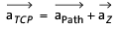

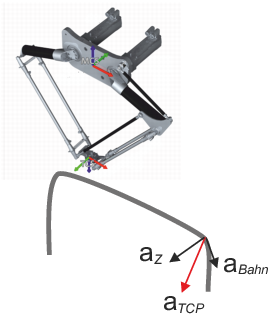
The following example shows the effect of curvatures on the permissible accelerations and velocities along the track:
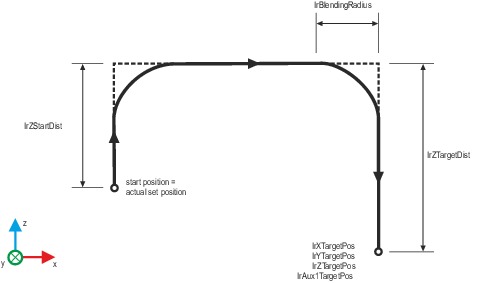
0: Inactive:
There is no limit to the path speed and/or path acceleration and the limits applied to the blocks apply.
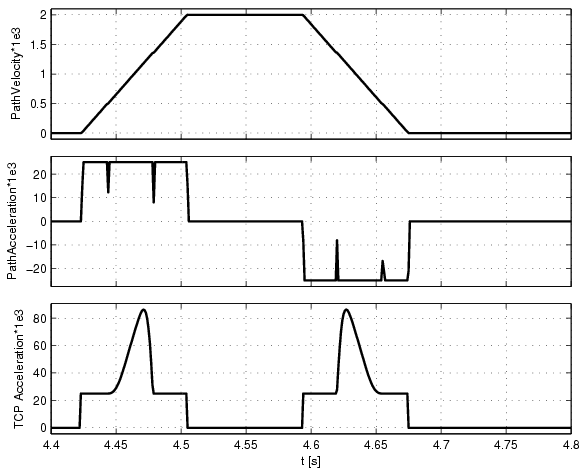
The combination of grinding radius, path speed and acceleration results in a TCP acceleration that strongly violates the limitations set on the Move FBs.
The TCP acceleration boost can be as large as required in relation to the parameterised path acceleration.
1:Vel:
The path speed is limited in such a way that the centripetal acceleration a Z corresponds to the maximum path acceleration parameterised on the FB. The path acceleration is not limited and the limit applied to the blocks is effective.
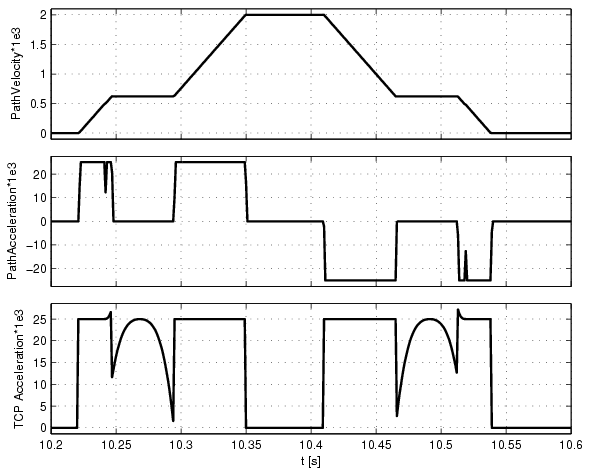
The combination of grinding radius, limited path velocity and limited acceleration results in a TCP acceleration that slightly violates the limits set on the FBs MC_Move<...> (see time points at approx. 10.25 s and 10.515 s).
The TCP acceleration can be exceeded by a factor of 1.414 in relation to the parameterised path acceleration.
2:Vel and Acc: (default value)
The path speed and acceleration are limited in such a way that the geometric sum of the two acceleration components does not exceed the acceleration set on the FBs. This means that neither the maximum path speed set on the FB nor the maximum acceleration is reached.
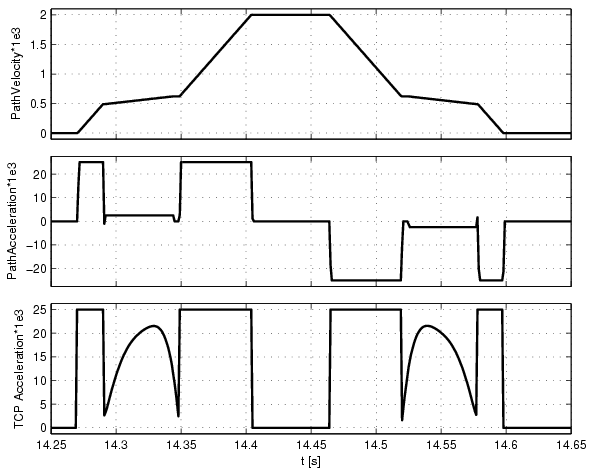
Path continuity: Tolerance angle exact stop (index offset 0, subindex 37)
|
Insert exact stop on the path if the angle between two programmed movements (e.g. two straight lines) is greater than the value of the parameter. |
|||||||||||
|
Setting range (min. value | unit | max. value) |
Lenze setting |
||||||||||
|
0.1 |
deg |
90 |
0.1 deg |
||||||||
|
|
FLOAT_64 |
||||||||||

|
Note
The parameter is only evaluated in the combination of the BufferModes mcBlending... with a blending radius of zero (FB input: TransitionParameter[...] := 0). |

|
Attention
If the value of this parameter is too high, the axle speed will change abruptly. |
Example
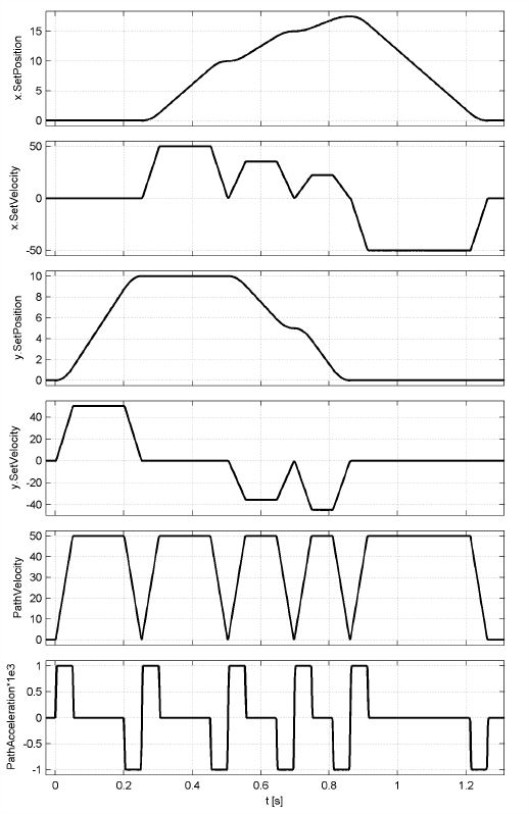
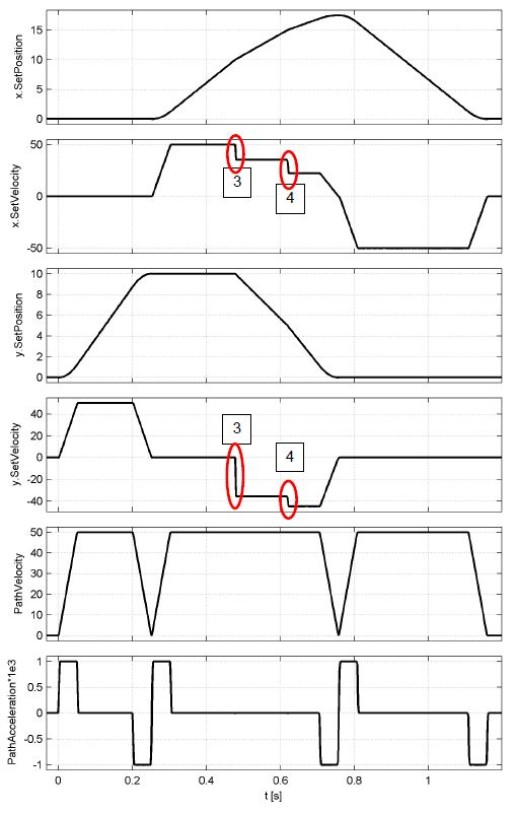
The geometry shown, consisting of 6 unpolished MC_MoveLinear components, is travelled through in a clockwise direction.
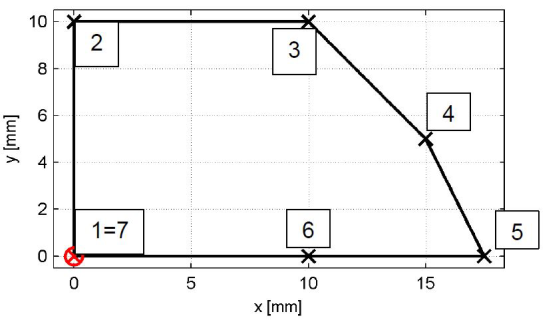
In the default setting of the parameter (angle tolerance 0.1°), an exact stop is inserted in points 2 to 5, point 6 is travelled through at a constant speed as the transition is kink-free.
If the parameter is increased to the value 45°, points 3 and 4 are also travelled through at a constant path speed, causing the speed to jump in the x and y axes.
Path continuity: max. acceleration jump (index offset 0, subindex 38)
|
This parameter can be used to parameterise a maximum abrupt change in centripetal acceleration at the transition between curved path elements. The greater the value of the parameter, the greater the transition speed that is possible in principle at non-curvature-continuous segment transitions (e.g. transition straight line -> circle). |
|||||||||||
|
Setting range (min. value | unit | max. value) |
Lenze setting |
||||||||||
|
0 |
mm/s² |
2147483647 |
0 mm/s² |
||||||||
|
|
FLOAT_64 |
||||||||||
|
|
Note
The parameter is only evaluated in the combination of the BufferModes mcBlending... with a blending radius of zero (FB input: TransitionParameter[...] := 0). |
|
|
Attention
A parameter value >0 leads to abrupt changes in the axle acceleration and thus to a high jerk |
Example
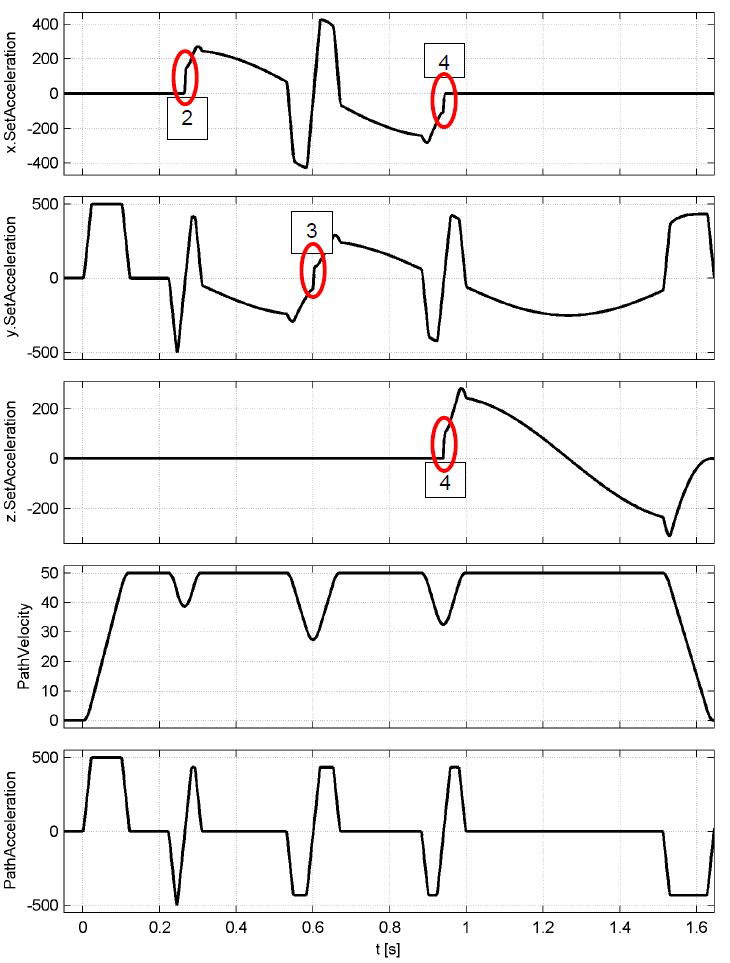
The geometry shown, consisting of unpolished MC_MoveLinear and MC_MoveCircular blocks, is traversed starting at point [0, 0, 0].
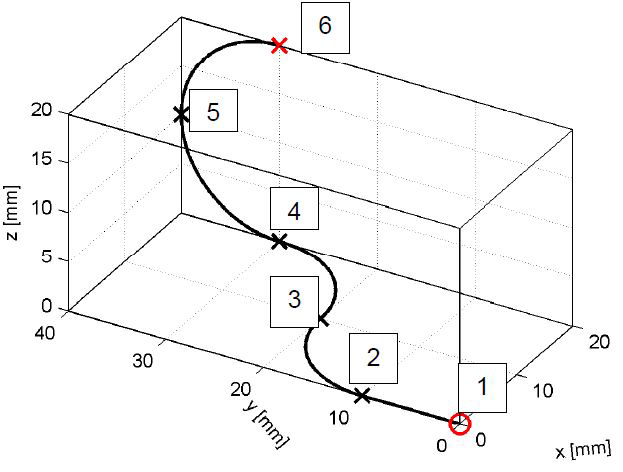
In the default setting of the parameter (acceleration jump = 0.0 mm/s²), an exact stop is inserted in points 2 to 4, point 5 is travelled through at a constant speed, as both adjacent segments have the identical centre of curvature.
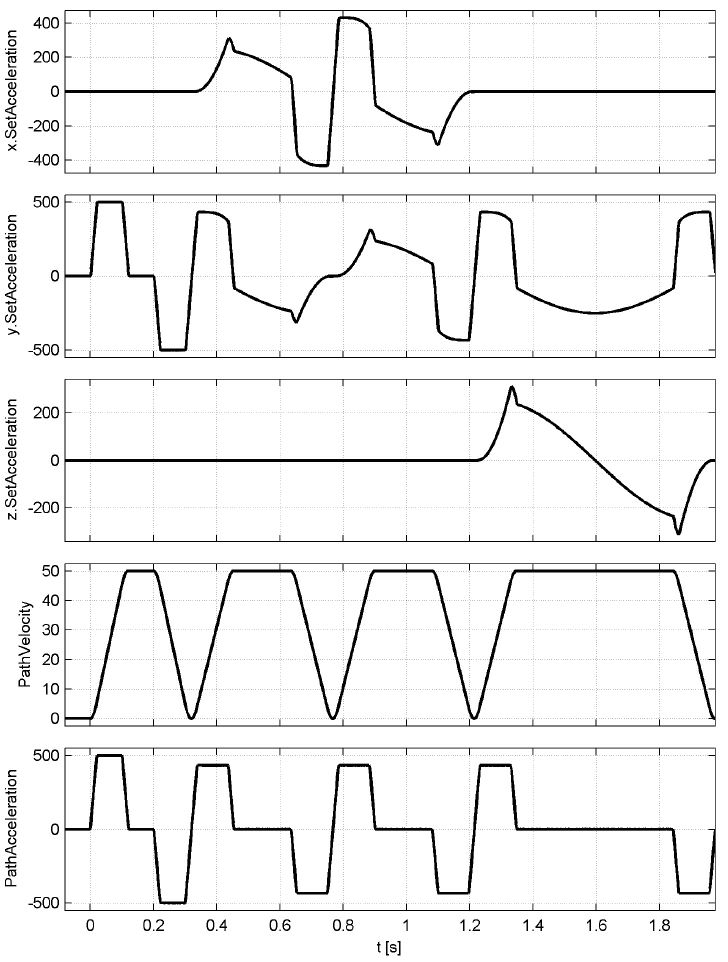
If the value of the parameter is increased to 150.0 mm/s², all transitions are travelled through at a speed >0 mm/s. The transition speeds are calculated within the motion kernel in such a way that the maximum change in acceleration is limited to the value of the parameter.
Rotation convention (index offset 0, subindex 39)
|
This parameter can be used to set the sequence of successive rotations for kinematics with rotation axes. |
|||||||||||
|
Selection list (Lenze setting in bold) |
|
||||||||||
|
0 |
Rotated x-y`-z" rotation |
||||||||||
|
1 |
Rotated z-y`-x" rotation |
||||||||||
|
2 |
Rotated x-z`-y" rotation |
||||||||||
|
3 |
Rotated y-z`-x" rotation |
||||||||||
|
4 |
Rotated y-x`-z" rotation |
||||||||||
|
5 |
Rotated z-x`-y" rotation |
||||||||||
|
|
UNSIGNED_16 |
||||||||||
|
|
Please note!
|
 Version information
 Example 1: Setting product coordinate systems
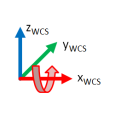
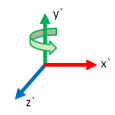
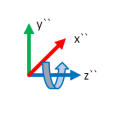
The following sketches show the difference between the rotation conventions using a PCS transformation (the orientation of the PCS is described in the WCS).
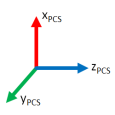
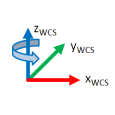
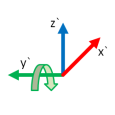
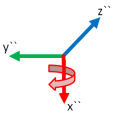
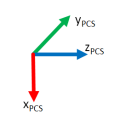
Example 2: Influence of the rotation convention on the kinematic transformations
The following figure shows the position of the coordinate systems MCS, TCS and the axes of rotation (ACS) of a Delta3_4dof kinematic system. The A4 axis is defined in such a way that it rotates mathematically positive around z MCS . In addition, the z TCS axis is orientated in the opposite direction to the z MCS axis, which is achieved by rotating around the x-axis by 180°.
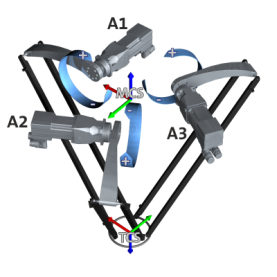
- Parameterisation 0: Rotated x-y'-z" rotation

- Parameterisation 1: Rotated z-y'-x" rotation

Jerk limitation (index offset 0, subindex 41)
|
This parameter can be used to switch off the jerk input on all motion function commands for axis groups (except homing and manual movement) and replace it with a global smoothing time (see index offset 0, subindex 42 ) for path interpolation. Changes are only permitted in the GroupDisabled state. Please note that with setting 1 (global blending time), the different speeds and accelerations at segment transitions are blended into one another. This can lead to a temporary increase in the profile sizes within the blending time. This is particularly the case if a high blending time ( subindex 42 ) is combined with short individual movements with different limitations. |
|||||||||||
|
Selection list (Lenze setting in bold) |
|
||||||||||
|
0 |
Jerk input on FB effective |
||||||||||
|
1 |
Global grinding time |
||||||||||
|
|
UNSIGNED_16 |
||||||||||
|
This parameter can be used to parameterise a global smoothing time for path interpolation. The value is only evaluated if the parameter Index offset 0, sub-index 41 is set to the value 1: global smoothing time. Please note that with larger values of this parameter, the path velocity in grinding and other curved movements may not be sufficiently reduced and vibration excitation may occur due to the centripetal acceleration. For machines with low natural frequencies and tight curvatures, use axis-based filtering of the movement using the function block L_MC1P_AverageFilterSetValue if necessary |
|||||||||||
|
Setting range (min. value | unit | max. value) |
Lenze setting |
||||||||||
|
0.0 |
s |
0.5 |
0.0 s |
||||||||
|
|
UNSIGNED_16 |
||||||||||