Example: Enable inverter
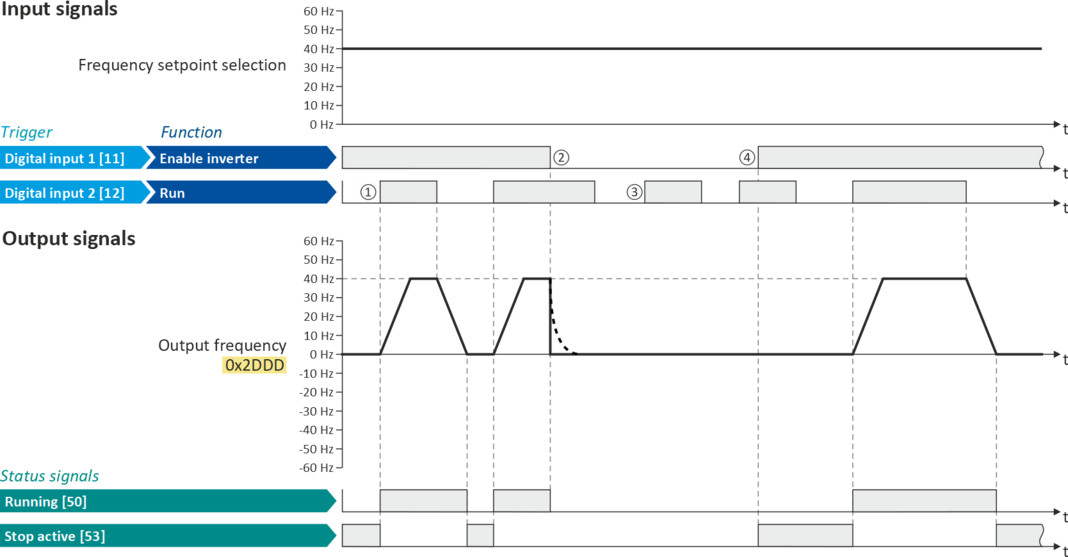
This example shows how to use the "Enable inverter" function for a separate enable input.
–
In sleep mode of switch S1 (normally-closed contact), "Enable inverter" is already available.
–
Switch S2 starts the motor in forward rotating direction (if switch S1 is closed). Switch S2 in initial position stops the motor again.
–
Switch S1 disables the inverter. The motor becomes torqueless (coasts).
|
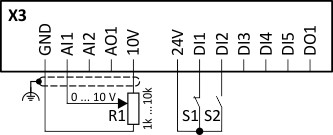
Connection plan
|
Function
|
|
|
|
Potentiometer R1
|
Frequency setpoint selection
|
|
Switch S1
|
Disable inverter
|
|
|
Switch S2
|
Run
|
|
|
Parameter
|
Name
|
Setting for this example
|
|
Enable inverter
|
Digital input 1 [11])
|
|
|
Run
|
Digital input 2 [12]
|
|
|
Reset fault
|
Not connected [0]
|
|
The status signals can be assigned to digital outputs.
 Configure digital outputs Configure digital outputs |
|
|
|
|
|
①
|
If the inverter is enabled and no error is active, the motor can be started with the "Run" function in forward rotating direction.
|
|
②
|
If "Enable inverter" is set to FALSE, the inverter is disabled. The motor becomes torqueless and coasts to standstill as a function of the mass inertia of the machine.
|
|
③
|
Without "Enable inverter", the motor cannot be started.
|
|
④
|
In the default setting, the motor does not start if the "Run" function is set to TRUE during "Enable inverter". "Start" has to be triggered again after "Enable inverter" to start the motor.
|