Sequencer basic settings
The sequencer is inhibited by default. The desired sequencer mode (time, step or time-step mode)
must first be selected in order for the sequencer to be enabled. The sequence start mode
and the sequence end mode must also be set. There are different modes to choose from here.
Details
Sequencer mode 0x4025 (P800.00)
–
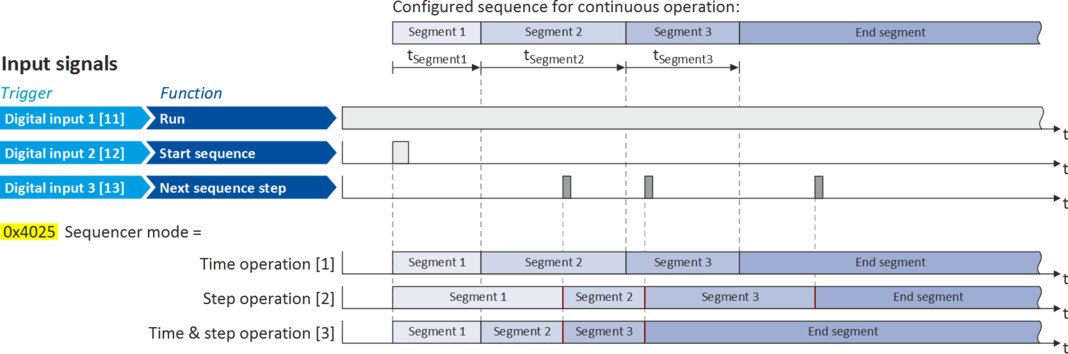
The sequencer can be operated in time, step or time-step operation.
–
The following diagram demonstrates
the different sequencer modes:
End of sequence mode 0x402F (P824.00)
–
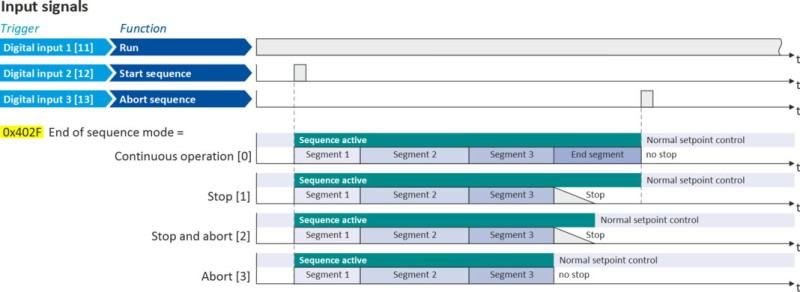
The end of sequence mode defines the action after the end of the sequence.
–
In the default setting "Keep running [0]", the setpoint set for the end segment is continuously transmitted to the motor control until the sequence is aborted.
–
The following diagram demonstrates
the different end of sequence modes:
Start of sequence mode 0x4040 (P820.00)
–
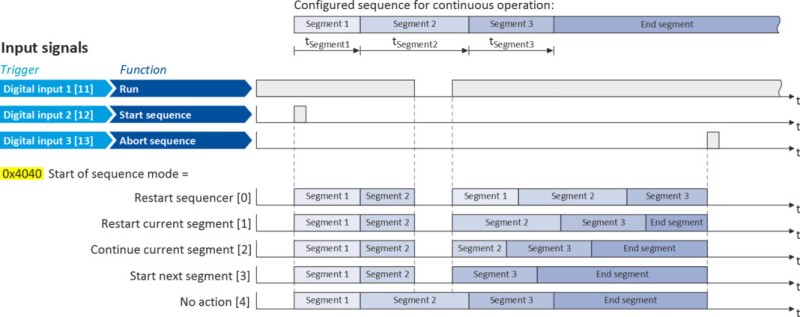
The start of sequence mode defines the action after the motor is stopped and restarted or after the motor has been restarted after an error occurred.
–
In the default setting "Restart sequencer [0]", the currently selected sequence is restarted.
–
The following diagram demonstrates
the different start of sequence modes:
Parameter
|
Address
|
Name / setting range / [default setting]
|
Information
|
|
|
0x4025
(P800.00)
|
Sequencer mode
(Sequencer mode)
–
From version 02.00
|
Selection of the sequencer mode.
|
|
|
0
|
Disabled
|
||
|
1
|
Time operation
|
The switch-over to the
next step of the sequence is made after the time set for the current segment has elapsed.
|
|
|
2
|
Step operation
|
The switch-over to the
next step of the sequence is made via the trigger assigned in 0x2631:032 (P400.32) to the "Next sequence step" function.
|
|
|
3
|
Time & step operation
|
The switch-over to the
next step of the sequence is made via the trigger assigned in 0x2631:032 (P400.32) to the "Next sequence step" function, but no later than after the time set for the current segment has elapsed.
|
|
|
0x402F
(P824.00)
|
End of sequence mode
(End of seq. mode)
–
From version 03.00
|
Selection of the action after the sequence has been completed, i. e., after the steps configured for the sequence have been passed through with the set numbers of cycles.
|
|
|
0
|
Keep running
|
The setpoint set for the end segment is continuously transmitted to the motor control until the sequence is aborted.
|
|
|
1
|
Stop
|
The motor is stopped with the stop method set in 0x2838:003 (P203.03). The setpoint is continued to be controlled by the sequencer. In order to return to the normal setpoint control, the sequence must be aborted.
Note!
After returning to the normal setpoint control, a start command is required to restart the motor.
|
|
|
2
|
Stop and abort
|
The motor is stopped with the stop method set in 0x2838:003 (P203.03). After standstill is reached, it is automatically returned to the normal setpoint control.
Note!
After returning to the normal setpoint control, a start command is required to restart the motor.
|
|
|
3
|
Abort
|
Return to the normal setpoint control without stopping the motor.
|
|
|
0x4040
(P820.00)
|
Start of sequence mode
(StartOfSeq. mode)
–
From version 03.00
|
Selection of the action after the motor has been stopped and restarted or after the motor has been restarted after an error occurred.
|
|
|
0
|
Restart sequencer
|
The currently selected sequence is restarted.
|
|
|
1
|
Restart current segment
|
The current segment of the selected sequence is restarted.
|
|
|
2
|
Continue current segment
|
The current segment of the selected sequence is continued (just like after a break).
|
|
|
3
|
Start next segment
|
The next segment of the selected sequence is started.
|
|
|
4
|
No action
|
For debugging purposes: The sequence is continued to be processed (including output states) even if the motor is stopped.
|
|