Sequencer control functions
The following functions serve to control the sequencer.  Sequencer
Sequencer Select sequence
A sequence is selected in a binary-coded fashion via the triggers assigned to the four functions "Select sequence (bit 0)" ... " Select sequence (bit 3)" in compliance with the following truth table:
|
Select sequence
|
Selection
|
|||
|
Bit 3
|
Bit 2
|
Bit 1
|
Bit 0
|
|
|
FALSE
|
FALSE
|
FALSE
|
FALSE
|
No sequence selected
|
|
FALSE
|
FALSE
|
FALSE
|
TRUE
|
Sequence 1
|
|
FALSE
|
FALSE
|
TRUE
|
FALSE
|
Sequence 2
|
|
FALSE
|
FALSE
|
TRUE
|
TRUE
|
Sequence 3
|
|
FALSE
|
TRUE
|
FALSE
|
FALSE
|
Sequence 4
|
|
FALSE
|
TRUE
|
FALSE
|
TRUE
|
Sequence 5
|
|
FALSE
|
TRUE
|
TRUE
|
FALSE
|
Sequence 6
|
|
FALSE
|
TRUE
|
TRUE
|
TRUE
|
Sequence 7
|
|
TRUE
|
FALSE
|
FALSE
|
FALSE
|
Sequence 8
|
|
TRUE
|
FALSE
|
FALSE
|
TRUE
|
Invalid selection
|
|
...
|
||||
|
TRUE
|
TRUE
|
TRUE
|
TRUE
|
|
Start sequence
The selected sequence is not started automatically. For starting the sequence, two functions are available:
–
0x2631:030 (P400.30): Run/abort sequence (status-controlled start)
–
0x2631:031 (P400.31): Start sequence (edge-controlled start)
Further control functions
The following functions serve to control the started sequence:
–
0x2631:032 (P400.32): Next sequence step
–
0x2631:033 (P400.33): Pause sequence
–
0x2631:034 (P400.34): Suspend sequence
–
0x2631:035 (P400.35): Stop sequence
–
0x2631:036 (P400.36): Abort sequence
For controlling the sequencer via the network, the sequencer control functions can also be assigned to the NetWordIN1 data word 0x4008:001 (P590.01).
Parameter
|
Address
|
Name / setting range / [default setting]
|
Information
|
|
|
0x2631:030
(P400.30)
|
Function list: Run/abort sequence
(Function list: Seq: Run/abort)
–
Setting can only be changed if the inverter is disabled.
–
From version 03.00
–
Further possible settings:
 Trigger list Trigger list |
Assignment of a trigger for the "Run/abort sequence" function.
Trigger = TRUE: Start selected sequence.
Trigger = FALSE: Abort sequence.
Notes:
–
The assigned trigger must remain set to TRUE for the duration of the sequence.
–
If the trigger bit is reset to FALSE, the sequence is aborted. In this case, the standard setpoint or the setpoint source selected via setpoint change-over is active again.
–
A sequence is selected in a binary-coded fashion via the trigger assigned to the four functions "Select sequence (bit 0)" 0x2631:050 (P400.50) ... "Select sequence (bit 3)" 0x2631:053 (P400.53).
–
For an edge-controlled start, the function "Start sequence" 0x2631:031 (P400.31) is optionally available.
|
|
|
0
|
Not connected
|
No trigger assigned (trigger is constantly FALSE).
|
|
|
0x2631:031
(P400.31)
|
Function list: Start sequence
(Function list: Seq: Start)
–
Setting can only be changed if the inverter is disabled.
–
From version 03.00
–
Further possible settings:
Trigger list |
Assignment of a trigger for the "Start sequence" function.
Trigger = FALSE
↗ TRUE (edge): Start selected sequence.Trigger = TRUE
↘ FALSE (edge): No action.Notes:
–
After the start, the sequencer remains activated until the function "Stop sequence" 0x2631:035 (P400.35) or the function "Abort sequence" 0x2631:036 (P400.36) is executed. A normal stop command does not reset the start command for the sequencer.
–
For a status-controlled start, the function "Run/abort sequence" 0x2631:030 (P400.30) is optionally available.
|
|
|
0
|
Not connected
|
No trigger assigned (trigger is constantly FALSE).
|
|
|
0x2631:032
(P400.32)
|
Function list: Next sequence step
(Function list: Seq: Next step)
–
Setting can only be changed if the inverter is disabled.
–
From version 03.00
–
Further possible settings:
Trigger list |
Assignment of a trigger for the "Next sequence step" function.
Trigger = FALSE
↗ TRUE (edge): Next sequence step.Trigger = TRUE
↘ FALSE (edge): No action.Notes:
–
The execution of the current step is completed even if the time parameterised for the segment has not elapsed yet.
–
The function is only relevant for Sequencer mode 0x4025 (P800.00) = "Step operation [2]" or "Time & step operation [3]".
–
A jump to the next sequence step is not possible if the sequence pauses, the sequence is suspended or the final segment is executed.
|
|
|
0
|
Not connected
|
No trigger assigned (trigger is constantly FALSE).
|
|
|
0x2631:033
(P400.33)
|
Function list: Pause sequence
(Function list: Seq: Pause)
–
Setting can only be changed if the inverter is disabled.
–
From version 03.00
–
Further possible settings:
Trigger list |
Assignment of a trigger for the "Pause sequence" function.
Trigger = TRUE: Pause sequence.
Trigger = FALSE: Continue sequence.
Notes:
–
During the pause, the sequence stops in the current step. The expiration of the time set for the segment is stopped.
–
The sequencer setpoint continues to remain active.
|
|
|
0
|
Not connected
|
No trigger assigned (trigger is constantly FALSE).
|
|
|
0x2631:034
(P400.34)
|
Function list: Suspend sequence
(Function list: Seq: Suspense)
–
Setting can only be changed if the inverter is disabled.
–
From version 03.00
–
Further possible settings:
Trigger list |
Assignment of a trigger for the "Suspend sequence" function.
Trigger = TRUE: Suspend sequence.
Trigger = FALSE: Continue sequence.
Notes:
–
This function serves to temporarily change over to the standard setpoint or the setpoint source selected via setpoint change-over.
–
The sequence is continued at the point where it was suspended.
|
|
|
0
|
Not connected
|
No trigger assigned (trigger is constantly FALSE).
|
|
|
0x2631:035
(P400.35)
|
Function list: Stop sequence
(Function list: Seq: Stop)
–
Setting can only be changed if the inverter is disabled.
–
From version 03.00
–
Further possible settings:
Trigger list |
Assignment of a trigger for the "Stop sequence" function.
Trigger = FALSE
↗ TRUE (edge): Stop sequence.Trigger = TRUE
↘ FALSE (edge): No action.Notes:
–
If the sequence is stopped, it is jumped to the final segment.
–
The further execution depends on the selected End of sequence mode 0x402F (P824.00).
|
|
|
0
|
Not connected
|
No trigger assigned (trigger is constantly FALSE).
|
|
|
0x2631:036
(P400.36)
|
Function list: Abort sequence
(Function list: Seq: Abort)
–
Setting can only be changed if the inverter is disabled.
–
From version 03.00
–
Further possible settings:
Trigger list |
Assignment of a trigger for the "Abort sequence" function.
Trigger = FALSE
↗ TRUE (edge): Abort sequence.Trigger = TRUE
↘ FALSE (edge): No action.Notes:
–
This function serves to directly stop the sequence without the final segment being executed. In this case, the standard setpoint or the setpoint source selected via setpoint change-over is active again.
|
|
|
0
|
Not connected
|
No trigger assigned (trigger is constantly FALSE).
|
|
|
0x2631:050
(P400.50)
|
Function list: Select sequence (bit 0)
(Function list: Seq: Select. b0)
–
Setting can only be changed if the inverter is disabled.
–
From version 03.00
–
Further possible settings:
Trigger list |
Assignment of a trigger for the "Select sequence (bit 0)" function.
Selection bit with the valency 20 for bit coded selection of a sequence.
Trigger = FALSE: selection bit = "0".
Trigger = TRUE: selection bit = "1".
Notes:
–
The selected sequence is not started automatically.
–
For a status-controlled start, the function "Run/abort sequence" 0x2631:030 (P400.30) is available.
–
For an edge-controlled start, the function "Start sequence" 0x2631:031 (P400.31) is available.
|
|
|
0
|
Not connected
|
No trigger assigned (trigger is constantly FALSE).
|
|
|
0x2631:051
(P400.51)
|
Function list: Select sequence (bit 1)
(Function list: Seq: Select. b1)
–
Setting can only be changed if the inverter is disabled.
–
From version 03.00
–
Further possible settings:
Trigger list |
Assignment of a trigger for the "Select sequence (bit 1)" function.
Selection bit with the valency 21 for the bit-coded selection of a sequence.
Trigger = FALSE: selection bit = "0".
Trigger = TRUE: selection bit = "1".
Notes:
–
The selected sequence is not started automatically.
–
For a status-controlled start, the function "Run/abort sequence" 0x2631:030 (P400.30) is available.
–
For an edge-controlled start, the function "Start sequence" 0x2631:031 (P400.31) is available.
|
|
|
0
|
Not connected
|
No trigger assigned (trigger is constantly FALSE).
|
|
|
0x2631:052
(P400.52)
|
Function list: Select sequence (bit 2)
(Function list: Seq: Select. b2)
–
Setting can only be changed if the inverter is disabled.
–
From version 03.00
–
Further possible settings:
Trigger list |
Assignment of a trigger for the "Select sequence (bit 2)" function.
Selection bit with the valency 22 for the bit-coded selection of a sequence.
Trigger = FALSE: selection bit = "0".
Trigger = TRUE: selection bit = "1".
Notes:
–
The selected sequence is not started automatically.
–
For a status-controlled start, the function "Run/abort sequence" 0x2631:030 (P400.30) is available.
–
For an edge-controlled start, the function "Start sequence" 0x2631:031 (P400.31) is available.
|
|
|
0
|
Not connected
|
No trigger assigned (trigger is constantly FALSE).
|
|
|
0x2631:053
(P400.53)
|
Function list: Select sequence (bit 3)
(Function list: Seq: Select. b3)
–
Setting can only be changed if the inverter is disabled.
–
From version 03.00
–
Further possible settings:
Trigger list |
Assignment of a trigger for the "Select sequence (bit 3)" function.
Selection bit with the valency 23 for the bit-coded selection of a sequence.
Trigger = FALSE: selection bit = "0".
Trigger = TRUE: selection bit = "1".
Notes:
–
The selected sequence is not started automatically.
–
For a status-controlled start, the function "Run/abort sequence" 0x2631:030 (P400.30) is available.
–
For an edge-controlled start, the function "Start sequence" 0x2631:031 (P400.31) is available.
|
|
|
0
|
Not connected
|
No trigger assigned (trigger is constantly FALSE).
|
|
Example for operating mode
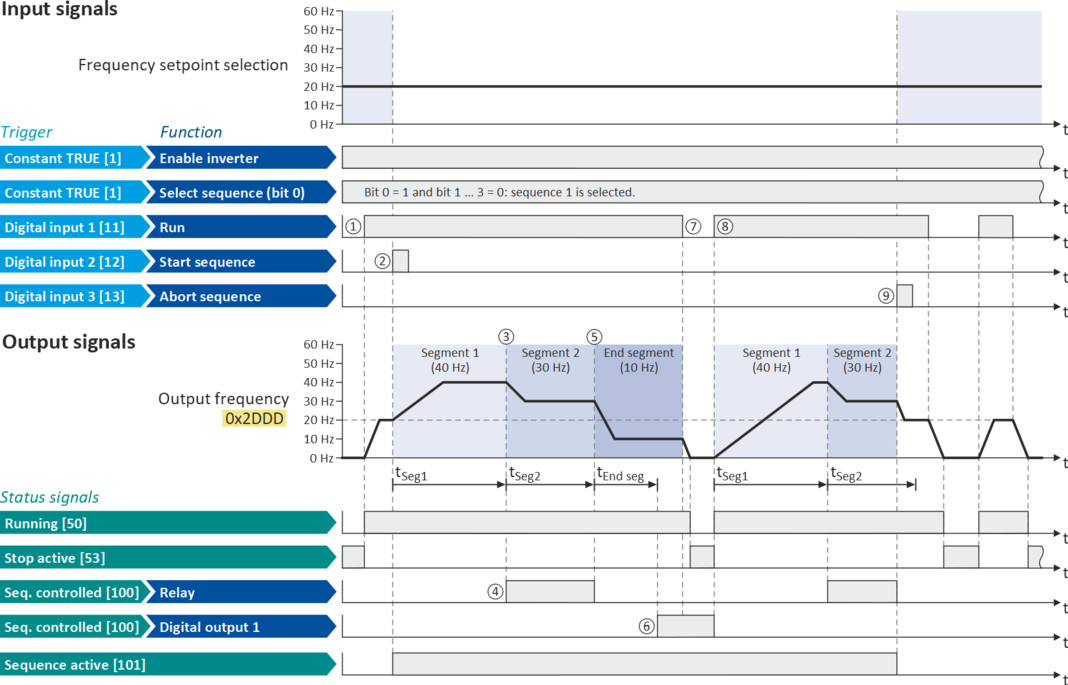
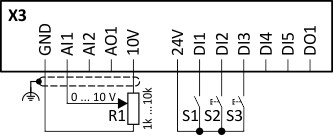
In the following example, the digital inputs 2 and 3 are used for controlling the sequencer.
–
The analog input 1 is set as standard setpoint source.
–
Switch S1 starts the motor in the forward direction of rotation. Switch S1 in initial position stops the motor again.
–
The button S2 starts the sequence, the button S3 cancels the sequence. After the abortion, the normal setpoint control is active again.
|
Connection diagram
|
Function
|
|
|
|
Potentiometer R1
|
Frequency setpoint selection
|
|
Switch S1
|
Run
|
|
|
Button S2
|
Start sequence
|
|
|
Button S3
|
Abort sequence
|
|
|
Parameter
|
Name
|
Setting for this example
|
|
Enable inverter
|
Constant TRUE [1]
|
|
|
Run
|
Digital input 1 [11]
|
|
|
Reset fault
|
Not connected [0]
|
|
|
Reverse rotational direction
|
Not connected [0]
|
|
|
Start sequence
|
Digital input 2 [12]
|
|
|
Abort sequence
|
Digital input 3 [13]
|
|
|
Select sequence (bit 0)
|
Constant TRUE [1]
|
|
|
Relay
|
Sequencer controlled [100]
|
|
|
Digital output 1
|
Sequencer controlled [100]
|
|
|
Segment and sequence configuration
In this example, only the sequence 1 is used. The sequence consists of two steps (segment 1 and segment 2).
|
||
|
Sequencer segment 1: Frequency setpoint
|
40 Hz
|
|
|
Sequencer segment 1: Acceleration/deceleration
|
20 s
|
|
|
Sequencer segment 1: Time
|
18 s
|
|
|
Sequencer segment 1: Digital outputs
|
0x00
|
|
|
Sequencer segment 2: Frequency setpoint
|
30 Hz
|
|
|
Sequencer segment 2: Acceleration/deceleration
|
15 s
|
|
|
Sequencer segment 2: Time
|
14 s
|
|
|
Sequencer segment 2: Digital outputs
|
0x02 (only relay)
|
|
|
End segment: Frequency setpoint
|
10 Hz
|
|
|
End segment: Acceleration/deceleration
|
8 s
|
|
|
End segment: Time
|
10 s
|
|
|
End segment: Digital outputs
|
0x04 (only digital output 1)
|
|
|
Sequence 1: Step 1
|
Segment 1 [1]
|
|
|
Sequence 1: Step 2
|
Segment 2 [2]
|
|
|
Sequence 1: Step 3
|
Skip step [0]
|
|
|
...
|
...
|
|
|
Sequence 1: Step 16
|
Skip step [0]
|
|
|
Sequencer basic settings
|
||
|
Sequencer mode
|
Time operation [1]
|
|
|
End of sequence mode
|
Keep running [0]
|
|
|
Start of sequence mode
|
Restart sequencer [0]
|
|
|
The status signals can be assigned to digital outputs.
Configure digital outputs |
|
|
|
|
|
①
|
If the inverter is enabled and no error is active, the motor can be started with the "Start" function.
As the sequence has not been started yet, first the normal setpoint control is active.
|
|
②
|
The "Start sequence" function is used to start the selected sequence in an edge-controlled way.
|
|
③
|
Sequencer mode 0x4025 (P800.00) = "Time operation [1]":
The switch-over to the next step of the sequence is made after the time set for the current segment has elapsed.
|
|
④
|
The segment 2 is configured here in such a way that the relay will be triggered during the time of processing.
|
|
⑤
|
End of sequence mode 0x402F (P824.00) = "Keep running [0]":
After the sequence has been processed, the setpoint set for the end segment is continuously transmitted to the motor control until the sequence is cancelled.
|
|
⑥
|
In case of the end segment, the time setting determines the delay after which the configured output states are to become active. Here, the end segment is configured in such a way that the digital output 1 is set after 10 s have expired.
|
|
⑦
|
If the "Run" function is set to FALSE, the motor is stopped with the stop method set in 0x2838:003 (P203.03). The started sequence, however, remains active and the sequencer-controlled outputs keep their state.
|
|
⑧
|
Start of sequence mode 0x4040 (P820.00) = "Restart sequencer [0]":
If the "Run" function is set to TRUE again, the (still active) sequence is restarted.
|
|
⑨
|
The "Abort sequence" function is used to cancel the sequence in an edge-controlled way.
In this case, the standard setpoint or the setpoint source selected via setpoint change-over is active again.
|