Sequencer
The "sequencer" function serves to transfer a programmed sequence of setpoints to the motor control. The switch-over to the next setpoint can be made time-controlled or even-controlled. Optionally, the "sequencer" function can also trigger the digital and analog outputs.

The sequencer only generates setpoints. However, the sequencer does not control the motor operation (does not output any start and stop commands).
Basics: Sequences, steps and segments
–
Overall, sequences with the numbers 1 to 8 can be configured.
–
Each sequence consists of 16 configurable steps.
–
Each step of a sequence can call a "segment".
–
A segment contains, among other things preset setpoints (speed setpoint, PID control value, torque setpoint), a combined acceleration/deceleration for the speed setpoint and optionally a configuration for the digital and analog outputs.
–
8 different segments and one end segment can be configured.
–
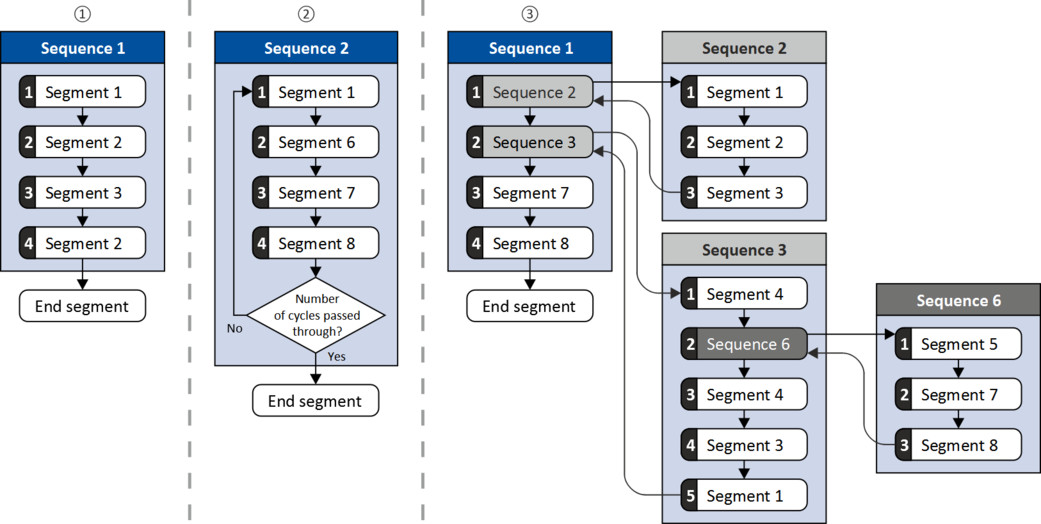
Alternatively to calling a single segment, a complete sequence (with a higher number) can also be called from one step. This serves to implement nested sequences or summarize several sequences to one sequence.
|
|
|
|
|
|
|
□
|
Simple sequence with four steps.
|
|
□
|
Simple sequence with four steps that are passed through several times (number of cycles > 1).
For each sequence, the number of cycles can be set individually.
|
|
□
|
Nested sequence, in which other (sub) sequences are called by one (main) sequence.
|
Commissioning
For commissioning the sequencer, we recommend the following proceeding:
1.
Configure segments (including end segment).
Details: Segment configuration
Details:
Segment configuration 2.
Configure sequences:
Details: Sequence configuration
a.
Assign the segments to the single steps of a sequence.
b.
Set the number of cycles for the respective sequence.
Sequence configuration 3.
Make the basic setting of the sequencer:
Details: Sequencer basic settings
a.
Set the desired operating mode (time and/or step operation).
b.
Optionally adjust the sequence end mode and the sequence start mode.
Sequencer basic settings 4.
Configure the control of the sequencer:
Details: Sequencer control functions
a.
Assign the functions for selecting a sequence to suitable
triggers (e. g. digital inputs).
triggers (e. g. digital inputs).
b.
Assign the functions for controlling the sequencer (start, stop, cancel, ...) to suitable
triggers.
triggers.
Sequencer control functions Control
The sequencer can be controlled with the following function. For details, see chapter "Sequencer control functions".
|
Function
|
Information
|
|
Select sequence (bit 0) ... Select sequence (bit 3)
|
Bit coded selection of the sequence to be started.
|
|
Start sequence
|
The selected sequence is started. The start can take place edge or status-controlled depending on the configuration.
|
|
Next sequence step
|
Immediate jump to the next step irrespective of the time set for the segment.
|
|
Pause sequence
|
The sequencer stops in the current step. The elapsing time set for the segment is stopped. The sequencer setpoint remains active.
|
|
Suspend sequence
|
There is a temporary return to the normal setpoint control. The sequence is then continued at the point where it was suspended.
|
|
Stop sequence
|
Direct jump to the end segment. The further execution depends on the selected end of sequence mode.
|
|
Abort sequence
|
Immediate return to the normal setpoint control. The end segment is not executed anymore.
|
Diagnostics
For diagnosing the sequencer, the diagnostic parameters listed in chapter "Sequencer diagnostics" are available.
Internal status signals
The sequencer provides different internal status signals (see the following table). These status signals can be assigned to the relay, the digital outputs or the status word NetWordOUT1. Configure digital outputs
Configure digital outputs |
Internal status signal
|
Information
|
|
"Sequencer controlled [100]"
|
The control is executed via the sequencer (according to the configuration of the digital outputs for the current segment).
|
|
"Sequence active [101]"
|
The sequence is running and is currently not suspended.
|
|
"Sequence suspended [102]"
|
The sequence is currently suspended.
|
|
"Sequence done [103]"
|
The sequence is completed (end segment was passed through).
|