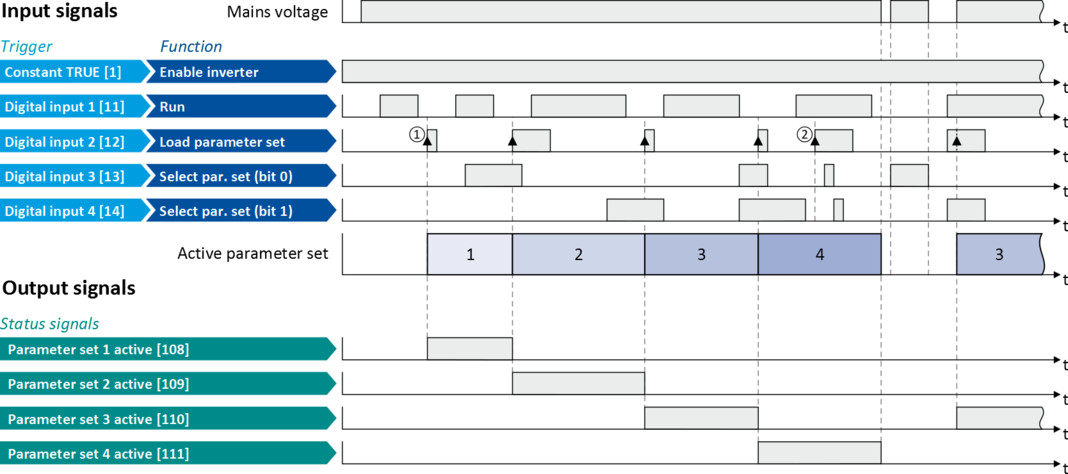
Example: Activation via command (only when disabled)
Activation method 0x4046 (P755.00) = "Via command (disable required) [0]":
–
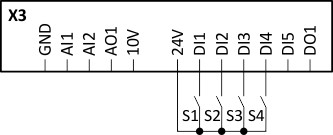
Switches S3 and S4 serve to select the parameter set (see the following table).
–
Switch S2 activates the change-over. Since the change-over is activated with a rising edge, a button (normally-open contact) can be used instead of a switch.
–
Change-over is only possible if the motor is not started (switch S1 open).
|
Connection plan
|
Function
|
|||
|
|
Switch S1
|
Run
|
||
|
Switch S2
|
Load parameter set
|
|||
|
Switches S3 ... S4
|
Parameter set selection:
|
|||
|
S3
|
S4
|
|
||
|
Off
|
Off
|
Parameter set 1
|
||
|
On
|
Off
|
Parameter set 2
|
||
|
Off
|
On
|
Parameter set 3
|
||
|
On
|
On
|
Parameter set 4
|
||
|
Parameter
|
Designation
|
Setting for this example
|
|
Enable inverter
|
Constant TRUE [1]
|
|
|
Run
|
Digital input 1 [11]
|
|
|
Reset fault
|
Not connected [0]
|
|
|
Reverse rotational direction
|
Not connected [0]
|
|
|
Activate preset (bit 0)
|
Not connected [0]
|
|
|
Load parameter set
|
Digital input 2 [12]
|
|
|
Select parameter set (bit 0)
|
Digital input 3 [13]
|
|
|
Select parameter set (bit 1)
|
Digital input 4 [14]
|
|
|
Control selection
|
Flexible I/O configuration [0]
|
|
|
Activation of parameter set
|
Via command (disable required) [0]
|
|
The status signals can be assigned to digital outputs.
 Configure digital outputs Configure digital outputs |
|
|
|
|
|
①
|
The change-over is activated with the "Load parameter set" function (FALSE/TRUE edge).
|
|
②
|
If the inverter is enabled and the motor is started, a change-over is not possible.
|