Error reset
An event with the severity level “Error” must be reset so that inverter operation can be continued.
Resetting is possible only when the cause of triggering the event has been eliminated.
Options for resetting an error:
–
Via the keypad key .  Error reset with keypad
 . Error reset with keypad
 –
Via the trigger assigned to the "Reset fault" function.
–
Via the button in the »EASY Starter« ("Diagnostics" tab).
 in the »EASY Starter« ("Diagnostics" tab).
–
In the default setting of 0x400E:008 (P505.08) via bit 7 in the mappable data word NetWordIN1 0x4008:001 (P590.01).
–
Via bit 7 in the mappable CiA control word 0x6040.
–
Via bit 2 in the mappable AC Drive control word 0x400B:001 (P592.01).
–
Via bit 11 in the mappable LECOM control word 0x400B:002 (P592.02).
Notes:
–
Certain errors can only be reset by mains switching.
–
Certain errors (e. g. earth fault or short circuit of the motor phases) may cause a blocking time.
In this case, the error can be reset only after the blocking time has elapsed.
An active blocking time is displayed via bit 14 in the inverter status word 0x2831.
In this case, the error can be reset only after the blocking time has elapsed.
An active blocking time is displayed via bit 14 in the inverter status word 0x2831.
The "Events, causes and remedies" table gives the blocking time (if available) for each error. This table also shows whether mains switching is required for the error reset.
Parameter
|
Address
|
Name / setting range / [default setting]
|
Information
|
|
|
0x2631:004
(P400.04)
|
Function list: Reset fault
(Function list: Reset fault)
|
Assignment of a trigger for the "Reset fault" function.
Trigger = FALSE
↗ TRUE (edge): The active error is reset (acknowledged) if the error condition
no longer exists and the error is resettable.Trigger = FALSE: no action.
|
|
|
12
|
Digital input 2
|
State of X3/DI2, taking an inversion set in 0x2632:002 (P411.02) into consideration.
|
|
|
0x2839:006
(P760.06)
|
Fault configuration: Fault handling in case of state change
(Fault config.: FaultStateChange)
|
Selection whether a pending error is to be reset via the functions "Enable inverter" 0x2631:001 (P400.01) and "Run" 0x2631:002 (P400.02) as well.
|
|
|
0
|
Reset fault
|
||
|
1
|
Do not reset fault
|
||
Example for operating mode
–
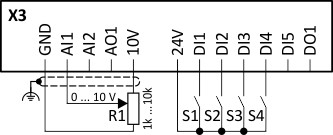
Switch S1 starts the motor in forward direction of rotation. De-asserting switch S1 stops the motor again.
–
Switch S2 resets the current error if the error condition is not active anymore and the error is resettable.
–
The switches/sensors S3 and S4 serve to set the inverter from the process to the error status. User-defined error triggering
User-defined error triggering |
Connection plan
|
Function
|
|
|
|
Potentiometer R1
|
Frequency setpoint selection
|
|
Switch S1
|
Run
|
|
|
Switch S2
|
Reset fault
|
|
|
Switch S3
|
Activate fault 1
|
|
|
Switch S4
|
Activate fault 2
|
|
|
Parameter
|
Designation
|
Setting for this example
|
|
Enable inverter
|
Constant TRUE [1]
|
|
|
Run
|
Digital input 1 [11]
|
|
|
Reset fault
|
Digital input 2 [12]
|
|
|
Reverse rotational direction
|
Not connected [0]
|
|
|
Activate preset (bit 0)
|
Not connected [0]
|
|
|
Activate fault 1
|
Digital input 3 [13]
|
|
|
Activate fault 2
|
Digital input 4 [14]
|
|
|
Control selection
|
Flexible I/O configuration [0]
|
|
|
Stop method
|
Standard ramp [1]
|
|
|
Frequency control: Default setpoint source
|
Analog input 1 [2]
|
|
|
Deceleration time 1
|
5.0 s
|
|
|
Quick stop deceleration time
|
1.0 s
|
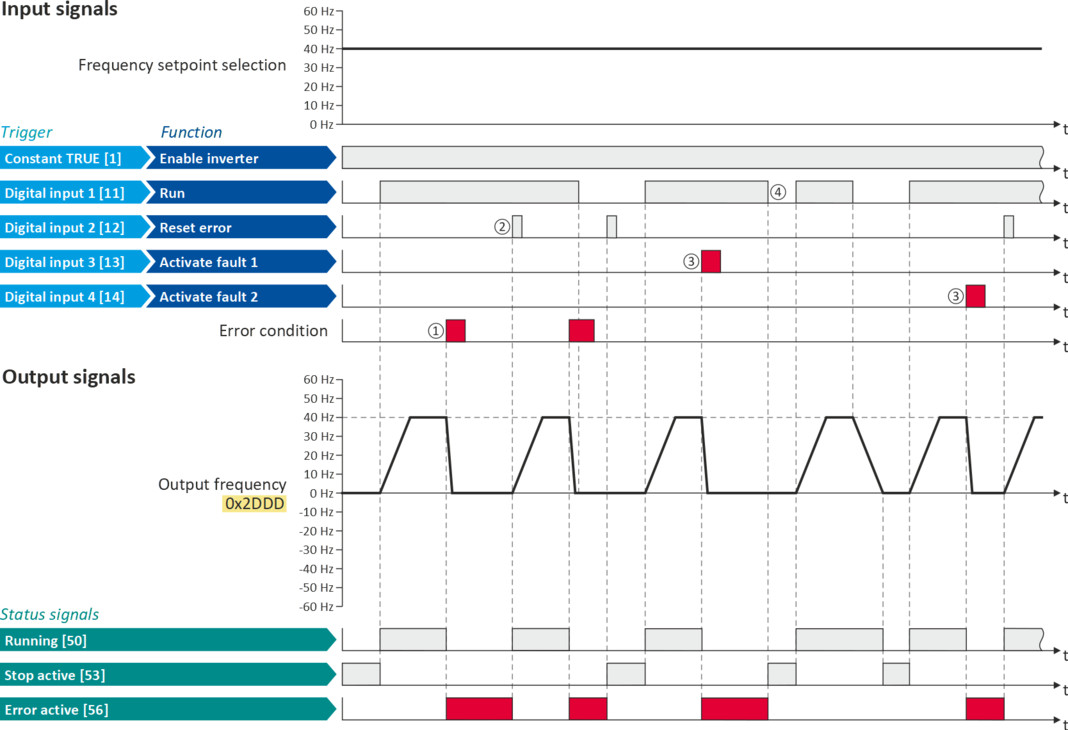
The following signal flow illustrates the reset of an error both with the "Reset error" function ② and by cancelling the start command ④:
|
The status signals can be assigned to digital outputs.
 Configure digital outputs Configure digital outputs |
|
|
|
|
|
①
|
If an error condition is active in the inverter, the motor is brought to a standstill with the quick stop ramp. The inverter is then disabled.
Exception: In case of a serious error, the inverter is disabled immediately. The motor has no torque (coasts).
|
|
②
|
If the error can be reset, the error state can be left again with the "Reset fault" function (if the error condition no longer exists). The motor accelerates again to the setpoint since the start command is still active.
|
|
③
|
The functions "Activate fault 1" and "Activate fault 2" serve to set the inverter from the process to the error status.
|
|
④
|
If the error can be reset, the cancelled start command results in leaving the error state (if the error condition no longer exists).
|