Configure digital inputs
Settings for digital inputs 1 ... 7.
Preconditions
Digital input 6 and digital input 7 are only available for a Control Unit (CU) with application I/O.
Details
The digital inputs are used for control tasks. For this purpose, the digital inputs are available as selectable triggers for functions.
The following settings are possible for the digital inputs:
–
Assertion level "HIGH active" or "LOW active" ①
–
Debounce time ②
–
Inversion ③
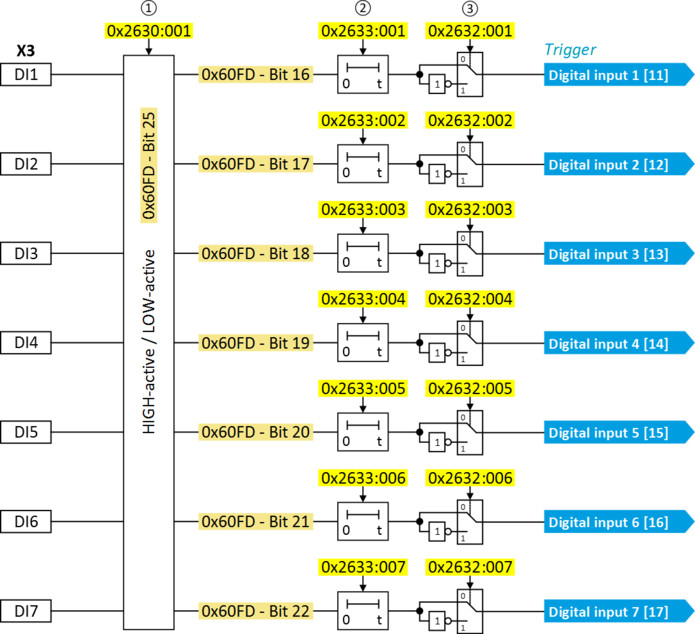
Assertion level "HIGH active" or "LOW active"
The digital inputs can be configured in 0x2630:001 (P410.01) HIGH active (default setting) or LOW active:
|
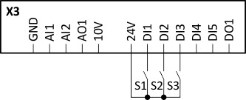
HIGH active (default setting)
|
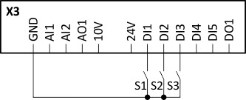
LOW active
|
|
–
Internally, the digital input terminals are set to LOW level via pull-down resistors.
–
The current flows from the current supply (e.g. X3/24V) through the contact to the digital input terminal (and internally via the pull-down resistor to GND).
–
If the contact is closed, the digital input is set to HIGH level and is thus HIGH active.
|
–
Internally, the digital input terminals are set to HIGH level via pull-up resistors.
–
The current flows from the digital input terminal through the contact to GND.
–
If the contact is closed, the digital input is set to LOW level and is thus LOW active.
|
|
Connection plan (example):
|
Connection plan (example):
|
|
|
|
Debounce time
For minimising interference pulses, a debounce time of 1 ms is set for all digital inputs. Via »EASY Starter« (or network), the debounce time for can be increased individually for each digital input to maximally 50 ms.
Inversion
Each digital input can be configured in such a way that the status pending at the terminal is internally inverted logically. This way, a closed contact, for instance, serves to deactivate an assigned function instead of activating it. Thus, the control of the inverter can be flexibly adapted to the requirements of the actual application.
Parameter
 HTL encoder
Example: Activating two functions simultaneously via digital input 4
The principle of assigning triggers to functions also enables a digital input to be assigned to several functions. The wiring complexity is reduced since there is no necessity to interconnect several digital inputs.
If, for instance, the frequency preset 1 is to be selected via the digital input 4 and a change-over to the acceleration time 2 and deceleration time 2 is to take place at the same time, this can be easily realised by the following parameter setting:
|
Parameter
|
Designation
|
Setting for this example
|
|
Activate preset (bit 0)
|
Digital input 4 [14]
|
|
|
Activate ramp 2
|
Digital input 4 [14]
|

In order to achieve the desired behaviour, the digital input 4 must not be assigned to any further functions!