HTL encoder
In case of the inverter i550, the digital inputs DI3 and DI4 can be configured as HTL input to evaluate the signal of a cost-effective HTL encoder.
Preconditions
–
Single-track or two-track HTL encoder.
–
A single-track HTL encoder (track A) cannot be used for motor speed feedback.
–
A two-track HTL encoder (track A and B) must have a phase offset of exactly 90° between track A and B (error ≤ ± 10°). Inverted tracks are not required.
–
Encoder increments: ≤ 16384 increments per revolution
–
For supplying the encoder, the maximum supply current of the inverter must be considered. If necessary, an external 24-V voltage supply for the encoder is required.
–
For using the digital inputs DI3 and DI4 as HTL input, the corresponding input function must be set in 0x2630:002 (P410.02).
Restrictions
–
When the digital inputs DI3 and DI4 are configured as HTL input, these two digital inputs are no longer available for other control functions.
–
The HTL input can be either used for detecting an HTL encoder signal or a pulse train. They cannot be used at the same time.
–
The maximum input frequency of the digital inputs is 100 kHz. If this frequency is exceeded, an error is triggered.
Intended use
An HTL encoder can be used at the Inverter i550 for the following tasks:
–
As motor encoder for a motor speed feedback for speed control that is as precise as possible  Servo control for asynchronous motor (SC-ASM) .
Servo control for asynchronous motor (SC-ASM) .–
As standard setpoint source (setpoint encoder):
|
Intended use
|
Parameter
|
Setting
|
Further information
|
|
As a setpoint encoder for defining a frequency setpoint.
|
HTL input [4]
|
Frequency control
 Standard setpoint source Standard setpoint source |
|
|
As setpoint encoder for defining the reference value for the process controller.
|
HTL input [4]
|
Frequency control
Configuring the process controller |
|
|
As a setpoint encoder for defining a torque setpoint.
|
HTL input [4]
|
Torque control
Standard setpoint source |
|
|
As an alternative to the setting as a standard setpoint source, the "Activate setpoint via HTL input" 0x2631:022 (P400.22) function can be used to enable a setpoint change-over to the HTL input.
|
|||
–
As actual value source (actual value encoder):
|
Intended use
|
Parameter
|
Setting
|
Further information
|
|
As actual value encoder for the process controller.
|
HTL input [6]
|
Frequency control
Configuring the process controller |
|
|
As actual value encoder for the "position counter" function.
|
Digital inputs DI3/DI4 [1]
|
Configuring the network
Position counter |
Connection
|
Connection of a single-track HTL encoder
(without external 24-V voltage supply)
|
Connection of a dual-track HTL encoder
(without external 24-V voltage supply)
|
|
|
|
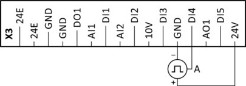
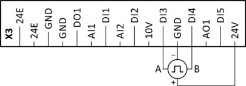
|
Connection of a single-track HTL encoder
(with external 24-V voltage supply)
|
Connection of a dual-track HTL encoder
(with external 24-V voltage supply)
|
|
|
|
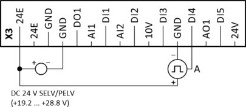
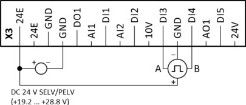
Details
|
Encoder dimensioning: Calculate maximum number of increments per revolution of the encoder
|
|
|
Max. encoder increments = fmax [Hz] * 60 s / nmax [rpm]
Max. encoder increment = 100000 [Hz] * 60 s / 1500 [rpm] = 4000 Increments/revolution
|
|
|
fmax
|
Maximum input frequency of the digital inputs = 100 kHz = 100000 Hz
|
|
nmax
|
Maximum encoder speed (in this example: 1500 rpm)
|
|
Max. encoder increments
|
Maximum number of increments per encoder revolution
|

Select an encoder with a maximum number of increments per revolution which is lower than or equal to the calculated number. The higher the number of increments per revolution, the more stable the system is.
Basic steps for configuring the encoder in the »EASY Starter«:
1.
Set the selection "High resolution HTL encoder [1]" in 0x2630:002 (P410.02) to configure the digital inputs DI3 and DI4 as encoder inputs.
2.
Set the encoder number of increments per revolution in 0x2C42:001 (P341.01) according to the manufacturer data/encoder data sheet.
Parameter